Create a website for doctors: top tools, costs & tips (2026)

As seen in:



Top 3 website tools for doctors
-
Visit site
Test score
9.4
2026
Outstanding
-
Visit site
Test score
8.5
2026
Excellent
-
Visit site
Test score
7.9
2026
Very good
Whether you want to build your medical practice website yourself — for example with a website builder or WordPress — or prefer to hire professionals:
In this article, you’ll find the top tools for both routes, tailored to doctors, therapists, dentists, and medical centres.
I’ll walk you through typical costs, what to look out for with planning, design, and privacy, and share some inspiring examples.
So you can make an informed decision on how to build your practice website.

How to create a doctor website:
- Introduction: what makes a good doctor’s website
- Build it yourself: the best website builders and CMS tools for doctors
- Web designer: where to get a doctor website built professionally
- Costs: how much a website for your medical practice costs
- Planning: how to plan the content for your doctor’s website
- Legal basics: what to consider for site details and privacy
- Final checks: what to review before going live
- How to create a doctor website:
- What makes a good medical practice website?
- Best website builders and CMS tools for doctors
- Who can build my website?
- Medical practice website costs
- Plan your medical practice website
- Legal basics for doctor websites
- Check this before you publish
- What else to keep in mind
At a glance
- Methods: You can either build your medical practice website yourself or have it created professionally. Modern tools like website builders or WordPress are easy to use, even for beginners.
- Most important: Present your practice clearly and professionally — with real photos, a simple overview of your services, and contact details that are easy to spot. Also think about potential applicants. A privacy policy and the required site owner details shouldn’t be missing.
- Costs: Website builders start from around £5 a month. If you hire an agency to create your practice website, you should budget at least £2,000.
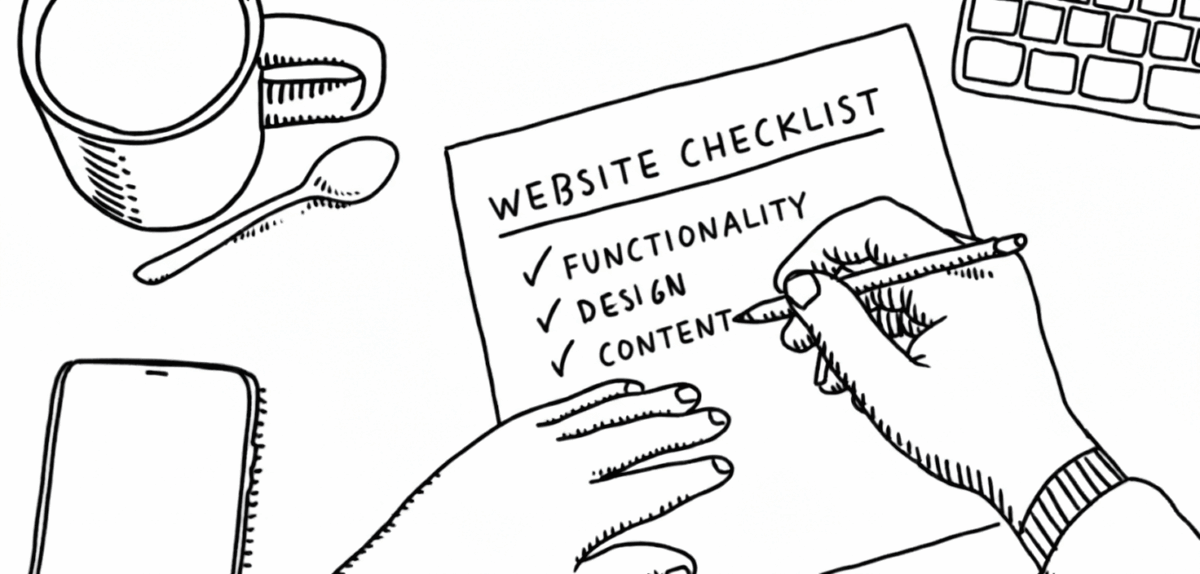
Why your website matters
A good medical practice website for doctors, therapists, and healthcare providers clearly explains your services, opening hours, and how to get in touch — and it should feel trustworthy, up to date, and professional. Whether you build your site yourself with a website builder or WordPress, or hire a service provider, your goals and content should be clear from the start.
Typical goals:
- Provide patients with information about opening hours, services, and contact options
- Enable online appointment booking
- Integrate telemedicine services
- Introduce your medical team and practice premises
- Show patient reviews and experiences
- Appeal to potential new staff
A good website doesn’t just reduce the number of phone calls to the practice — it also builds trust with new patients and takes pressure off the team when it comes to day-to-day organisation.
“Before you get started, ask yourself: what exactly do you want to achieve with your website? That will determine what your site needs to be able to do.”
Jörn Brien
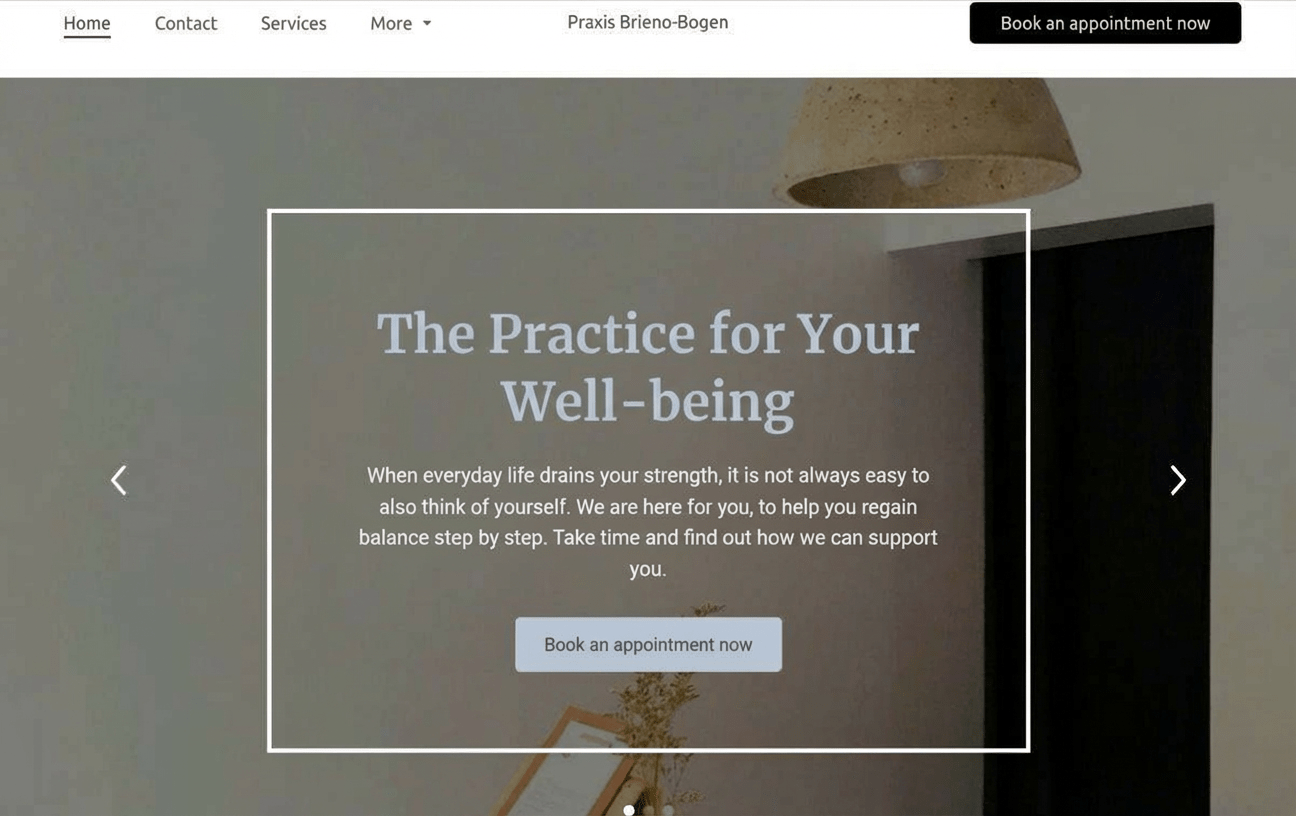
Well-designed medical practice websites


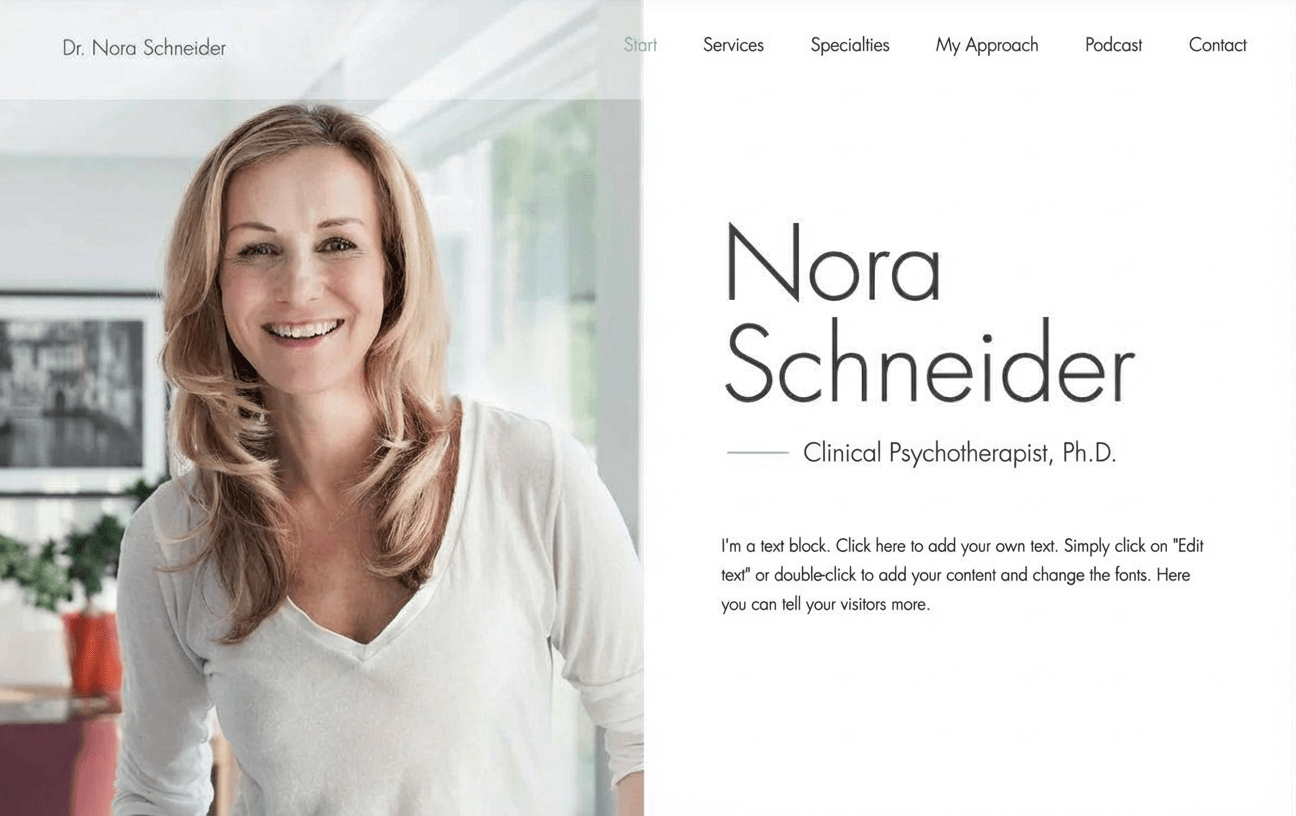
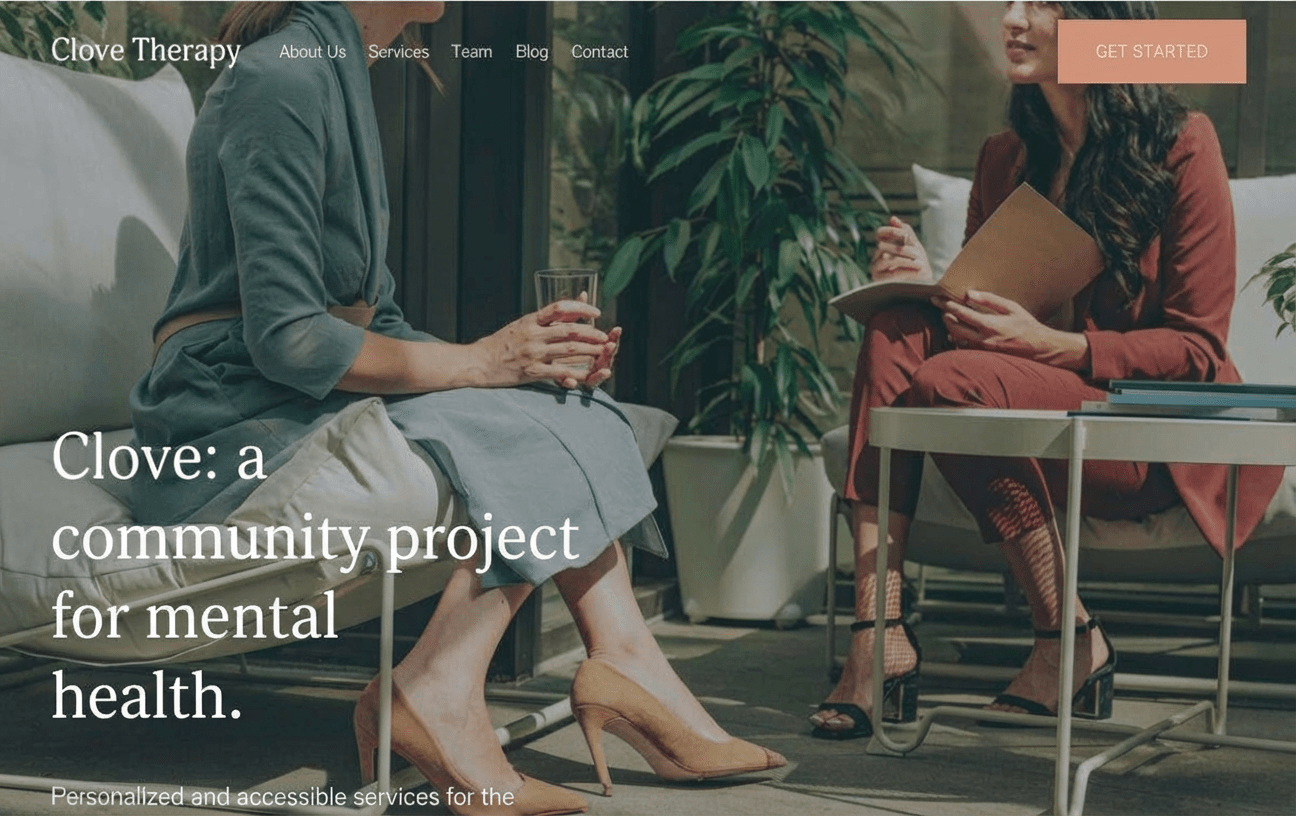
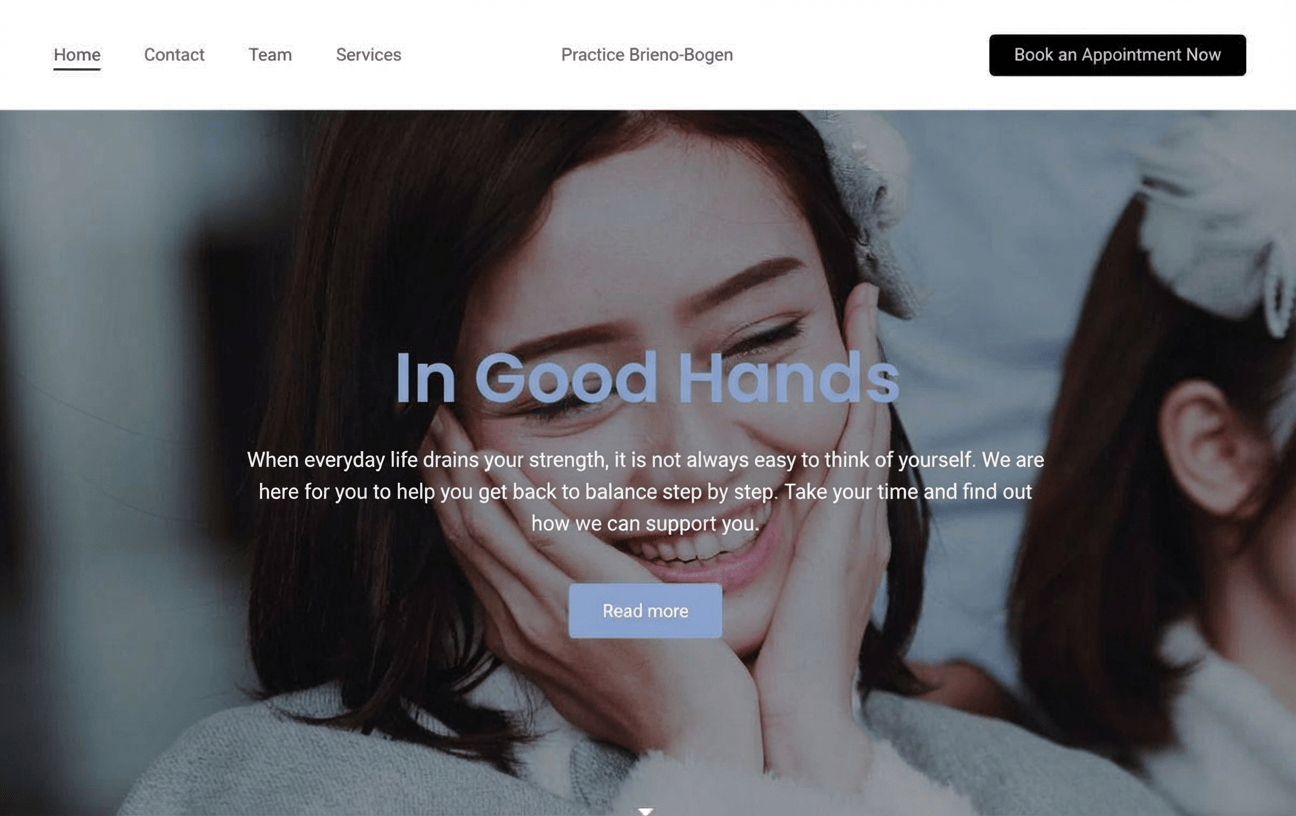
Medical practice website must-haves
So your site doesn’t just look good but also supports day-to-day work in the practice, it’s worth paying attention to a few key features. They make the difference between a simple online business card and a website that’s genuinely useful:
- Contact and appointments page with opening hours and online booking
- Service overview with clear, low-key descriptions
- A introduction to the team and the practice, with authentic photos
- Links to telemedicine options (e.g. video consultations)
- Google Maps embed or clear directions
- A small blog or news area for updates
- A GDPR-compliant privacy policy and the necessary legal information
Ways to build a medical practice website
Building a website for your practice yourself is much easier today than it used to be — and usually far cheaper than an agency solution.
Still, both routes — DIY or hiring professionals — come with pros and cons. In this guide, I’ll show you what matters, which tools performed well in testing, and what costs you can expect.
| Method | Description | Costs |
|---|---|---|
| 1. Build it yourself with a website builder or WordPress | For beginners and simple projects Modern website builders and content management systems let even beginners create a high-quality website directly in the browser. | From around £5 per month |
| 2. Have it built by a web designer or agency | Convenient and professional, but more expensive Tools and service providers vary widely when it comes to support and pricing. A basic website built by a professional typically starts at around £2,000, with no real upper limit. | From around £2,000 |
Creating your own medical practice website is easier than ever today — and usually much cheaper than hiring a web designer or an agency.
The key requirement: you should feel comfortable using a computer and the internet, not be intimidated by tech, and be willing to set aside some time to learn your chosen tool. For smaller practices or solo doctors, this can be a really solid option.
Best website builders for doctors:
-
1 Winner 2026

Test score
9.4
2026
Outstanding
Pros and Cons
- WordPress securely installed with 1 click
- Control over functions and data
- Huge range of extensions and designs
- Automatic updates and backups
- Using WordPress is more complicated than a website builder
Visit sitePricing
- IONOS WordPress
- Fast server hardware
- Incl. domain & email addresses
- From £1 / month
- 30 days money back
-
2 Ideal for beginners

Test score
8.5
2026
Excellent
Pros and Cons
- Very easy to set up
- Best results for simple websites
- AI assistant facilitates creation
- Image database with 17,000 photos
- Email inbox included in the tariff
- Rather not ideal for more complex websites
- Other providers offer more choice in design templates
Visit sitePricing
- IONOS MyWebsite Now
- Free from advertisements
- With your own domain & email
- from 1£ / month
-
3 Best value for money

Test score
7.9
2026
Very good
Pros and Cons
- Very simple and beginner-friendly creation
- Designs optimised for mobile devices
- Free support
- Attractive Pro tariffs
- Selection of design templates is limited
- Functionality not as extensive in comparison (no app store)
Visit sitePricing
- Webador Free
- Permanently free of charge
- No own domain
- Webador banner on the page
- Webador Pro
- Incl. domain and email inbox
- Incl. online shop
- from £8.50 / month
- Test 3 months free of charge
-
4 Very easy to set up

Test score
7.3
2026
Very good
Pros and Cons
- Website wizard that gets your page up and running in just a few minutes
- Attractive & mobile-optimised designs
- Functions rather limited to basics
- Few possibilities for extension
Visit sitePricing
- JIMDO Free
- Permanently free of charge
- Jimdo branding
- No own domain
- JIMDO Premium
- Advertising free
- With your own domain
- from 9,00£ / month
-
5 Most flexible solution

Test score
7
2026
Very good
Pros and Cons
- Website builder with the greatest design freedom
- 800+ high-quality designs, 300+ app extensions
- AI assistant for website and content
- Several image databases integrated
- Range of functions can be overwhelming at first
- Email addresses only via Google Workspace (costs extra)
Visit sitePricing
- WIX Free
- Permanently free of charge
- Wix.com branding
- No own domain
- WIX Premium
- Advertising free
- With your own domain
- from £7.50 / month
- Test 14 days free of charge
-
6 Great design templates

Test score
6.8
2026
Good
Pros and Cons
- Particularly stylish & mobile-optimised design templates
- Templates for every industry
- Integrated marketing and analysis tools
- Access to over 40 million images
- Comparatively few add-ons (or cost extra)
- Email inbox costs extra (via Google Workspace)
Visit sitePricing
- Squarespace Personal
- With your own domain
- from 11,00£ / month
- Test 14 days free of charge
How to build a medical practice website with a website builder
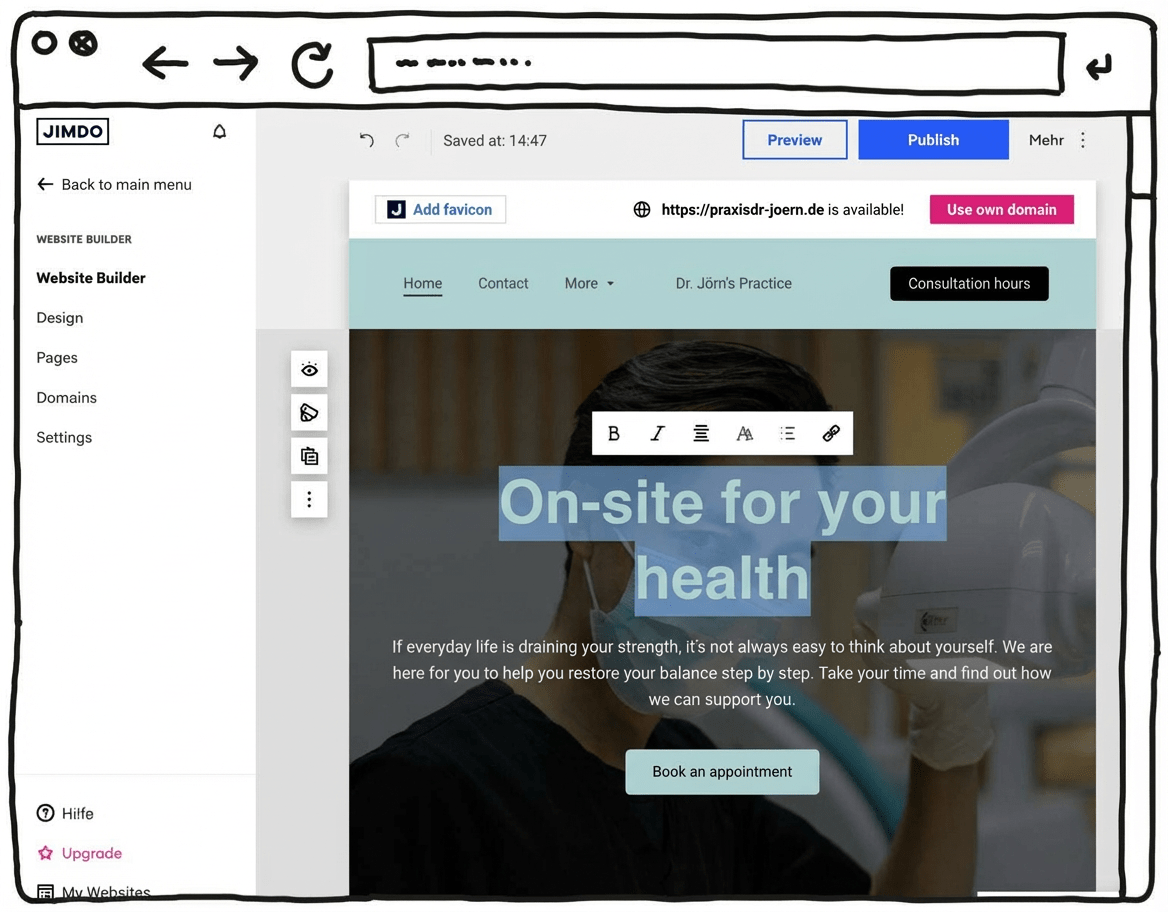
If you want to create a simple medical practice website, a modern website builder is usually the best option.
You don’t need a big budget, you don’t have to code, and you don’t need specialist technical knowledge. The only simpler route — but typically more expensive — is to have a professional build the website for you.
With most builders, professional designers provide ready-made templates for medical practices. You put the pages together with drag-and-drop, directly in your web browser.
These templates are designed for practice websites and usually include the key features you’ll need.
What you still need to provide for your practice website are strong, clear texts and — ideally professionally taken — photos of you, your team, and the practice.
You can also add a blog to your medical practice website if you want to share updates.
It’s usually easy to add external features to your website by inserting buttons and links. Useful add-ons can include, for example:
- An online appointment booking tool that connects to your practice system
- A simple appointment scheduler or booking form
- A platform for video consultations
- Review profiles where patients can leave feedback
Another advantage of using a website builder is that you often get support from a virtual assistant. This can also guide you after launch, for example with search engine optimisation (SEO) and basic marketing tasks.
Guide:
- Choose the right tool (the overview above can help you decide)
- Pick a design template for your practice that suits your style
- Adjust the design to match your own practice
- Add your texts and images
- Publish your practice website
Pros and cons of a website builder
- Easy to get started — no coding skills required
- Professionally designed templates can deliver polished results
- No large upfront investment, with affordable monthly plans
- Free plans or trial versions to test things out
- Can be expanded with add-ons such as an online shop or blog
- A support team can help if you run into problems
- Can reach its limits with more complex websites
- Basic plans often come with a limited set of features
- You’re tied to one tool
Conclusion: Website builders are a strong choice for creating simple websites for doctors. For beginners, they’re the easiest and most convenient way to build a medical practice website yourself.
Standard pages such as contact, services, and an “about the practice” section are available with all tools.
For add-ons like online appointment booking, telemedicine, or a free appointment scheduler, it’s usually better to use specialised providers — not least to reduce risk around privacy requirements and security. You can then embed those systems on your site or link patients to them.
Top pick (9.4 of 10): WordPress
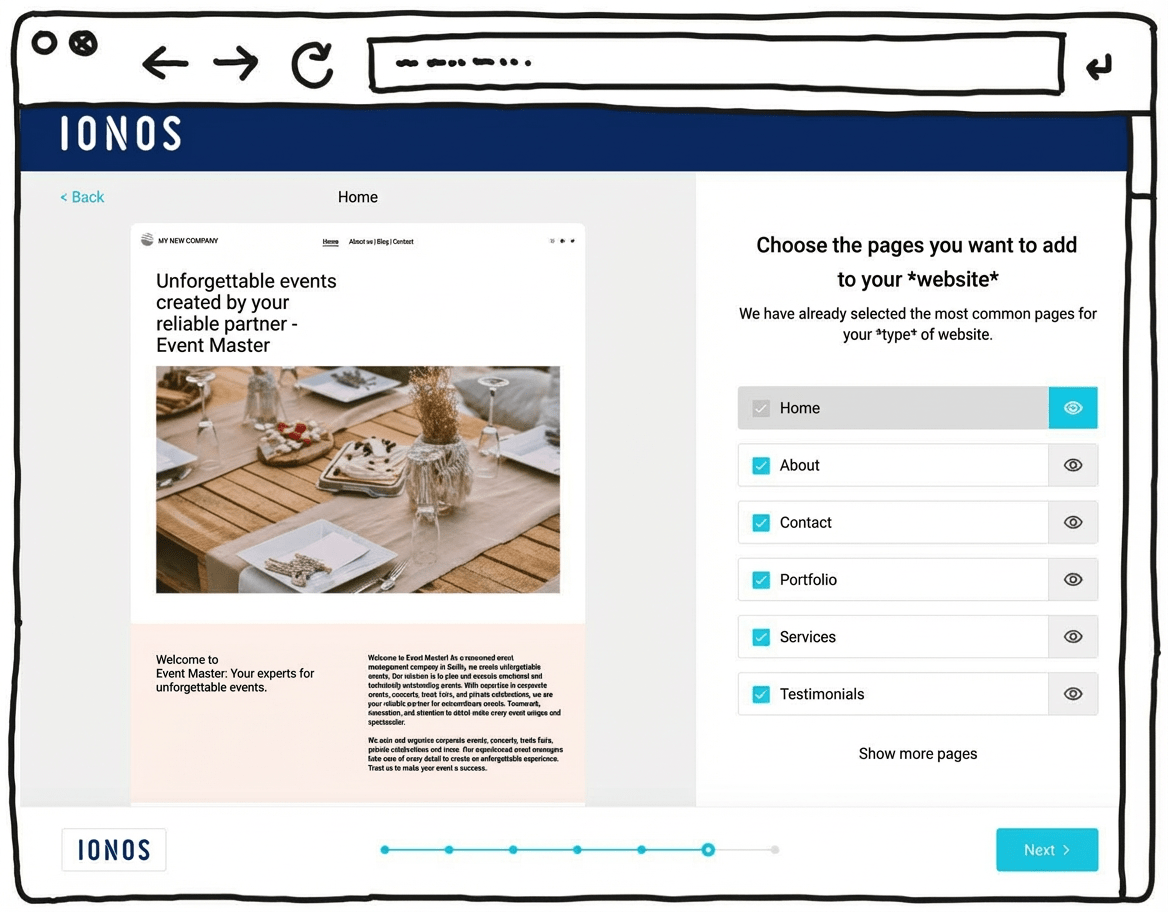
IONOS’s newer WordPress hosting aims to combine the simplicity of a website builder with the advantages of WordPress, the world’s most widely used website system. With its built-in AI setup, it can feel almost as easy as a website builder.
That can make it suitable for beginners who don’t have much experience building websites. The setup assistant guides you step by step through installing WordPress and suggests a practical selection of themes and plugins.
One key difference here is the built-in AI assistant, which can generate an initial WordPress website for you. It helps you take care of the most important settings quickly and find a suitable template. Automatic updates and daily backups can also provide extra peace of mind.
Another plus is customer support, available 24/7, including phone support rather than relying only on chat or email.
Pricing for IONOS WordPress hosting starts at around £1 per month for the first six months, then around £5 per month afterwards. A domain and an email mailbox are included in this price.
Pros of IONOS WordPress hosting
- WordPress installed securely in one click
- AI assistant for building your website
- A professional-looking design within minutes
- Designs well optimised for mobile phones
- All the benefits of WordPress as the world’s most widely used website CMS
- Flexible to extend with plugins
- Blogs or online shops possible
- Switching hosting provider later is possible
Cons of IONOS WordPress hosting
- Less design freedom than drag-and-drop website builders
- The wide range of features can still feel overwhelming for beginners, despite the guided setup
Pricing
- “Start” plan: from £3/month for the first 6 months, then £5/month
- “Grow” plan: from £1/month for the first 6 months, then £10/month
- All plans include your own domain and an email address
Here you can find our detailed IONOS WordPress hosting review.

Whether it’s a tech-savvy friend, a freelance web designer you find online, or a specialised local agency — there are plenty of ways to get a professional medical practice website made. But how do you tell who will actually deliver good work? And what will it cost?
I looked closely at different tools and providers — from affordable all-in-one platforms to agencies that focus on websites for doctors and healthcare organisations. I paid particular attention to the design, how reliably the technology performs, and whether pricing feels fair. You’ll find the best results and recommendations here, specifically for medical practices.
Best web designers for doctors
You can also find all the tools I tested in my detailed comparison of web design agencies:
-
1 Winner 2026

Test score
9.1
2026
Outstanding
Pros and Cons
- Custom premium design
- Very good and transparent value for money
- Numerous positive references
- Built with WordPress
- Privacy-compliant implementation
- On-page optimization for Google
- Suitable for complex requirements
- Additional costs may apply for services such as logo design or professional photography.
Get a quotePricing
-
Package pricing
- Landing page (1 page): from 2,990
- Mini (5 pages): from 3,990
- Basic (10 pages): from 4,990
- Premium (15 pages): from 5,990
- VIP (25 pages): from 7,990
- Included services
- Content writing and up to 10 stock photos
- Blog functionality included from the “Mini” package onwards
- Get a 300£ discount
- Mention the discount code “WEBSITEADVISOR300” when making your inquiry.
-
2 Best value for money

Test result
8.5
2026
Excellent
Pros and Cons
- Strong expertise in branding and web design
- Individual consulting and hands-on support
- Very good value for money
- Established provider with more than 300 clients
- A solid selection of well-executed reference projects
- Extensive experience in SEO and Google optimization
- Implementation of online marketing measures such as Google Ads
- Privacy-compliant development
- Additional costs may apply for services related to online marketing.
Get a quotePricing
- Package pricing
- Landing page (1 page): from 1,590
- Mini (5 pages): from 2,990
- Basic (10 pages): from 3,990
- Prices may vary depending on scope and requirements.
- Get a 300£ discount
- Mention the discount code “WEBSITEADVISOR300” when making your inquiry.
-
3 Best subscription model
Test score
8.2
2026
Excellent
Pros and Cons
- Subscription model: no high one-time costs
- Transparent monthly pricing
- Monthly updates included
- Web hosting, domain, and an email inbox included
- Built on WordPress
- May be more expensive in the long term than a one-time build
- Complex requirements are not included
Get a quotePricing
- Service package S
- 3 pages, 1 change per quarter
- £45 per month
- £199 setup fee
- Service package M
- 5 pages, 1 change per month
- £45 per month
- Service package L
- 7 pages, unlimited changes
- £85 per month
- No setup fee
-
4 Top freelancer platform

Test score
7.6
2026
Very good
Pros and Cons
- Best platform for finding freelancers
- International and local freelancers
- Especially cost-effective implementation possible
- Transparent fixed prices
- Security through references, client reviews, and a satisfaction guarantee (for Pro users)
- The large number of freelancers can make selection more difficult.
- Price and quality levels may vary.
Get a quotePricing
- A simple website can be created for just a few hundred Pound.
Before you hire someone, think about this
If you hand your website over to professionals, good preparation pays off. The clearer you can describe what you need, the smoother the collaboration will be — and the more the result will fit you and your practice.
What to consider:
- Which target groups do you want to reach? (patients, relatives, applicants, etc.)
- Which services and areas of focus should the website highlight?
- Which features do you need (e.g. online booking, contact form, directions/map)?
- Are there any legal or regulatory requirements that affect your content (for example rules around advertising)?
- How do you want to present your team and the practice?
- Do you have design preferences or existing materials (logo, colours, images)?
- Do you want to be able to update content yourself later, or hand everything over?
- What ongoing costs are acceptable (e.g. maintenance or hosting)?
Practical tips:
- Create a brief: Write down your goals, design preferences, and required features — the more specific, the better.
- Plan regular check-ins: Ask to see progress along the way and give feedback early.
- Prepare your materials: Clarify in advance what you need to provide — for example photos, text, logos, or login details.
- Set realistic deadlines: Build in some buffer time — in day-to-day practice, things can come up.
- Discuss the budget openly: Clear agreements on pricing and payment terms help avoid misunderstandings.
- Get the quote in writing: A detailed written proposal gives both sides clarity and confidence.
Top pick (9.1 of 10): Netfame
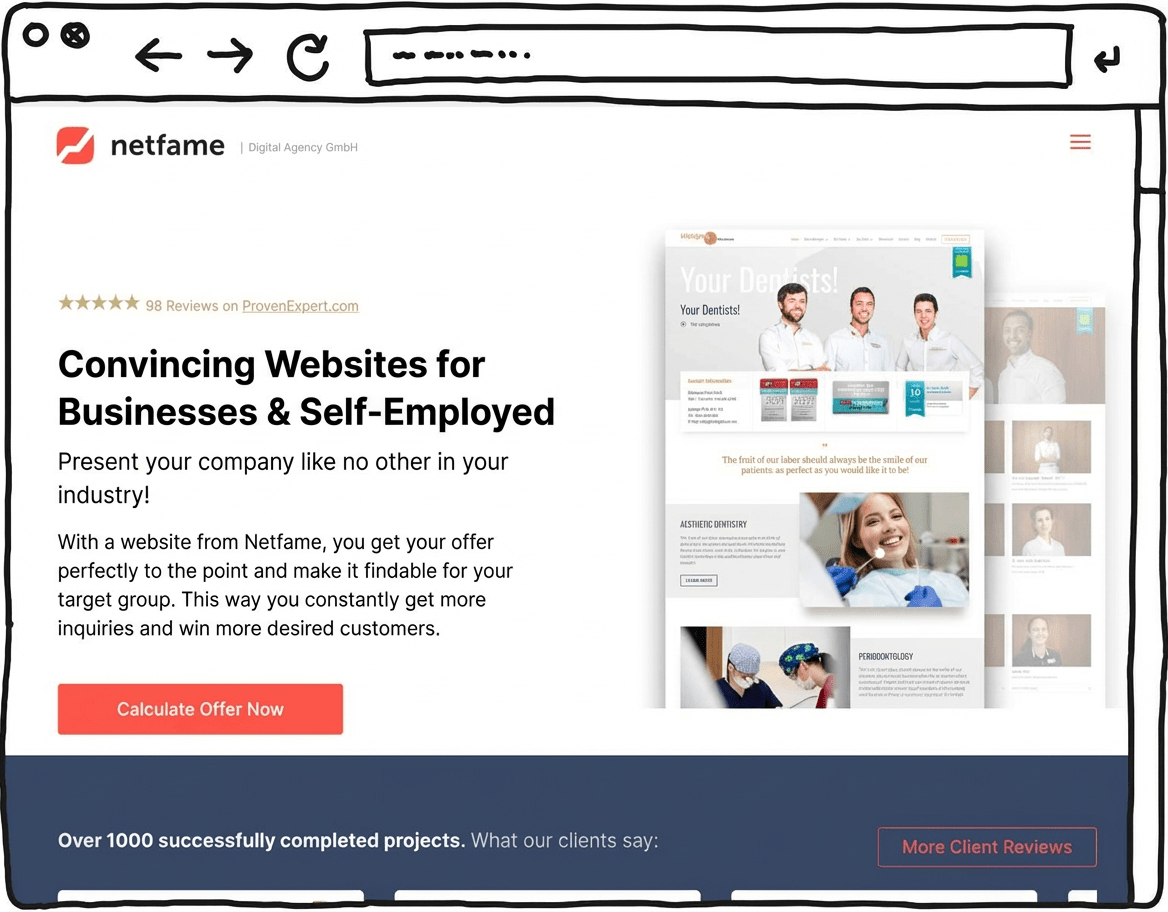
In our comparison, Netfame stood out as a particularly capable option, combining bespoke premium design and WordPress expertise. The agency says it has delivered more than 1,000 websites across a wide range of industries. Transparent pricing was a key factor in its top position.
Many of its projects are showcased in Netfame’s portfolio and come across as modern and cleanly built. Each client receives a bespoke website design.
Another important point is its focus on WordPress as the technical foundation. Using the world’s most widely used website CMS helps keep your website easy to extend over time, and it usually means you can make content changes yourself without much trouble.
Netfame also states that its work meets GDPR / UK GDPR requirements, helping to reduce legal risk for a business website.
On-page SEO optimisation is included in the base package to support search visibility on Google.
Optional add-ons such as logo and brand design, copywriting and professional photography round out the package. Overall, Netfame combines design, build and advice in a full-service WordPress setup.
Strengths of Netfame
- Bespoke premium design
- Many positive references and completed projects
- Transparent pricing
- Professional WordPress implementation
- GDPR / UK GDPR-aligned setup
- On-page optimisation for Google
Weaknesses of Netfame
- Additional costs for services such as logo design or professional photography
Pricing
- Landing page (1 landing page + legal pages and contact) — £2,990
- Mini website (5 pages) — £3,990
- Basic website (10 pages) — £4,990
- Premium website (15 pages) — £5,990
- VIP website (25 pages) — £7,990
Save £300 with Netfame
Mention the discount code “WEBSITEADVISOR300” in your project enquiry and receive a £300 credit.
The cost of a website depends heavily on how large your project is and which route you choose: building it yourself or hiring someone to do it. In general, the rule is simple: the leaner and more straightforward the site, the lower the cost.
For many medical practices, a classic website is completely sufficient. You present your practice, your team, and your services, list your opening hours, and make it easy for patients to get in touch or book an appointment. With a website builder, you can often create this kind of site yourself for just a few pounds per month.
Costs tend to rise if you need specific features — such as an integrated appointment booking system (for example Doctolib), a video consultation solution, multiple subpages for different specialisms, or a multilingual website.
Can I build it for free?
Yes, some tools let you create a website for free. But these free plans usually come with clear downsides: you won’t get your own domain, you’ll have to accept adverts on your site, and you can’t use key features like email addresses on your own domain or analytics tools.
For a medical practice, a professional appearance matters. That’s why it’s usually worth paying a small monthly fee for an ad-free, credible package — it simply looks more trustworthy to patients.
In the overview below, you’ll see what you can realistically expect to pay, depending on whether you build your website yourself or hire professionals:
Website costs at a glance
Overview: This table gives you a first idea of the minimum costs you’re likely to face:
| Simple website | Medium website | Complex website | Blog | Online shop | |
|---|---|---|---|---|---|
| Suitable for | basic information that doesn’t change often | more extensive or multilingual information | large site with many interactive features | regularly updated, current content | selling goods and services |
| Website builder | from £10/month | from £20/month | not recommended | from £10/month | from £25/month |
| WordPress | from £5/month | from £10/month | from £35/month | from £5/month | from £5/month |
| Web designer | from around £2,000 | from around £3,500 | from around £5,000 | from around £1,500 | from around £3,000 |

You’ve chosen the right website builder tool for your practice website? Great — then let’s plan your site together.
You’ll reach your goal — creating a website for your medical practice — most efficiently if you sketch out the basic site structure in advance.
If you prepare the layout and design for your practice website thoroughly, you’ll save a lot of time.
Follow these steps:
- Your visitors and patients will expect certain content and functions. Think about what those might be
- Make sure content and features are sensibly distributed across the different pages
- Create a sitemap as a logical structure for your practice website
Create a sitemap
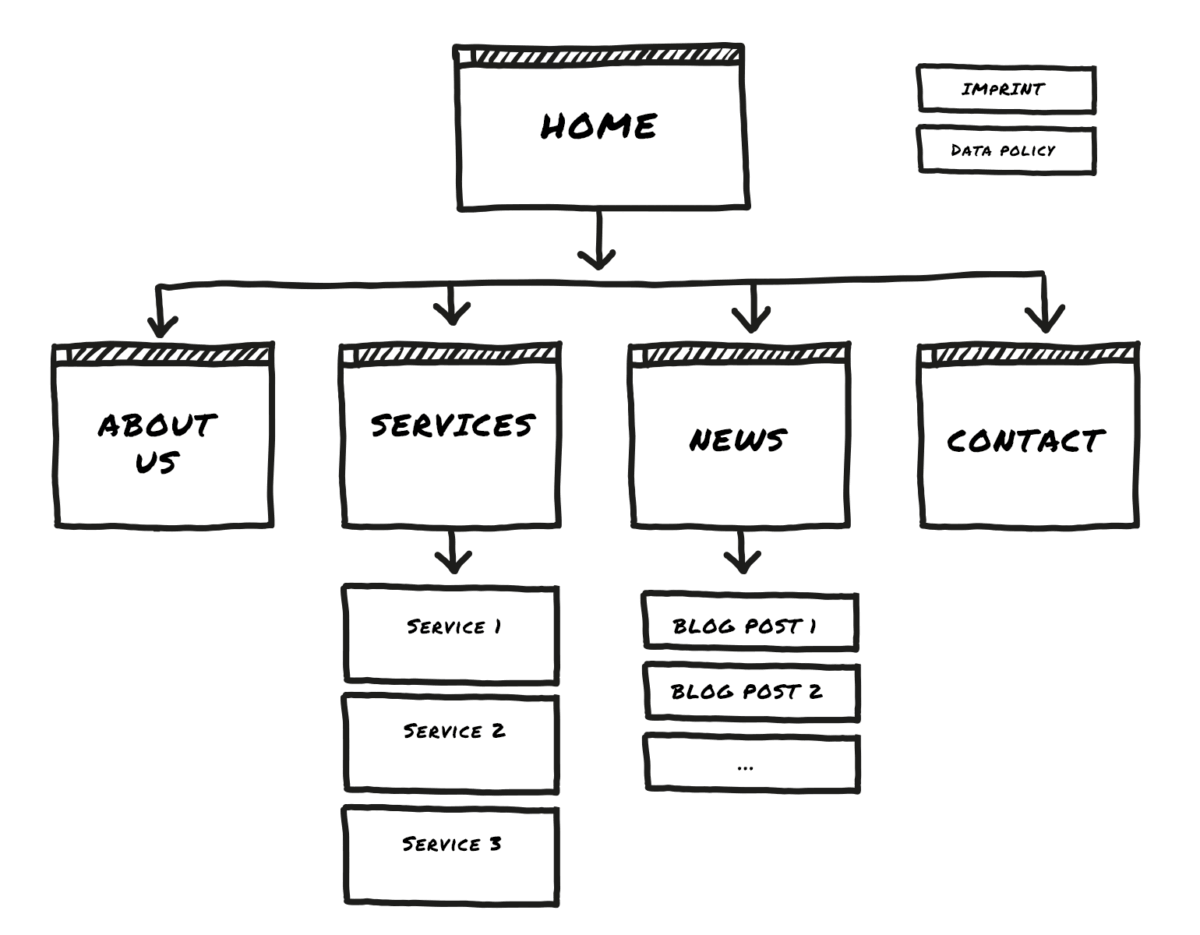
To plan your medical practice website effectively, I recommend visualising the structure as a sitemap.
Ideally, write it down on a sheet of paper — though you can of course do this on your computer too.
- Level 1: Home page.
- Level 2: 3 to 7 main sections (for example “Practice/Team”, “Contact/Appointments”).
- Level 3: Use detail pages to split up information, such as your different services.
- Level 4 or deeper: For simple practice websites, additional levels aren’t recommended.
If you want to build a multilingual medical practice website, you should plan parallel sitemaps for each language as well. Visitors can then switch languages via a button in the header.
Plan done? Register your domain name!
As mentioned earlier, you can usually start with a free plan from a website builder — but that option comes with some limitations.
One of the most important ones: you won’t get your own domain, only a so-called subdomain. That might look like this, for example:
examplepractice.jimdofree.com
For a professional presence, I recommend using your own domain instead. It tends to feel more trustworthy and is easier to remember — for example:
www.dr-mueller-practice.co.uk
This applies not only to GPs, but also to dentists, psychotherapists, physiotherapy clinics, and other specialisms. Another benefit: you can then use a professional email address too, such as contact@dr-mueller-practice.co.uk — which makes a much better impression on patients and partners.
By the way: I’ve put together a step-by-step guide to registering a domain, including more detailed advice on choosing a good domain name.
Always include legal details and privacy policy
As the operator of a website, you need to comply with data protection rules (such as the UK GDPR). This also applies to medical practices — regardless of whether you build the site yourself or have it created professionally.
In most cases, the basics include clear legal/owner information, a robust privacy policy, and a cookie notice or banner. If you cut corners here, you can create avoidable legal and compliance risks — even though it’s usually straightforward to get this set up properly.
Tip: To get your legal pages right, start with the ICO’s free privacy notice generator (UK GDPR) and make sure your “Company information” is complete.
More legal requirements to know
Medical websites are usually subject to tighter rules on how you present your services: information should be accurate, not misleading, and not overly promotional. That means you can describe what you offer clearly — but avoid superlatives and direct comparisons with other practices, and don’t make promises you can’t evidence (such as guaranteed results). Any claims you make should be truthful and verifiable. asa.org.uk+2gmc-uk.org+2
Depending on how you process personal data, you may also need to appoint a Data Protection Officer (DPO) — for example if your core activities involve large-scale processing of health data or large-scale, regular and systematic monitoring. ICO+2Sprintlaw UK+2
On top of that, it’s worth keeping an eye on professional rules from your regulator and the UK advertising standards that apply to marketing and testimonials. It can sound complicated, but with a bit of care it’s very manageable. asa.org.uk+2asa.org.uk+2
| Topic | Applies to | What do you need to do? |
|---|---|---|
| Website owner details (legal notice) | Most non-personal websites | Provide contact details, owner/company information and other required legal details. |
| Privacy notice | Any website | Explain what data you collect and why (e.g. contact form, table booking, embedded maps). |
| Cookies | Websites using cookies/tracking | Use a cookie consent banner to ask for permission if you use non-essential cookies (e.g. analytics or marketing tools). |
| Copyright | Any website | Don’t use other people’s images or text without permission; add credits where required. |
| Data protection officer (DPO) | Certain organisations processing personal data¹ | Check whether you need to appoint a DPO — this can be required for specific types of processing. |
| Cancellation/returns information | Online shops | Inform customers about cancellation and return rights and how to exercise them. |
| Terms & Conditions | Online shops | Set out rules for ordering, payment and delivery (not always mandatory, but usually sensible). |
| Newsletter | If you send marketing emails | Get consent before sending promotional emails (a confirmed opt-in process is a good practice). |
| Online shop requirements | Online shops | Show prices clearly, label the purchase button clearly, and state delivery times. |
¹ Under UK GDPR, whether you need a DPO depends on what you do with personal data (e.g. large-scale processing or sensitive data), not simply the number of employees.
The most exciting moment: your website goes live!
Your own medical practice website is finished. In a moment, you can publish it. That feels pretty good, doesn’t it?
With a website builder tool like Jimdo* or Wix*, it often really is as simple as clicking “Publish”.
Before you do, it’s worth taking a few minutes to check a handful of important points.
Launch checklist:
- Does everything work? Go through all pages and features step by step. Are all links clickable? Do interactive elements work properly?
- Chrome, Safari, Firefox: Does your design display well in the common browsers? Also double-check the mobile version on your phone.
- What do friends and family say? Ask a few people you trust for feedback. Can they find their way around easily? Do they notice anything confusing or odd?
- Is your site SEO-ready? Before you hit “Publish”, review the SEO settings in your website builder and make sure your medical practice website is search-friendly. Pay attention to page titles and preview texts so they look good in Google — this is a basic requirement if you want your site to be found.
Congratulations — your medical practice website is live!
Take a breath. You did it: your website is online.
Feel free to share in the comments what you think of your DIY practice website. I’m also happy to hear feedback on this guide and your experience with it.
How to create a medical practice website (guide):
You can either build your doctor’s website yourself using a website builder or WordPress, or have it created by professionals. The key is to clarify your goals, plan your content, and meet the legal requirements — then you’ll have a professional online presence.
Creating a practice website with the help of a website builder tool like Jimdo can cost just a few pounds per month. How much you’ll spend overall depends on what you need — the more complex the site, the higher the cost.
Having a doctor’s website created by a web designer or an agency is significantly more expensive. For a simple practice website, prices typically start at around £1,000.
It’s not difficult at all. Even beginners can use different website builder systems to create websites for doctors or medical practices with just a few clicks. To help you get past the biggest hurdles, I’ve put together a detailed step-by-step guide to building a website — and it also applies if you’re creating a dentist’s website.
Contrary to what many people assume, you don’t need coding skills to build a standard website for a medical or dental practice. Plugins and add-ons can help if you want more advanced features. Still, you should feel reasonably comfortable using a computer.
Of course, it’s even easier to have a professional web designer create your practice website — but that option is also significantly more expensive.
A professional website for doctors should help patients find key information such as consulting hours and the services you offer. It’s also useful to give visitors an impression of your expertise, your team, and your premises.
Beyond that, medical websites come with additional requirements. For example, doctors shouldn’t use overly promotional claims, and certain professional details may need to be published. A privacy policy should also be included on every medical practice website.
Visitors should also be able to tell from the website whether it’s for a dental practice or a general medical practice.
Extra features such as online appointment booking or a simple appointment scheduler are often best added via external providers and then embedded or linked from your site.
You might also like
- Create a website in 2026: 5 simple steps Read article
- Build a budget website: cheapest tools & step-by-step guide (2026) Read article
- Create a coaching website: top tools, costs & tips (2026) Read article
- Create a hotel website: top tools, costs & tips (2026) Read article
- Create a photography website: top tools, costs & tips (2026) Read article
- Create a portfolio website: top tools, costs & tips (2026) Read article
- Create a website for doctors: top tools, costs & tips (2026) Read article
- Create a rental website: top tools, costs & tips (2026) Read article
- Create a restaurant website: top tools, costs & tips (2026) Read article
- Create a school website: top tools, costs & tips (2026) Read article
- Tradesman website: top tools, costs & tips (2026) Read article
- Create a wedding website: top tools, costs & tips (2026) Read article
Comments and ratings
Was this article helpful?
Rate article
Share article