Blog platforms compared 2026

As seen in:



Top 3 blog platforms
-
Visit site
Test score
9,1
2026
Outstanding
-
Visit site
Test score
8,5
2026
Excellent
-
Visit site
Test score
7,9
2026
Very good

This blog platform comparison 2026 covers:
A blog platform is a software tool that lets you create your own blog, so you can share your thoughts, experiences, or expertise.
With the tools covered here, you can blog privately, run a company blog, or build an audience and earn money from blogging.
Top blogging platforms
- WordPress.org: WordPress.org is the world’s most widely used website CMS and was originally built specifically for blogging. That’s why it offers lots of strong blog themes and blogger-focused features such as categories and archives, a well-designed comments system, and solid SEO options. WordPress itself is free, open-source software and can be expanded with countless plugins. To get started, you mainly need suitable WordPress hosting to run your blog.
- Blog Website Builders: A number of website builders, such as Wix, include useful features for creating and writing a blog. The advantage is that these builders are usually quick to set up and easy to customise. On the other hand, the many design options can also be distracting — and switching to a different tool later can be difficult.
- Free Blogging Platforms: Tools like Blogger.com, Medium, or Tumblr let you create an account for free and start publishing straight away, with no setup needed. The downside is that you’re often heavily limited in design and branding, which is why these options tend to suit personal hobby blogs best. For that reason, I’m leaving these tools out of this comparison.
“If you’re serious about blogging — and honestly, in my view that’s when the effort really pays off — it makes sense to choose a capable platform like WordPress or a modern blog website builder from the start.”
Johannes Schwaderer
Here you’ll find an overview of all the blogging platforms I tested. Afterwards, I describe the best blogging platforms in more detail.
-
1 Winner

Test score
9,1
2026
Outstanding
Pros and Cons
-
The most popular and flexible blogging system, securely installed in one click
-
AI-assisted setup makes blog creation easier
-
Professional design in just a few minutes
-
Excellent optimisation for mobile devices
-
Highly flexible thanks to thousands of plugins
-
Switching providers later is possible
- Less design flexibility than drag-and-drop builders
- The extensive feature set can be overwhelming for beginners
Visit sitePricing
- IONOS WordPress
- Includes AI website creation
- Includes domain and email addresses
- From £1 / month
- 30-day money-back guarantee
-
-
2 Elegant blog designs

Test score
8,5
2026
Excellent
Pros and Cons
-
Stylish and mobile-optimised blog designs
-
Templates for every type of blog
-
Simple and intuitive editing
-
Integrated marketing and analytics tools
-
Access to over 40 million images
- Comparatively few add-ons (or cost extra)
- Email inbox costs extra (via Google Workspace)
Visit sitePricing
- Squarespace Personal
- With your own domain
- from 11,00£ / month
- Test 14 days free of charge
-
-
3 Best value for money

Test score
7,9
2026
Very good
Pros and Cons
-
Very easy and well-structured blog setup
-
Mobile-optimised designs
-
Affordable Pro plans
- Selection of design templates is limited
- Functionality not as extensive in comparison (no app store)
Visit sitePricing
- Webador Free
- Permanently free of charge
- No own domain
- Webador banner on the page
- Webador Pro
- Incl. domain and email inbox
- Incl. online shop
- from £8.50 / month
- Test 3 months free of charge
-
-
4 Most flexible solution

Test score
7.3
2026
Very good
Pros and Cons
- Website builder with the greatest design freedom
- 800+ high-quality designs, 300+ app extensions
- AI assistant for website and content
- Several image databases integrated
- Range of functions can be overwhelming at first
- Email addresses only via Google Workspace (costs extra)
Visit sitePricing
- WIX Free
- Permanently free of charge
- Wix.com branding
- No own domain
- WIX Premium
- Advertising free
- With your own domain
- from £7.50 / month
- Test 14 days free of charge
-
5 For simple blogs

Test score
6.8
2026
Good
Pros and Cons
-
Easy setup for your own blog
-
User-friendly drag-and-drop editor
-
Mobile app for creating and managing on the go
-
Expandable thanks to the app centre
-
Limited selection of design templates
-
Support and documentation available only in English
Visit sitePricing
- Weebly Free
- Permanently free
- Maximum of 5 products
- No custom domain
- Weebly Professional
- Ad-free
- With your own domain
- From £14.00 per month
-
Blogging platforms I tested
Alongside our top picks, we also took a close look at a range of other blogging platforms and blog software tools. A full overview of all the platforms we reviewed for blogging can be found here:
| Rank | Blog platform | Rating | Short description | Tool link |
|---|---|---|---|---|
| 1 | WordPress by IONOS | 9.1 of 10 | WordPress hosting with AI-assisted blog setup | Go to tool |
| 2 | Squarespace | 8.5 of 10 | Best blog website builder | Go to tool |
| 3 | Webador | 7.9 of 10 | Best value for money | Go to tool |
| 4 | WIX | 7.3 of 10 | Feature-rich website builder | Go to tool |
| 5 | Weebly | 6.7 of 10 | For simple blogs | Go to tool |
| 6 | Medium.com | 6.6 of 10 | Global blogging community | Go to tool |
| 7 | Blogger.com | 6.3 of 10 | Simple, free blogging platform | Go to tool |
| 8 | Hostinger Website Builder | 6.1 of 10 | Simple blogs with basic features | Go to tool |
| 9 | WordPress.com | 6 of 10 | Try WordPress, blog for free | Go to tool |
| 10 | Site 123 | 5.2 of 10 | Simple and quick | Go to tool |
| 11 | Strikingly | 4.7 of 10 | Simple and quick | Go to tool |
Different blogging tools share some similarities, but there are also clear differences.
To compare them as fairly as possible, we use a standardised, detailed set of criteria for every tool. This gives you a clear overview of which blogging platform best matches your needs.
Our ratings are not based on the commission we may receive from tools — unlike many other comparisons. The tool we name as the best blogging platform is genuinely the best based on our transparent test results.
Our aim is to assess blogging tools and their plans as objectively and thoroughly as possible.
For each tool, we give ratings across several categories. These are weighted to calculate an overall rating for every tool.
Evaluation criteria
| Rating criteria | Category winners | |
|---|---|---|
| Easy to use Weighting: 20% |
| WordPress by IONOS |
| Templates / design Weighting: 25% |
| WIX |
| Blog features Weighting: 30% |
| WordPress by IONOS |
| Support & reviews Weighting: 10% |
| WordPress by IONOS |
| Costs & value for money Weighting: 15% |
| Webador |
WordPress by IONOS (9.1 of 10): Build a WordPress blog fast with AI
The WordPress hosting plan from IONOS that I tested as part of this comparison is especially suitable for beginners who have little experience building websites. The setup wizard guides you step by step through the WordPress installation and offers a practical pre-selection of themes and plugins.
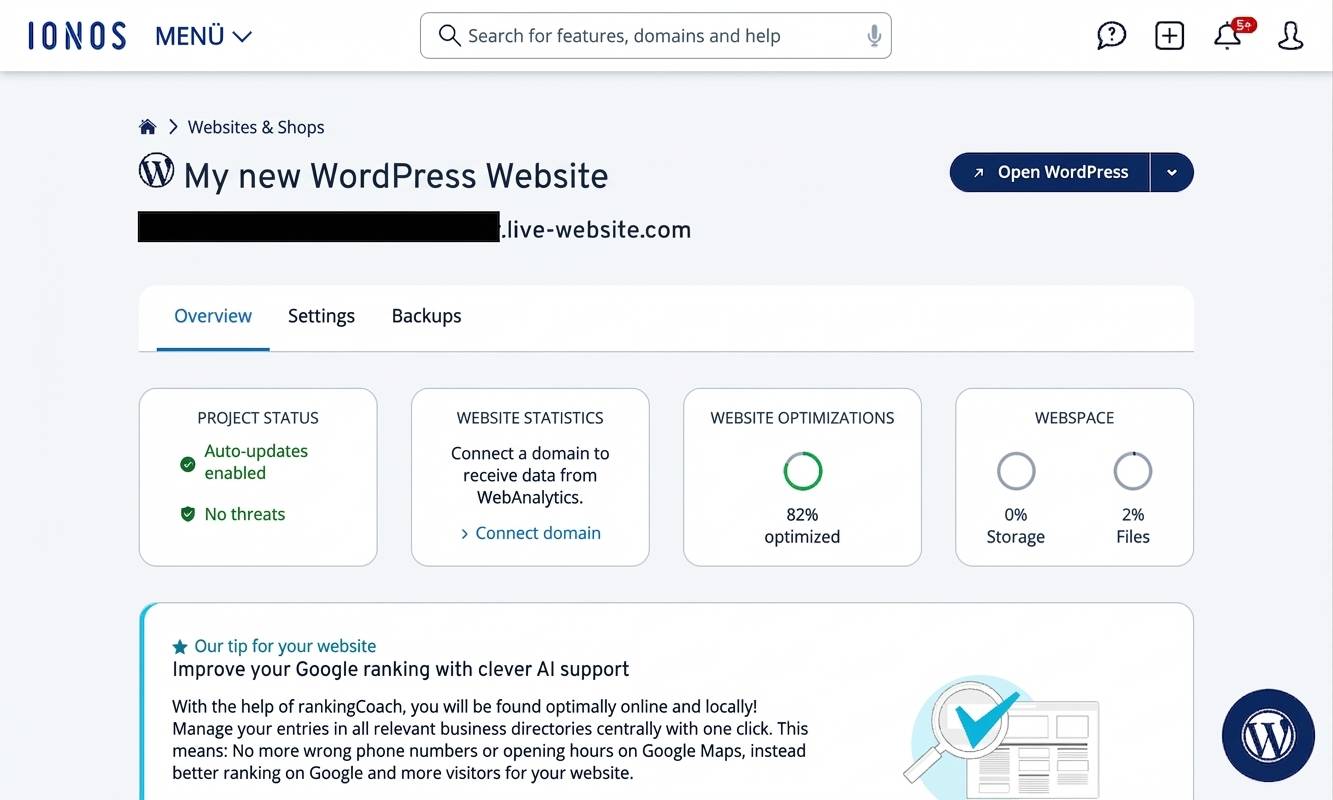
What ultimately secured the test win — and is genuinely unusual in this form — is that IONOS WordPress hosting includes a well-built AI assistant that can create your WordPress website for you using artificial intelligence. This makes WordPress, a popular and flexible system, much easier to handle for beginners and turns it into a genuine alternative to traditional website builders.
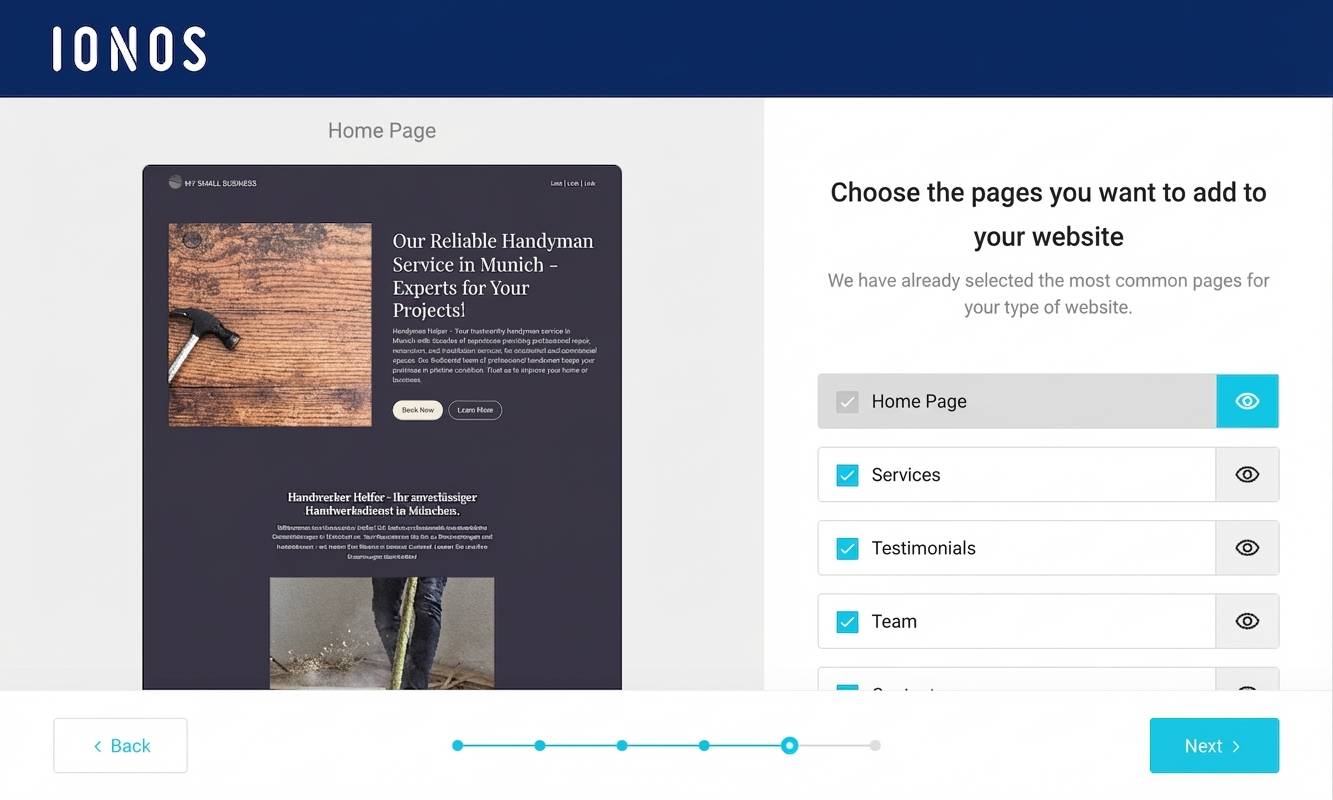
The rest of the setup also ran smoothly for me: the assistant helped me quickly apply the most important settings and find a suitable template for my site. Automatic updates and daily backups also reduced the ongoing maintenance effort.
Another plus is the capable customer support, available 24/7. Whenever I had questions, I got quick and helpful answers. A small downside is the limited flexibility compared to fully self-managed hosting, though that’s unlikely to matter much for most beginners.
IONOS WordPress hosting starts at around £0.87 per month for the first 6 months and then costs around £4.33 per month, which I find very affordable — especially as the price includes a domain and an email inbox.
For larger, more demanding websites, IONOS may not be the best fit: configuration options are more limited, and some advanced features such as a CDN or developer tools (which pricier pro hosts may offer) are partly missing.
Overall, I’m very happy with IONOS‘s managed WordPress hosting and would recommend it especially to beginners who want a simple, reliable solution.
Pros of IONOS WordPress hosting
- Easy WordPress setup and low-maintenance management
- AI assistant for automatic WordPress website creation
- Fast servers with SSD storage and caching
- 99.98% uptime
- Automatic backups and updates
- DDoS and malware protection
- Strong value for money
Cons of IONOS WordPress hosting
- No migration service for existing websites
- No built-in CDN (content delivery network)
Pricing
- “Start” plan from around £2.60/month for the first 6 months, then around £4.33/month
- “Grow” plan from around £0.87/month for the first 6 months, then around £8.66/month
- All plans include your own domain and email address
Here’s our in-depth IONOS WordPress hosting review.
Squarespace (8.5 of 10): Best website builder for blogs

With Squarespace, it’s very easy to create a genuinely polished design for a new website.
After you choose what type of website you want and what your main goals are, the website builder suggests a suitable template. Editing and customising it is straightforward as well.
Best for:
- Creatives such as designers or photographers
- Local businesses that want a stylish website — with a blog and an online shop
- Anyone who simply wants a professional-looking, well-designed website
What I liked most:
- Easy to use and quick to get started thanks to the set-up wizard
- A wide range of stylish, mobile-optimised templates across many industries
- AI-supported text creation
- Access to millions of images
- Strong blog and online shop features
What could be better:
- An email inbox costs extra (Google Workspace)
- When it comes to privacy, the provider’s set-up is not ideal for everyone
Find out more in my Squarespace review.
Get started with Squarespace – save 10%
SQUARESPACE offers various packages starting from €11/month. They also offer 14-day free test.
Tip: Enter the code “PARTNER10” when registering to save 10% during the first year!
Webador (7.9 of 10): Simple, low-cost blogging
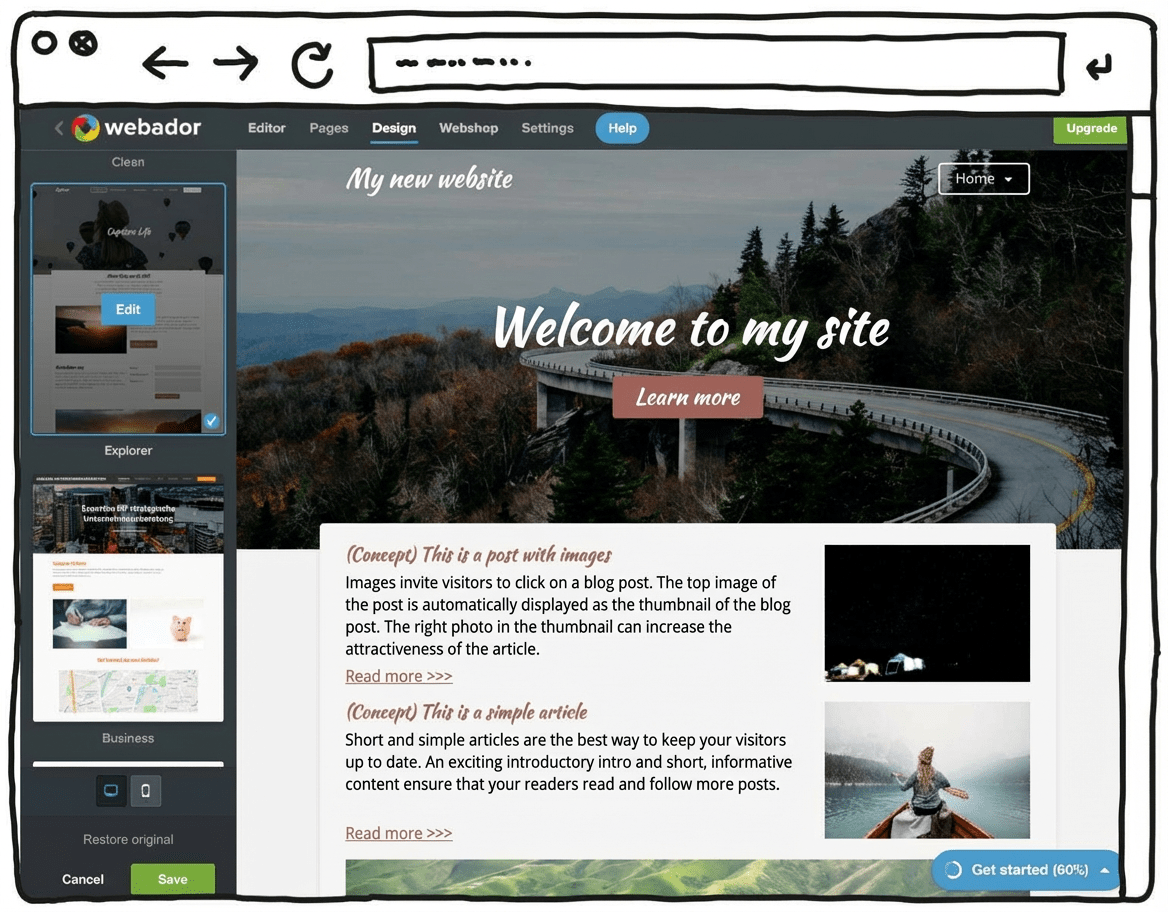
Webador is a particularly easy-to-use and low-cost website builder. It’s a fairly minimalist tool that focuses on the essentials. The upside is that, with this budget-friendly tool, you can save quite a bit compared to many other options. Webador also offers a permanently free “Free” plan.
On top of that, you can try the Pro version free for 6 months. You won’t find that kind of trial period with most other website builders.
This Dutch tool positions itself as a solution that helps beginners build a website.
As a result, the feature set is mainly limited to what you really need. In return, the editor is genuinely simple and intuitive to use.
Another plus: according to the company, Webador uses 100% sustainable energy for its servers. In theory, that means users can run their website in a climate-neutral way.
Also positive: as a Dutch tool, Webador hosts its servers in the EU. That can be reassuring for users in terms of legal framework and data protection standards.
With this minimalist builder, you can create simple websites and small online shops that don’t require major customisation or personalisation.
Webador’s free version — as with many competitors — is best seen as a way to test things out. You can use it to build a free website or even set up an online shop at no cost. However, you won’t get your own domain, and Webador will display an ad banner on your site.
Pricing:
- Webador Free: Permanently free, no custom domain, Webador banner displayed on the site
- Webador Lite: Includes a custom domain, 6-month free trial, then a low monthly fee
- Webador Pro: Includes a custom domain, email inbox and online shop, 6-month free trial, then a higher monthly fee
Try Webador free for 6 months
Test Webador’s website builder free for 6 months, or sign up for the permanently free Free plan.
Because every user and every blogging project has different requirements, we also tested the blogging platforms based on how well they suit different use cases. Whether you want to start a niche blog, a blog for a small business, or a personal blog as an individual.
| Type of blog | Key requirements | Test winner |
|---|---|---|
| Topic blog (e.g. food blogs, travel blog, health and fitness blog, lifestyle or fashion blog, DIY blogs, parenting blog, …) |
| WordPress by IONOS |
| Business or company blog |
| |
| Blog as part of a (company) website |
| Squarespace |
| Blog as part of an online shop |
| Squarespace |
| Personal blog (hobby blog) |
| Webador |
| Free blog |
|
My conclusion
With a modern blogging platform, you can start your own blog quickly and affordably without much prior knowledge. Choose a solution from the start that can grow with you as your blog gains traction and your requirements increase.
The best blogging platforms in comparison are:
- WordPress by IONOS (9.1 of 10g)
- Squarespace (8.5 of 10)
- Webador (7.9 of 10)
- WIX (7.3 of 10)
- Weebly (6.7 of 10)
- Medium.com (6.6 of 10)
- Blogger.com (6.3 of 10)
- Hostinger Baukasten (6.1 of 10)
- WordPress.com (6 of 10)
- Site 123 (5.2 of 10)
- Strikingly (4.7 of 10)
For beginners, a website builder with blogging features — such as Wix — can be a good choice because it’s easy to use, offers lots of templates, and doesn’t require a technical background. With a suitable WordPress host, WordPress can also work well for beginners.
Yes, you can earn money with blogging platforms. Common methods include advertising (for example, Google AdSense), sponsored posts, affiliate marketing, and selling products or services.
Free blogging platforms include WordPress.com, Blogger, and Tumblr. They offer basic features at no cost, but are more limited when it comes to customisation and advanced functionality.
Choose a blogging platform based on your needs. Consider factors such as ease of use, customisation options, costs, support, and whether monetisation is possible.
WordPress.org is often considered very strong for SEO because it offers many SEO plugins. Squarespace and Wix also include built-in SEO features that can be helpful.
Yes, most blogging platforms offer export and import features that let you move your blog to another platform, although this can come with technical challenges.
WordPress tends to be one of the most flexible options here, as it’s open source and widely used.
Squarespace is known for high-quality, professional design templates. WordPress and Wix also offer plenty of customisable and attractive templates.
One criterion I’d weight more heavily is the exit path. Before publishing 50 posts, test export format, redirect control, and whether image URLs survive a migration. In our own tool comparisons, the regret usually appears 18 months later, when a simple builder becomes hard to unwind.
Thanks Clara – this is one of the many reasons we recommend WordPress!