Jimdo: experiences & test 2026

As seen in:



-
Rank 1 of 6

Testurteil
1,9
2026
Sehr gut
- Bedienbarkeit
- Templates/Design
- Funktionsumfang
- Onlineshop
- Kunden-Support
- Tarife & Preise
Baukasten-Vergleich Zum Anbieter Zum AnbieterJimdo ist ein Homepage-Baukasten aus Deutschland, der sich vor allem für die Erstellung einfacher Websites eignet. Die Einrichtung geht sehr bequem, allerdings ist der Funktionsumfang begrenzt. Jimdo wirbt außerdem mit dem Thema Rechtssicherheit.
- Bedienbarkeit
Jimdo is one of the more popular website builder tools. Many users appreciate how quickly and easily a professional-looking website can be created using its modular system.
The tool is mainly aimed at small businesses and solo traders. No coding skills are required to build a website with Jimdo, which makes it accessible even for beginners. As a tool developed in Germany, Jimdo places a strong emphasis on data protection. This is complemented by features such as ready-made legal text templates and additional safeguards designed to help users meet common website compliance requirements.
But is Jimdo really that easy to use? And how well do its features and pricing hold up in everyday use? Who is this website builder actually a good fit for?
To find out, I subscribed to a Jimdo premium plan and tested the website builder thoroughly. Alongside a number of strengths, I also came across some clear weaknesses, which I will outline just as openly.
After reading this detailed review and experience report, you should have a clear idea of whether Jimdo is the right choice for building your own website, or whether an alternative tool such as IONOS or Squarespace might suit your needs better.
My Jimdo review:
- Jimdo review: conclusion and key takeaways
- Ease of use: how comfortable Jimdo feels day to day
- Templates & design: how flexible the look and layout options are
- Features: what the website builder can do
- Online shop: how well Jimdo works for e-commerce
- Customer ratings & support: what users say and how helpful support is
- Pricing: what Jimdo costs on each plan
- Alternatives: the best Jimdo alternatives to consider
- My Jimdo review:
- Overall rating: 7.3 of 10 — solid website builder with compliance focus
- Is Jimdo easy to use?
- How good are the templates and designs?
- What features does Jimdo offer?
- Is Jimdo suitable for online shops?
- Customer reviews and support
- Jimdo plans and pricing
- Alternatives to Jimdo
- What else to keep in mind
At a glance
| Category | Website builder |
| Overall rating | 7.3 of 10 (ranked 4th) |
| Price | from £11 per month |
| Free plan available? | ✅ Yes, but with Jimdo branding and without a custom domain |
| Beginner-friendly | ✅ Yes! |
| Setup time | approx. 2 hours |
| Tool website | Jimdo |
Jimdo makes it easy for beginners to build professional-looking websites. You can choose from attractive designs that are optimised for mobile devices. No coding knowledge is needed, and the builder itself is straightforward to use.
That simplicity is also where one of Jimdo’s main limitations shows. The clear, easy setup is great for getting started, but Jimdo isn’t really built for complex, highly customised websites.
Jörn Brien
On the other hand, Jimdo stands out when it comes to privacy and compliance. This is not just about where the servers are located. In one specific plan, Jimdo also offers an additional form of protection aimed at reducing legal risks linked to running a website.
The relatively low prices are another plus.
Why Jimdo scored 7.3 of 10
As part of my in-depth website builder tests on WebsiteWissen.com, I review different tools objectively and carefully, focusing on features and pricing.
The results are easy to compare because each builder receives weighted scores across several categories. The final overall rating for Jimdo is based on this evaluation process.
| Overall rating | Rating 7.3 of 10 |
|---|---|
| Ease of use (weighting: 35%) | 29 out of 40 points |
| Templates / design (weighting: 15%) | 22 out of 32 points |
| Features (weighting: 10%) | 36 out of 55 points |
| Online shop (weighting: 5%) | 12 out of 18 points |
| Customer support & ratings (weighting: 15%) | 9 out of 13 points |
| Costs and value for money (weighting: 20%) | 15 out of 20 points |
My experience with Jimdo
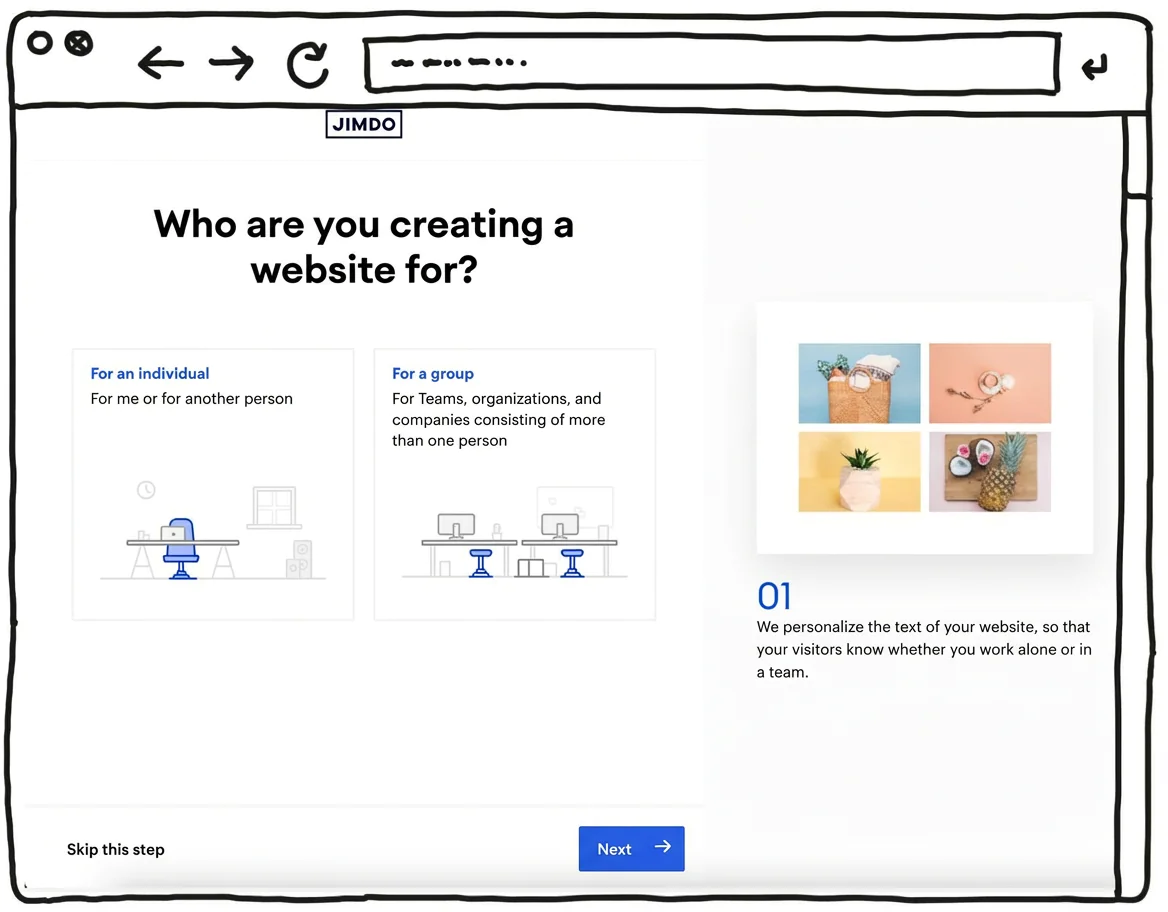
I’d recommend preparing your photos and text in advance and having them ready while you build the site. That way, you can put together a professional-looking website with Jimdo within a few hours and publish it online.
Best for:
- Building a website for self-employed people such as coaches or estate agents
- Professional websites for small trades businesses or medical practices
- Anyone who wants to create a simple website without technical know-how
What I liked most:
- Easy to use and quick to build a website
- The design templates look modern
- Strong focus on privacy and compliance (including an additional protection option in certain plans)
- Comparatively affordable plans, plus an ongoing free option to try it out
- A custom domain is included from the lowest paid plan
What could be better:
- Limited choice of designs and templates
- Not suitable for building complex websites
- Online shop features are fairly basic
- The image library has limitations when searching
At a glance
| Rating | |
| Points achieved | 29 out of 40 points |
| Advantages |
|
| Disadvantages |
|
Jimdo is comfortable to use, but the website builder still has clear room for improvement when it comes to AI support. There are also deductions because there is no dedicated app.
Jimdo is simple and intuitive to operate, and you can put together a basic website quickly. However, you shouldn’t expect the kind of AI assistant support for writing text and generating images that some other tools offer.
Setup assistant
Jimdo does not include a dedicated AI assistant for building your website like IONOS does. That said, there is a smart setup flow running in the background: based on your answers, it creates suitable pages and a polished design.
With Jimdo, you start by answering a few straightforward questions — for example, your preferred site name and what kind of business you run or what your website will be about. You also choose which sections and subpages the assistant should focus on when putting your Jimdo site together. If you already have a social media presence or a Google listing, you can import images, key details and contact information from there.
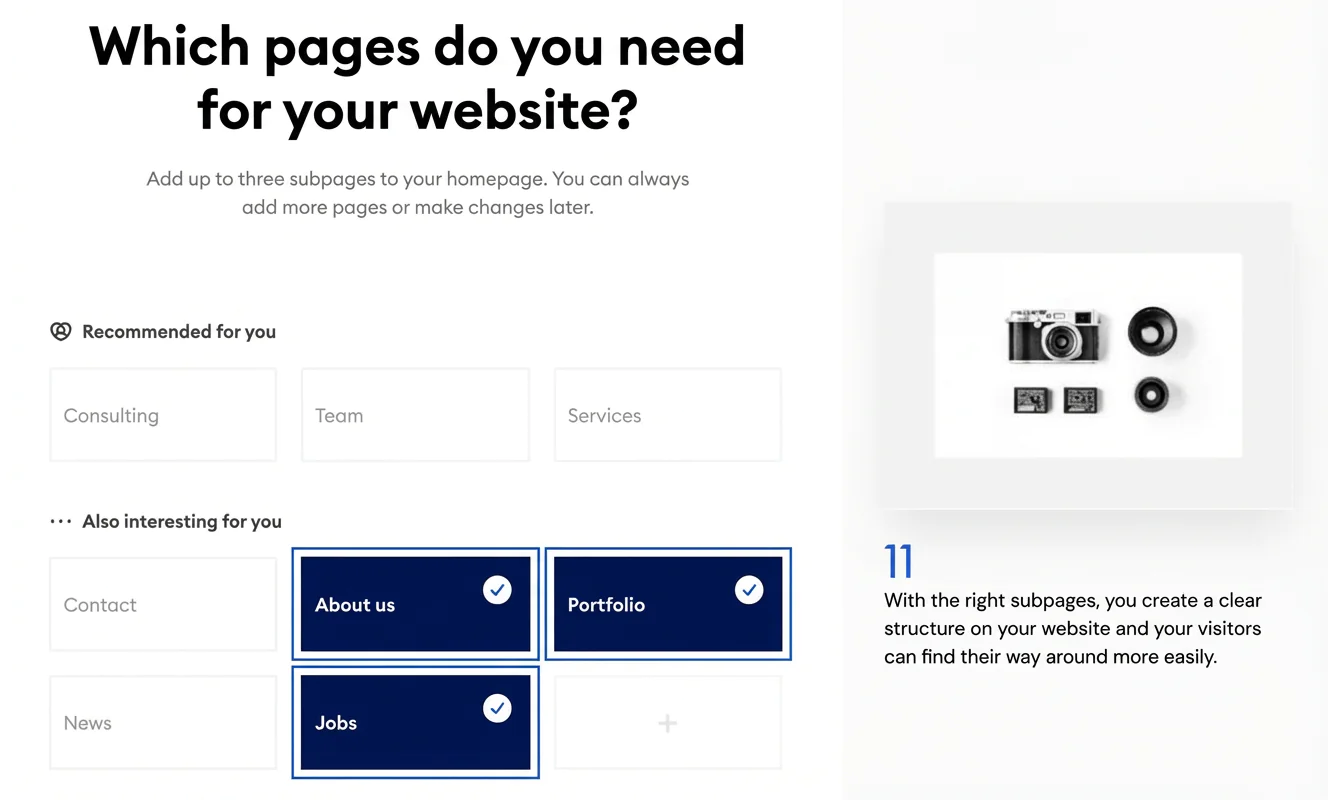
After that, you can choose between two design suggestions. Don’t worry — you can change the design at any time later on.
The selected design is already pre-filled with content such as text, images and subpages. While this content broadly matches your earlier choices, I recommend replacing it with your own photos and copy.
It’s best to prepare these materials in advance. This will make your finished website look more professional — and you’ll get everything done much faster.
Website editor ease of use
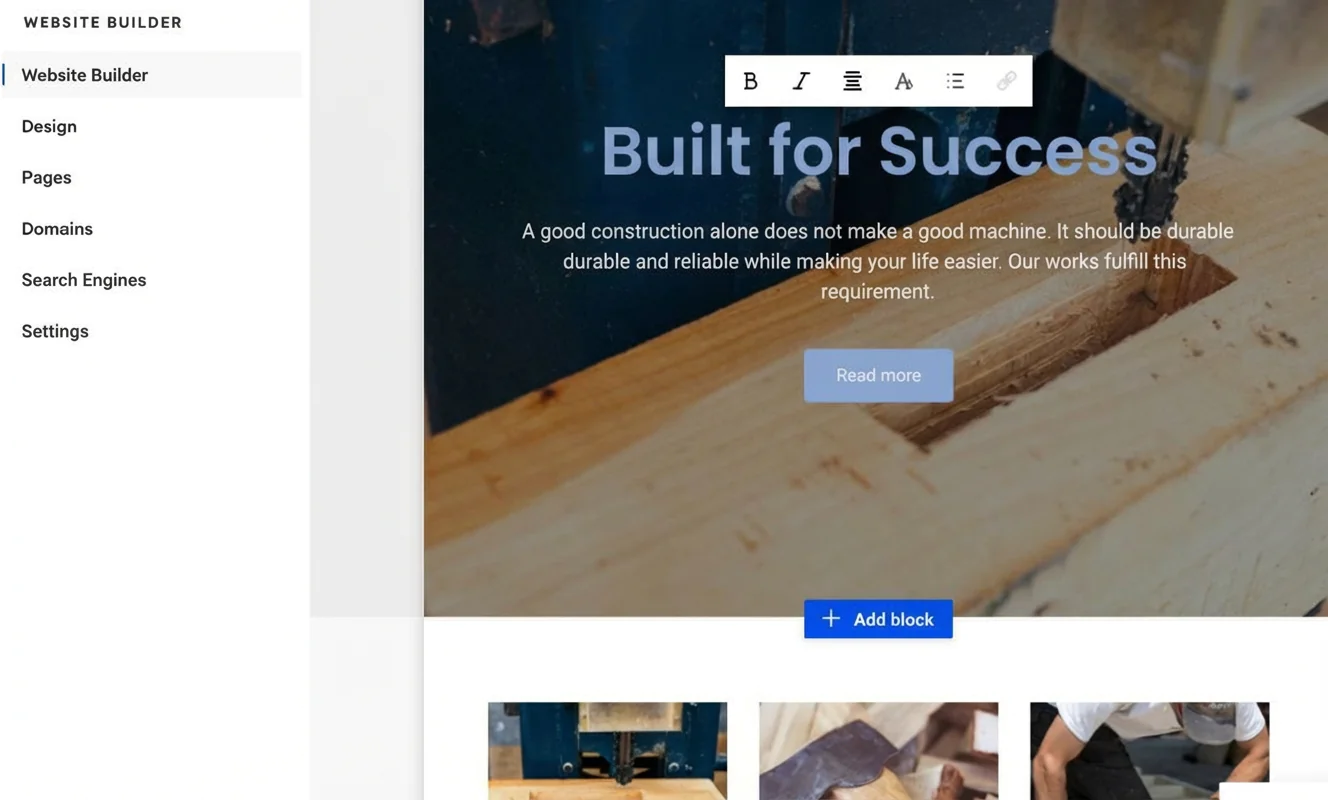
Jimdo’s built-in website editor is comfortable to use without much learning time. The interface is organised around two main areas. On the right, you see the page template. By simply clicking into it, you can edit text and images and add new content or features.
On the left, Jimdo provides a menu with additional options, such as adjusting the design and adding new subpages. The left-hand menu also opens when you want to insert extra website blocks. You can then choose from different content types such as headings, columns, images, bookings and more.
You won’t find an AI assistant in Jimdo to help with writing text or creating images — something that has become common with other tools such as IONOS. If you need that kind of support, you can use external tools like ChatGPT or Midjourney instead.
Even without built-in AI support, it is still possible for beginners to create a professional-looking website design with Jimdo. The editor is easy to handle and performed well in my test.
AI website builder
As mentioned above, Jimdo’s simple builder system does not include a dedicated AI assistant that builds your site for you. However, there is a smart tool working in the background during setup to turn your answers into a suitable design.
The results are solid. Even without design training, you can end up with a modern, professional-looking website — although you should replace the pre-written text and stock images.
Jimdo does not offer AI support for creating text, images or even video content. If you want, you can generate content with ChatGPT or Midjourney and then add it to your Jimdo website.
Admin area and features
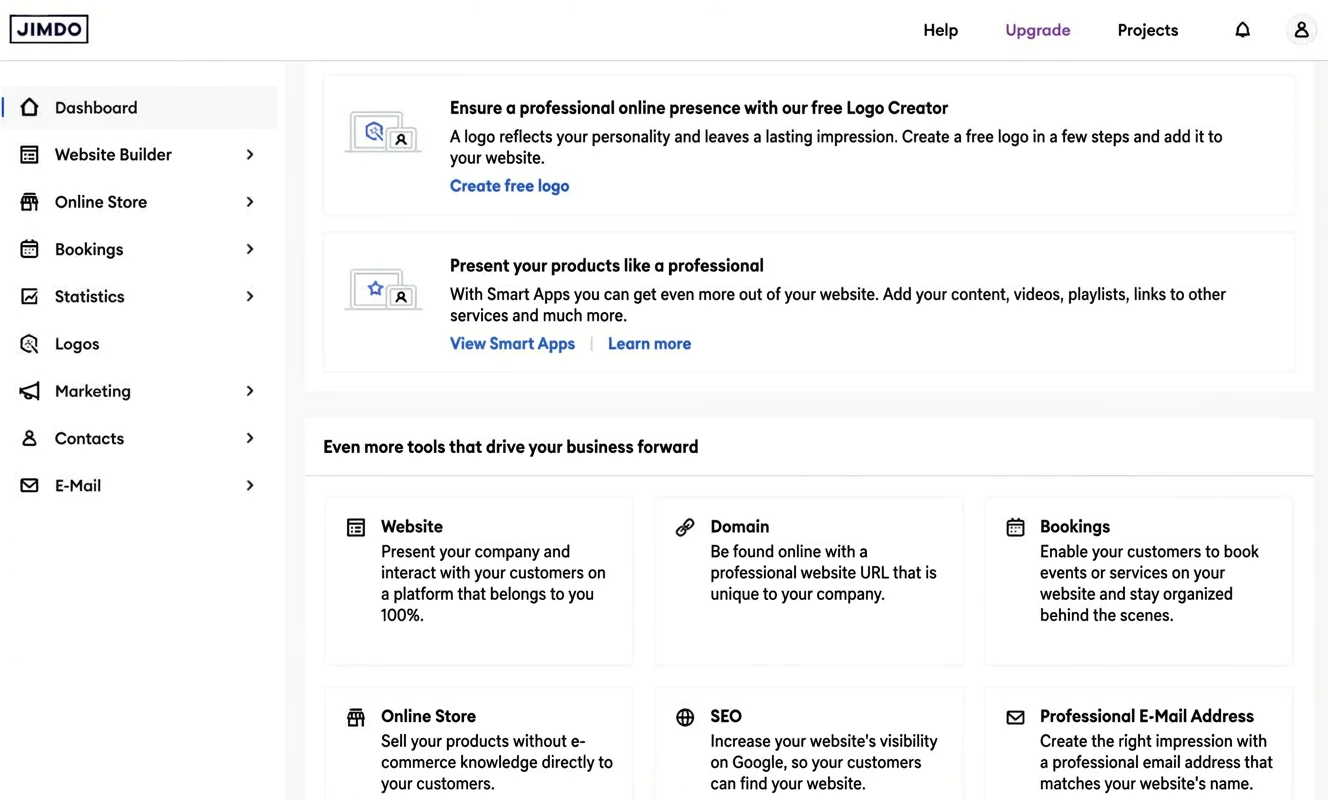
With Jimdo, the main admin options are clearly organised in the menu on the left-hand side. In the dashboard, you’ll find an overview of your website along with settings for further customisation. There are also menu sections such as online shop, statistics and marketing, where you can access the relevant tools and configuration options.
Edit your site on the go with the app
Jimdo does not offer an app for creating, editing or managing websites with its basic website builder.
At a glance
| Rating | |
| Points achieved | 22 out of 32 points |
| Advantages |
|
| Disadvantages |
|
Jimdo offers a selection of templates that is more than sufficient for beginners, and the overall quality is high. The designs look modern and polished, so it’s hard to go too far wrong when you want to create a professional-looking website. The main point of criticism is that Jimdo could provide a wider range of design options.
Examples of Jimdo websites





Template variety and quality
With just 40 templates, Jimdo has the smallest selection of design templates among the leading website builders. For most purposes and industries, however, this is perfectly adequate. There is also little to criticise in terms of quality and the range of built-in features. The templates look modern and are optimised for mobile viewing.
But: if you want the widest possible choice, you’ll probably be better off with WIX (800 templates) or IONOS (400 templates). Squarespace offers “only” 140 templates, but is widely seen as particularly strong on design.
Beginners using Jimdo are given a pre-built design based on their preferences, which they can then customise as they like. In my test, I was happy with the result. A direct like-for-like comparison with competitors is not always straightforward here.
Content modules and flexibility
When it comes to content modules, Jimdo includes what you need to build a simple website. There are modules for contact and “About me” pages, different booking options and menu layouts, as well as ways to add text, photos and slideshows.

For each type of content module, Jimdo provides a small selection of variations. In some cases, however, these differ only slightly from one another. When it comes to the sheer number of content modules and available options, Jimdo also falls behind some of its competitors.
How customizable the templates are
Customising Jimdo’s design templates is straightforward. Fonts and colours can be adjusted easily, as can the shape of buttons. That said, the options — particularly for colour schemes — are limited. Colours can only be changed at site-wide level, and elements such as buttons are adjusted automatically by the system.
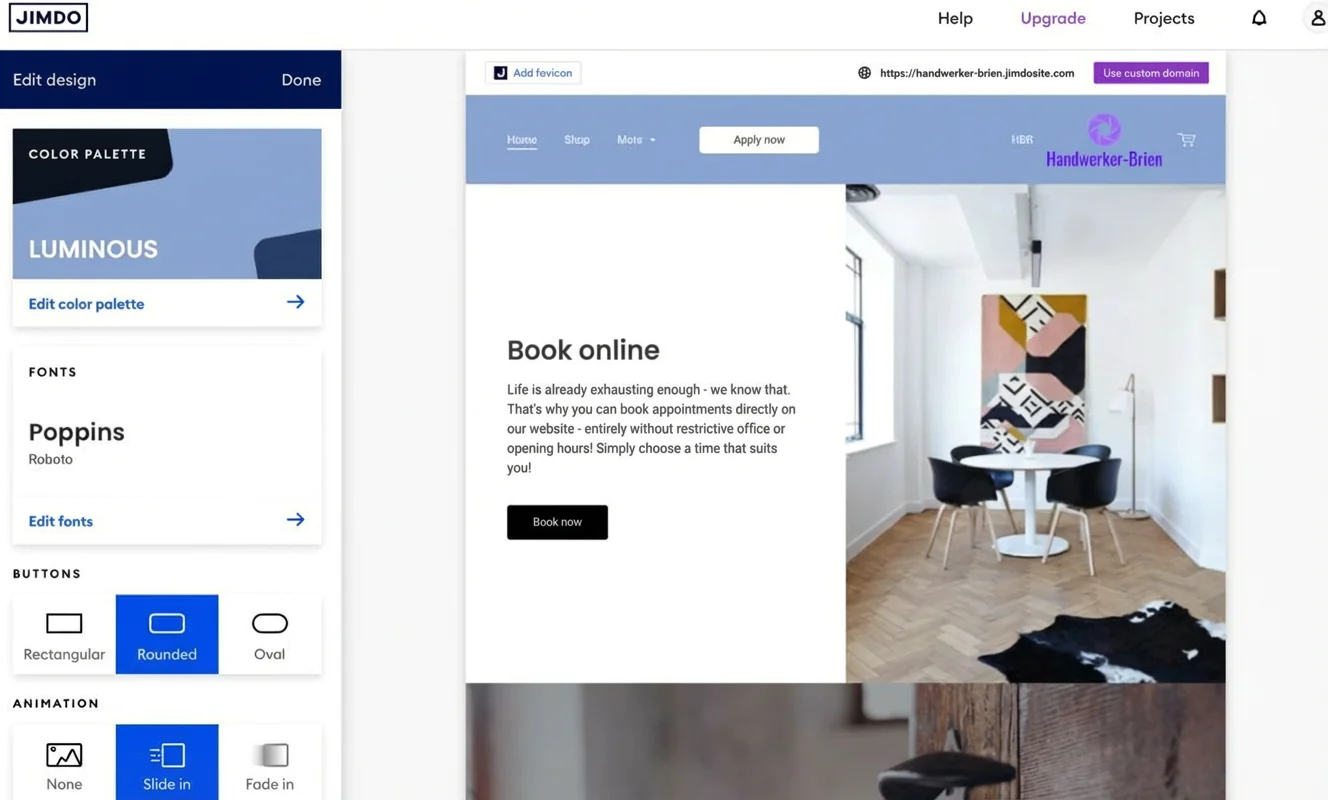
What might quickly annoy experienced designers is, in my view, exactly the right approach for beginners without specialist knowledge. It helps you keep things under control, and the website design tends to retain a professional feel.
With Jimdo, you can choose from just under 40 fonts. However, you cannot upload your own fonts. Here too, the builder sticks to its principle of keeping website design as simple and clear as possible for beginners.
You can add a logo to the navigation bar or the footer. If you don’t have a logo yet, you can create one using Jimdo’s own logo creator. The results are generally usable for a beginner website. If it really matters, though, it’s worth getting input from a professional.
You can also add a favicon to your website, but you’ll need a paid plan for that.
Mobile optimization
All Jimdo templates are fully responsive and optimised for display on mobile devices such as smartphones. You can preview how your site will look on a phone or tablet by clicking the smartphone icon.
Jimdo does not offer a way to customise content specifically for mobile display. In my opinion, that’s not necessarily a drawback for beginners — the default implementation is already modern and looks professional.
Loading times
Like some other website builders, Jimdo doesn’t perform particularly well when it comes to loading speeds. If you want faster load times — which can also support better visibility in Google search — it’s best not to use too many large image files.

When using custom fonts, it’s generally wise to be cautious anyway — although this isn’t an option with Jimdo in the first place. To identify elements that might slow your website down, tools such as Google PageSpeed can be helpful. As a simple rule of thumb, though, it’s best not to overload your site with too many elements.
At a glance
| Rating | |
| Points achieved | 36 out of 55 points |
| Advantages |
|
| Disadvantages |
|
With Jimdo, you can create simple websites quickly and still get access to most key website features, such as an online shop or galleries.
However, there is no built-in blog feature. You also won’t find a full external app store. Instead, Jimdo offers a range of “smart apps” provided by third parties.
Competitors such as WIX and Squarespace perform noticeably better in this area. WIX, for example, includes full blog functionality. Squarespace, meanwhile, is often the better choice for people who place a lot of emphasis on creative design.
Storage space and traffic
In the entry-level “Start” plan, Jimdo includes 5 GB of storage and 10 GB of bandwidth (traffic). The number of subpages is limited to 10. Unlimited storage, traffic and subpages are only available with the most expensive “Unlimited” plan.
- 5 GB of storage in the “Start” plan
- Unlimited storage in the most expensive “Unlimited” plan
Blog functionality
With Jimdo, you cannot run a blog in the simple setup mode described here. This option is only available in the more advanced system with coding features (Creator). There, you do get access to the main blog essentials, such as comments and tags. Even so, this limitation leads to a deduction in the rating.
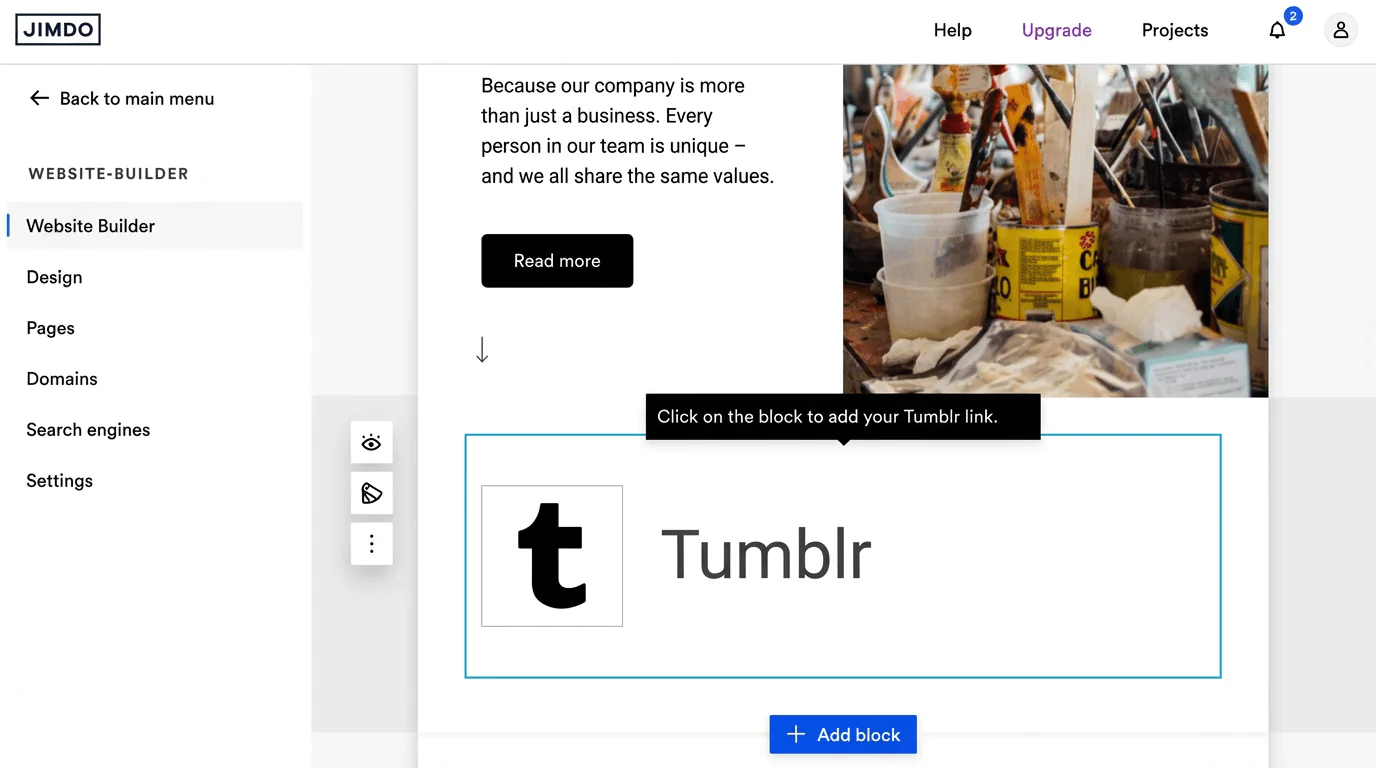
Tip: Jimdo provides a smart app for the blogging platform Tumblr. By integrating it, you can at least display a preview of a Tumblr blog on your website.
If you plan to run a more extensive blog — for example, an online magazine — I’d recommend using WordPress. Among website builders, WIX is likely one of the strongest options for blogging.
- Blog functionality only in the pro system
- More ambitious bloggers use WordPress or WIX
With Jimdo, you can create between 10 subpages (plan: “Start”) and an unlimited number (plan: “Unlimited”). You can organise them across up to three navigation levels. However, if you want to display your website in multiple languages, you lose one navigation level. The menu can only be shown at the top of the page header.

- Depending on the plan, you can create between 10 and an unlimited number of subpages
- Up to three levels of navigation
Multilingual website
You can display a Jimdo website in seven different languages. Automated system and shop pages — including the cookie policy and legal pages — are then shown in the selected language. For websites hosted in Germany that are not aimed exclusively at a foreign-language audience, it’s generally advisable to keep German as the default language.
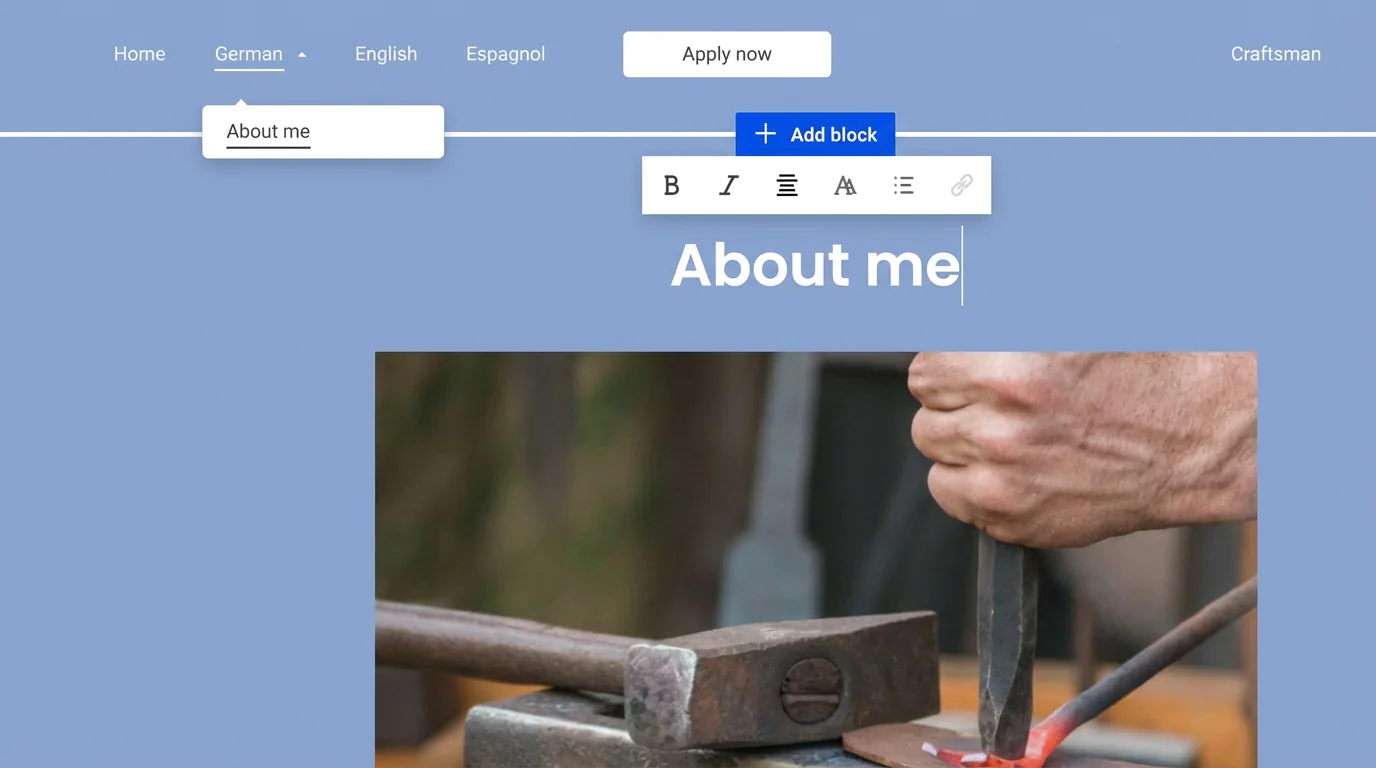
Jimdo does allow you to build multilingual websites — but the process is neither automatic nor particularly straightforward compared to other tools. To do this, you have to give up one level of navigation.
In practice, this works as follows: on the first navigation level, you create menu items such as “German”, “English” and “Spanish”. On the second level, you then add the language-specific pages, for example an “About me” page under the English menu.
Overall, this approach isn’t very convenient. You also have to translate all content yourself. That said, you can use external tools such as ChatGPT to help with translations.
- Multilingual websites are possible, but with limitations
- Text content must be translated manually
(Booking) calendar
Jimdo includes a built-in booking feature. You can define on which days and at what times customers can book your services or appointments. It also lets you manage participants and emails. The booking calendar can be added to your website via the “Add block” option.

However, the booking tool is a paid add-on to your plan. Depending on the contract length, it costs €6 or €7 per month. Unlike WIX or Squarespace, this tool does not support online payments.
Via the Smart Apps option, you can integrate booking and calendar services from third-party providers such as Airbnb or Calendly. Design control is limited, though, and bookings are usually completed externally on the provider’s website.
- Paid booking option available
- Extensions via Smart Apps possible, but not very practical
Video hosting
Jimdo does not offer true video hosting for beginners. Using Smart Apps, you can embed videos from platforms such as YouTube, Vimeo and Dailymotion into your website.

Video hosting is only available in Jimdo Creator. In that version, videos can be uploaded and embedded via HTML5. Compared to competitors, however, this solution is not particularly convenient.
- Embed YouTube and similar videos via Smart Apps
- Advanced users can integrate videos via HTML5
Image library
High-quality, relevant images are essential when building a website. Ideally, you should use your own professionally produced photos. This helps your site stand out and highlights your strengths.

If you run out of ideas or don’t have suitable images for certain sections, Jimdo offers an integrated image library with photos from the free provider Unsplash.
The images are high quality and varied, but the selection is limited. The usability of the tool also leaves something to be desired, as you can’t search for specific topics or products. Instead, you can only browse predefined categories such as “Services”, “Restaurant” or “Portfolio & CV”.
You can, of course, search other free image libraries such as Pixabay or use Unsplash directly in your browser. Images can then be uploaded to Jimdo. Be sure to check the copyright and licence terms of each provider — in many cases, the photographer and source must be credited.
A positive note: you can edit images directly within the editor.
SEO
Jimdo includes the basic settings needed for search engine optimisation (SEO). Key fields such as meta titles and meta descriptions are automatically filled in by the platform using what Jimdo calls intelligent technology. The same applies to URLs.
This means you have less direct control than with some other tools. Jimdo does provide tips on how to improve your site’s SEO performance and lets you submit your website to business directories and promote it via social media.
Marketing
In line with Jimdo’s focus on simplicity, its marketing tools are fairly basic. Via Smart Apps, you can connect social media channels such as Facebook, Instagram and TikTok and display previews on your website.
Jimdo does not offer its own newsletter system. Instead, it recommends specialised platforms such as CleverReach and Mailchimp. If data protection and GDPR compliance are important to you, CleverReach is often the preferred option.
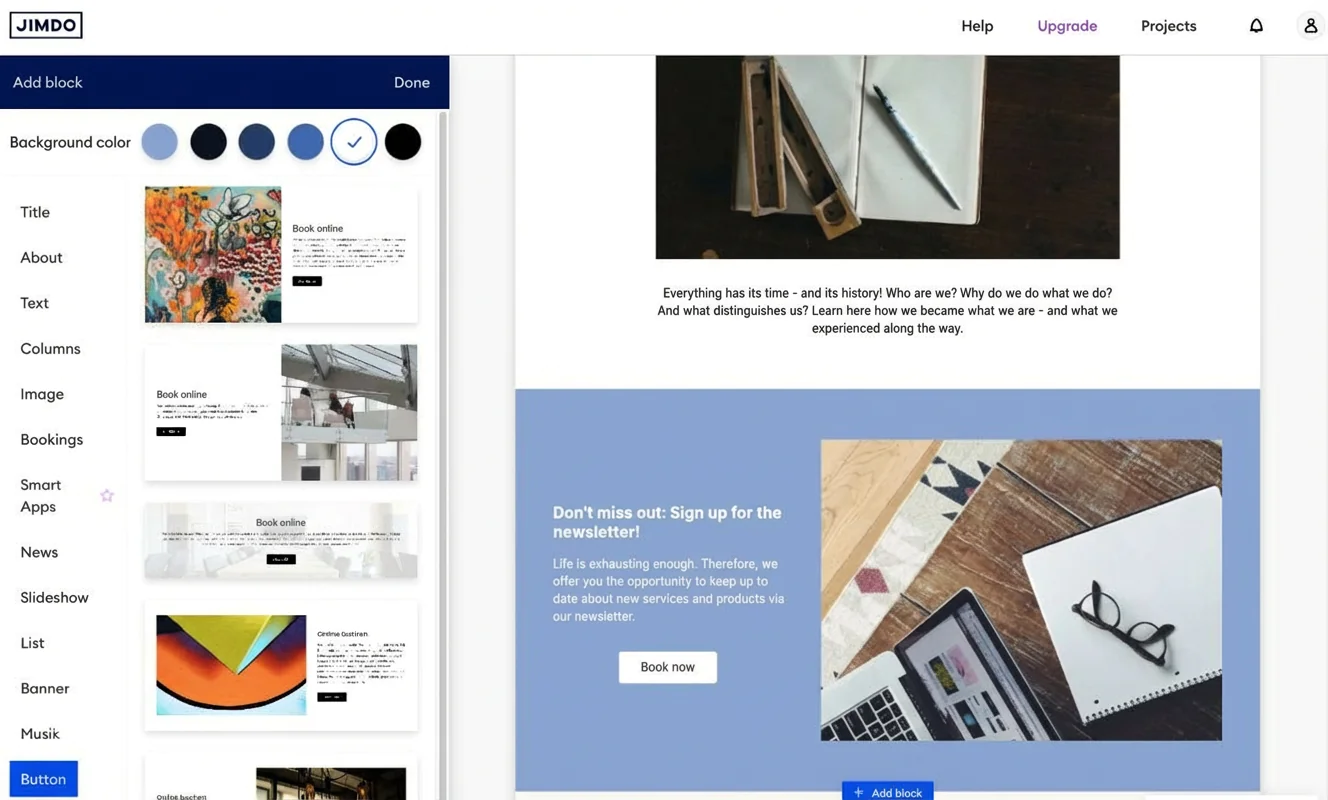
A newsletter signup form can only be embedded in the Creator version. For the entry-level version, using a button that links to your newsletter tool is the better option. You can also integrate Google Forms via Smart Apps to create a workaround.
Extensions via plugins or apps
Jimdo does not have its own app store. Only the so-called Smart Apps are available. These allow you to embed certain third-party services, but they cannot be customised or fully adapted to your website.
The situation is different in the Creator version, where adjustments via HTML and CSS are possible using widgets.
Analytics and statistics
Jimdo includes its own statistics tool that shows how often your website is visited. You can also see where visitors come from — whether via search engines, ads, social media or direct URL entry. In addition, up to five of the most visited pages are displayed.
If that’s not enough, you can integrate Google Analytics. For beginners, this is usually unnecessary. There are also ongoing data protection concerns around Google Analytics, particularly for businesses — although it can be used in a GDPR-compliant way.
Contact forms
Jimdo allows you to add a contact form using a small selection of design templates. Beyond that, the forms are not highly customisable.
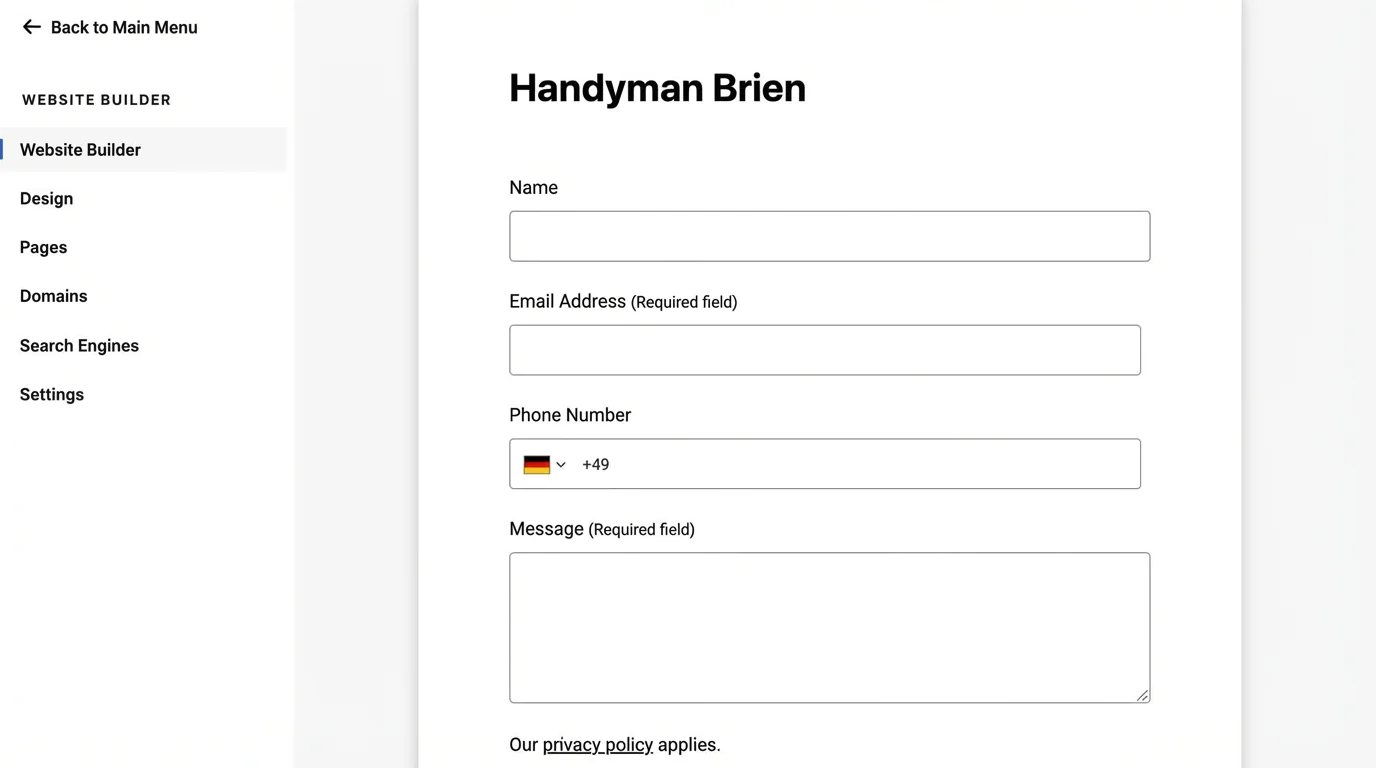
You can also set up contact via WhatsApp using a widget. In addition, custom Google Forms can be embedded through the Smart Apps feature.
Password protection and member areas
For clubs or service providers, password-protected areas can be useful for staying in touch or offering digital products and subscriptions. With Jimdo, individual pages can be password-protected — but only in the Creator version. Dedicated member areas are not available.
If you need this functionality, you should consider another website builder. WIX, in particular, offers extensive options for member areas, including the “WIX Members Area” app.
Jimdo also lacks database functionality and an internal site search. The latter is especially disappointing, as it would be a very useful feature and likely not difficult to implement. This is an area where Jimdo could improve.
GDPR and legal compliance
When it comes to GDPR and data protection, Jimdo performs very strongly — and not just because its servers are located in Germany.
Jimdo is one of the few website builders to offer not only a cookie notice but a user-friendly cookie opt-in system. This is particularly helpful if you want to use Google Analytics.
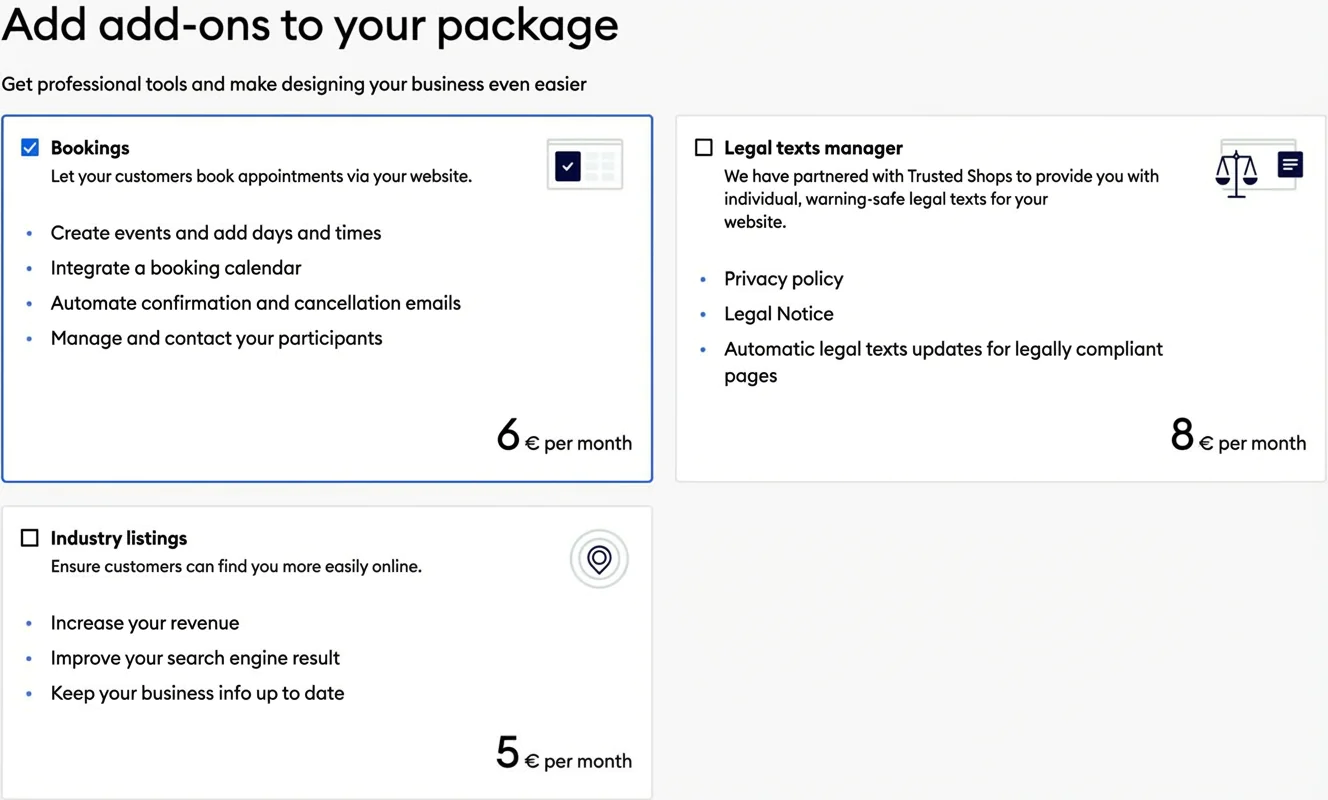
The standout legal feature is Jimdo’s legal text manager. It provides up-to-date texts for the imprint, privacy policy, terms and conditions and withdrawal information. This helps businesses keep their websites legally compliant.
At a glance
| Rating | |
| Points achieved | 12 out of 18 points |
| Advantages |
|
| Disadvantages |
|
To start with: if you want to build a fully professional online shop as a retailer, you’ll usually be better off with dedicated platforms such as Shopify. If you prefer creating your site with a website builder and want to add a more substantial shop, it’s worth looking at a broader comparison of e-commerce tools and platforms.
If you’re happy with a solid online shop that isn’t overly complex, Jimdo covers the essentials. The basic shop functions are included in the entry-level “Basic” plan. However, if you want to offer different product variants or sell via Facebook and Instagram, you should choose at least the “Business” plan.
There is also the “Unlimited” plan. It includes unlimited storage and traffic, faster support and an unlimited number of subpages. In addition, only this plan includes compliant legal text templates, business directory listings and booking features.
What you can sell
In Jimdo’s online shop, you can list up to 100 products. The option to add different product variants or designs is only available from the “Business” plan onwards. Products can be organised into different categories.
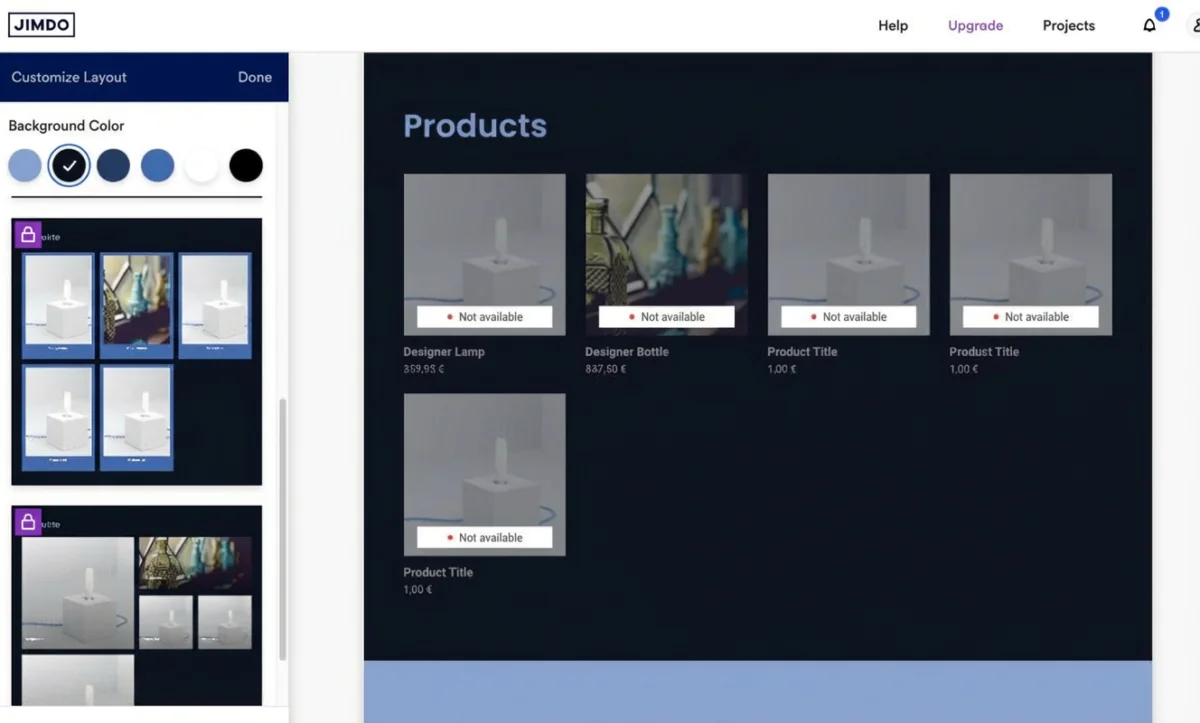
Unfortunately, Jimdo does not support selling digital products at all.
Customisation options and design
When it comes to customisation and design, Jimdo performs well, but not exceptionally. To adjust product design in more detail, you need to choose one of the higher-priced plans.
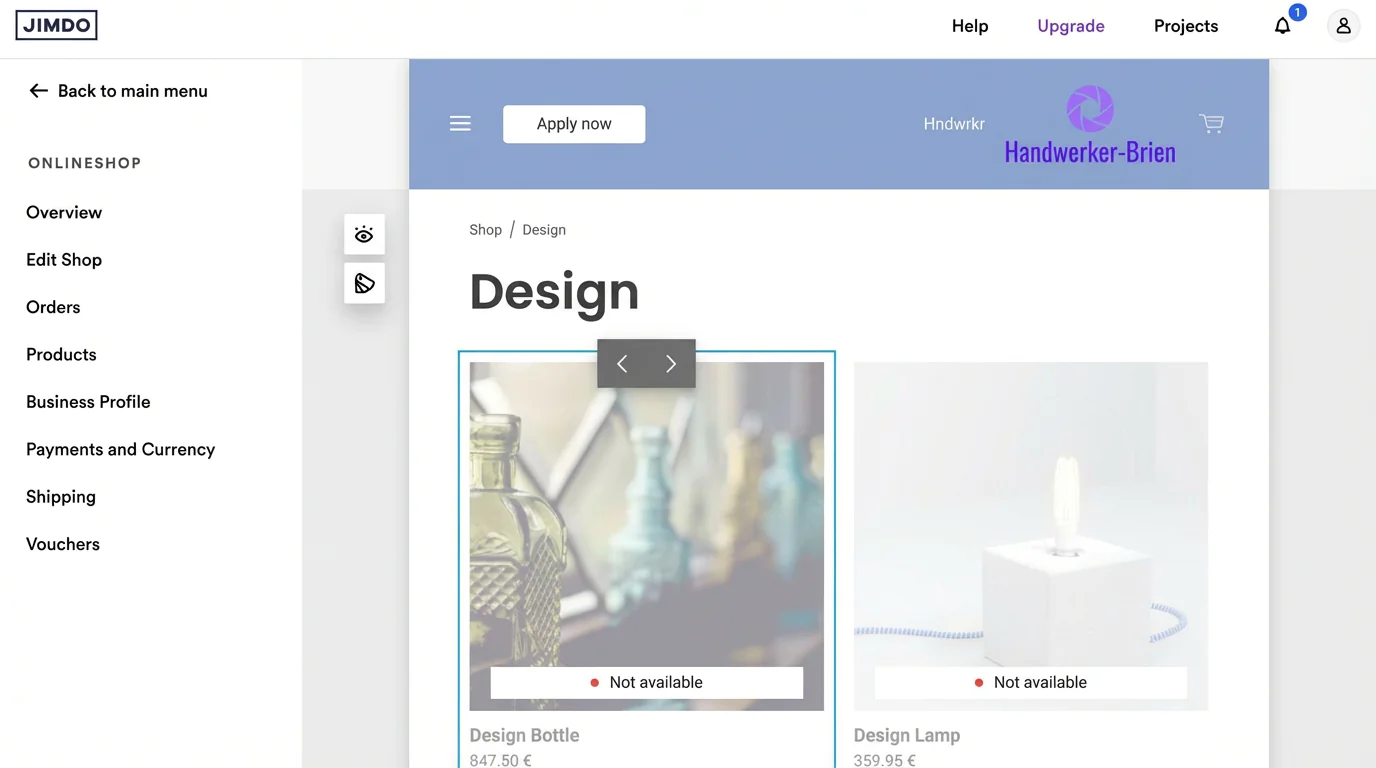
Customer reviews — which many other shop systems support — cannot be added in Jimdo.
Supported payment methods
Jimdo allows shop owners on all plans to offer a selection of payment options.
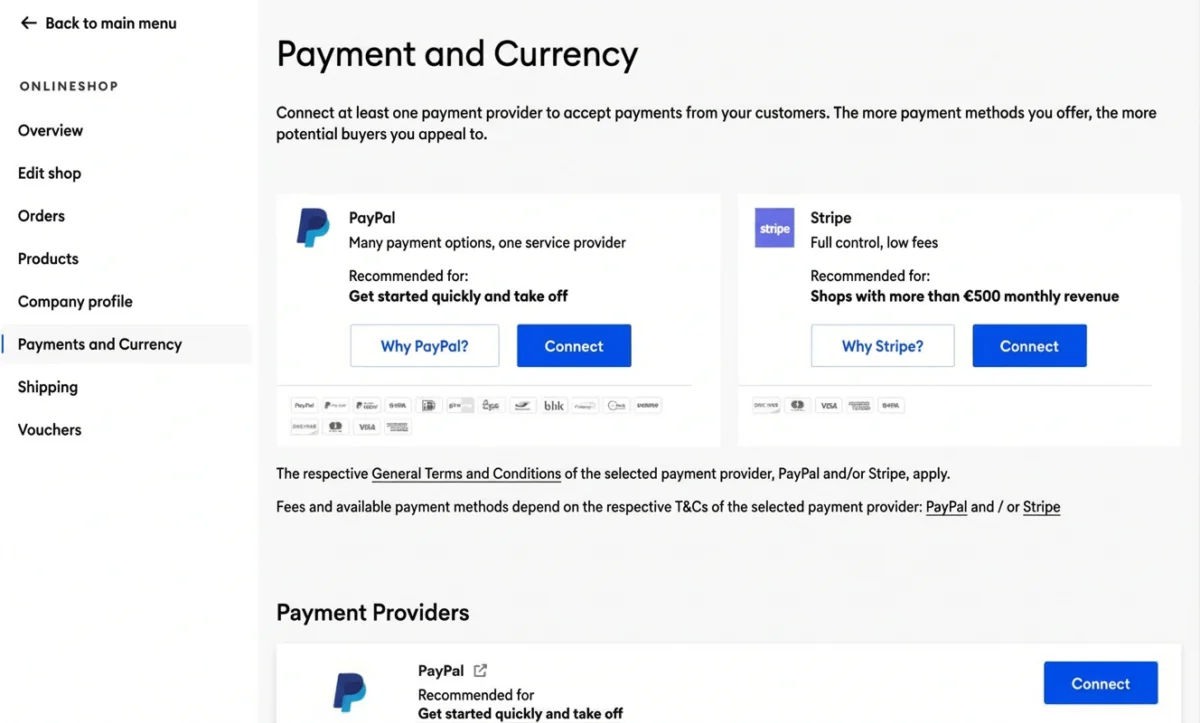
Specifically, these are:
- PayPal (credit and debit cards, plus local payment methods such as direct debit)
- Stripe (credit and debit cards, plus additional local payment methods such as direct debit)
Payment processing costs
While Jimdo does not charge its own transaction fee, PayPal charges 2.49% plus €0.35 per transaction, and Stripe charges 1.4% plus €0.25 per transaction.
Flexible shipping options
With Jimdo, you can set shipping costs and delivery times for four regions: domestic, EU countries, other European countries and the rest of the world. Click & Collect pickup is also available.
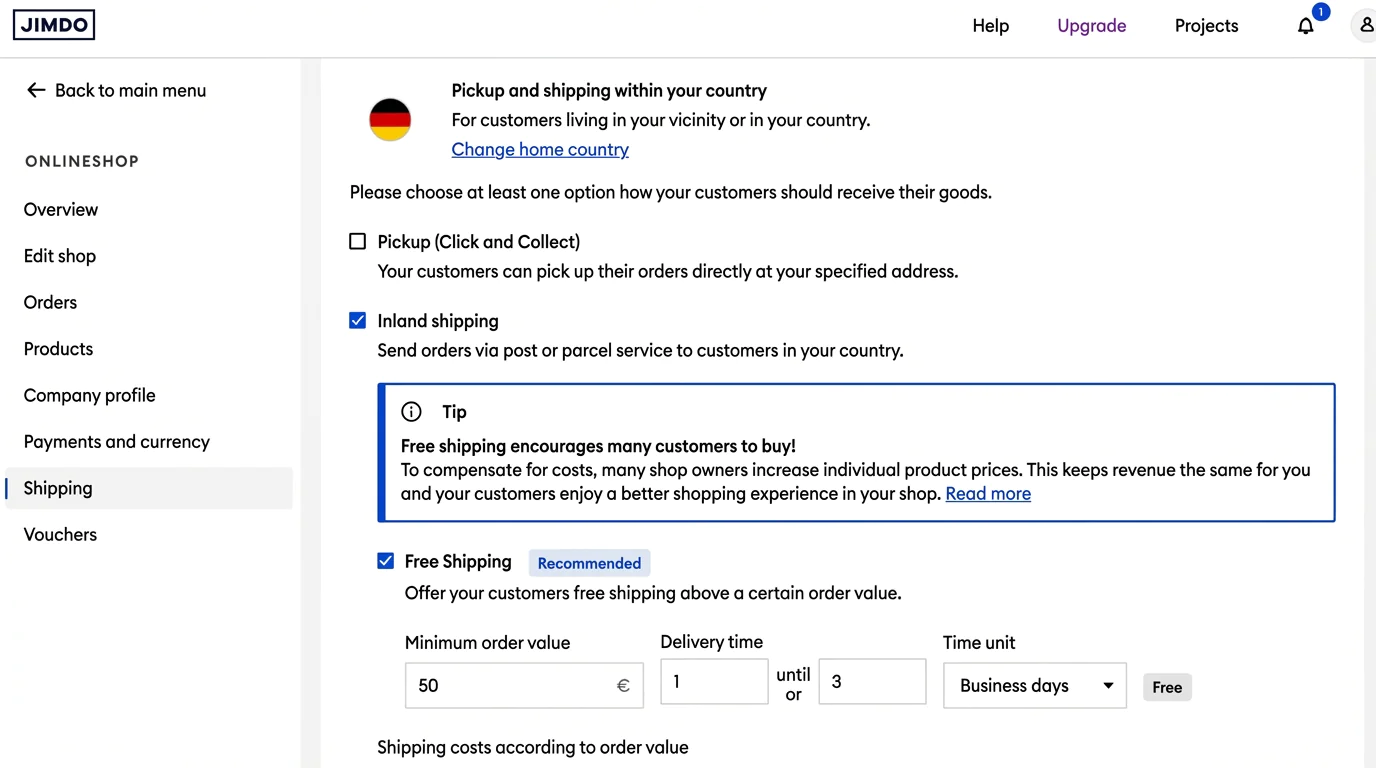
You can also set up free shipping once a certain order value is reached. However, unlike some other shop systems, you can’t predefine or offer a choice of specific shipping providers.
Accounting and inventory integration
Jimdo does not offer a direct integration with accounting or inventory management systems. That said, you can manage orders within Jimdo itself or export them for use in an external system.
Legal compliance
Jimdo’s online shop solution also meets current legal requirements and is GDPR-compliant. If you want maximum legal certainty, you can use the compliant legal text templates that are included in the highest-priced “Unlimited” plan.
At a glance
| Rating | |
| Points achieved | 9 out of 13 points |
| Advantages |
|
| Disadvantages |
|
As a German-based tool, Jimdo offers support in German. However, users are limited to written contact. The more you pay for your subscription, the faster enquiries are typically answered.
Support channels and languages
Users are first encouraged to look for a solution in the help centre — which is, to be fair, quite extensive.
The next “hurdle” before you can reach a person is a chatbot that tries to answer questions as effectively as possible. In practice, it mainly pulls information from the help centre.

Only if you still can’t resolve the issue can you persuade the chatbot to create a support ticket. Communication then takes place via email. Jimdo does not offer phone support.
How fast and helpful is support?
Response times depend on the plan you choose. Priority support is available on all paid subscriptions. Depending on the plan, you’ll either receive an answer within one to two working days or within an hour.
Overall, support replies are mostly competent and arrive quickly.
How satisfied are Jimdo users?
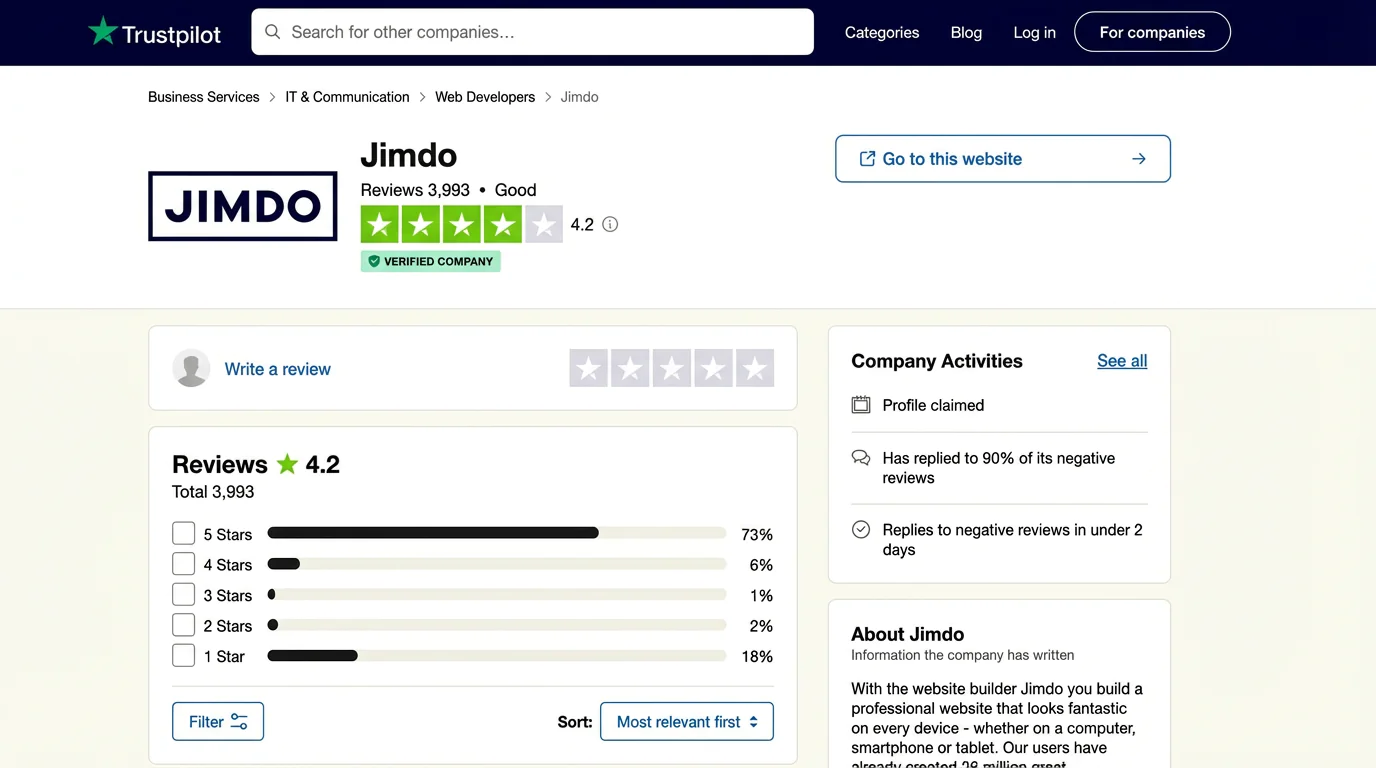
On Trustpilot, Jimdo has received a “good” rating based on around 4,000 reviews — 4.2 out of 5 stars. Alongside positive feedback, there are, of course, negative comments as well. One positive point is that, according to Trustpilot, Jimdo responds to negative reviews in under two days.
What Jimdo users rate positively:
- Helpful and competent support
- Easy to use
Recurring points of criticism:
- Missing features
- Support can be hard to reach, no phone contact
- Cancellation terms
At a glance
| Rating | |
| Points achieved | 15 out of 20 points |
When it comes to value for money, Jimdo ranks near the top among the major website builder tools. The entry-level paid plan already includes the most important features as well as a custom domain. Points are deducted for the limits on subpages, storage space and bandwidth in all paid plans except the most expensive one (“Unlimited”).
At the same time, Jimdo offers a free plan (“Play”) for anyone who simply wants to try out website creation. As the name suggests, this option is best used as a way to explore the basics.
Because of the heavy limitations, the lack of a custom domain and mandatory Jimdo branding on the site, I recommend choosing one of the paid plans if you intend to use your website for business purposes.
| Start | Grow | Grow Legal | Unlimited | |
|---|---|---|---|---|
| Price | from £11 per month | from £18 per month | from £26 per month | from £45 per month |
| Full use of the builder | ✅ Yes | ✅ Yes | ✅ Yes | ✅ Yes |
| AI website generator | ✅ Yes | ✅ Yes | ✅ Yes | ✅ Yes |
| Custom domain (1 year) | ✅ Yes | ✅ Yes | ✅ Yes | ✅ Yes |
| Email inbox | ✅ Yes | ✅ Yes | ✅ Yes | ✅ Yes |
| Web space | 5 GB | 15 GB | 15 GB | Unlimited |
| Subpages | 10 | 50 | 50 | Unlimited |
| AI text & image generator | ❌ No | ❌ No | ❌ No | ❌ No |
| Website analytics | ✅ Yes | ✅ Yes | ✅ Yes | ✅ Yes |
| Advanced SEO features | ✅ Yes | ✅ Yes | ✅ Yes | ✅ Yes |
| Legally compliant legal texts | ❌ No | ❌ No | ✅ Yes | ✅ Yes |
| Suitable for | Simple websites | Simple websites with extended requirements | Simple websites with extended requirements plus legal features | Larger websites |
Why Jimdo might not be for you
Jimdo is a good choice for anyone who wants to create a simple website quickly and without technical knowledge. However, if you’re planning a more demanding project that requires more features than a standard website, it’s worth looking at other options.
Reasons Jimdo may not be a fit:
- Complex website projects: If your planned site needs a large number of subpages and advanced functionality, a website builder like Jimdo is unlikely to be the right fit. In this case, a more flexible tool such as WIX or a full content management system like WordPress is usually a better choice.
- Ambitious bloggers: In its simple version, Jimdo does not include a blog feature. If blogging is important to you, competitors like WIX offer much more comprehensive blog functionality. For professional blogging, WordPress is generally the better option, as it provides more control over performance and speed.
- Online shop operators: Running a small shop with a limited number of products is possible with Jimdo and similar builders. If your online shop is the core of your business, though, specialised platforms like Shopify are the better choice. They offer more advanced product and order management, a wider range of payment options and far greater flexibility for expansion.
- Design-focused users: Jimdo’s templates are professional and visually appealing. If you’re looking for particularly refined, design-led templates, Squarespace usually stands out in comparison.
- Private users and very small projects: If you only want to create a private website or a very simple project, Webador can be a more affordable alternative to Jimdo.
You’ll find the best alternatives to Jimdo in our comprehensive comparison of website builders.
Best Jimdo alternatives
-
1 Winner 2026

Test score
9.4
2026
Outstanding
Pros and Cons
- WordPress securely installed with 1 click
- Control over functions and data
- Huge range of extensions and designs
- Automatic updates and backups
- Using WordPress is more complicated than a website builder
Visit sitePricing
- IONOS WordPress
- Fast server hardware
- Incl. domain & email addresses
- From £1 / month
- 30 days money back
-
2 Ideal for beginners

Test score
8.5
2026
Excellent
Pros and Cons
- Very easy to set up
- Best results for simple websites
- AI assistant facilitates creation
- Image database with 17,000 photos
- Email inbox included in the tariff
- Rather not ideal for more complex websites
- Other providers offer more choice in design templates
Visit sitePricing
- IONOS MyWebsite Now
- Free from advertisements
- With your own domain & email
- from 1£ / month
-
3 Best value for money

Test score
7.9
2026
Very good
Pros and Cons
- Very simple and beginner-friendly creation
- Designs optimised for mobile devices
- Free support
- Attractive Pro tariffs
- Selection of design templates is limited
- Functionality not as extensive in comparison (no app store)
Visit sitePricing
- Webador Free
- Permanently free of charge
- No own domain
- Webador banner on the page
- Webador Pro
- Incl. domain and email inbox
- Incl. online shop
- from £8.50 / month
- Test 3 months free of charge
-
4 Very easy to set up
Test score
7.3
2026
Very good
Pros and Cons
- Website wizard that gets your page up and running in just a few minutes
- Attractive & mobile-optimised designs
- Functions rather limited to basics
- Few possibilities for extension
Visit sitePricing
- JIMDO Free
- Permanently free of charge
- Jimdo branding
- No own domain
- JIMDO Premium
- Advertising free
- With your own domain
- from 9,00£ / month
-
5 Most flexible solution

Test score
7
2026
Very good
Pros and Cons
- Website builder with the greatest design freedom
- 800+ high-quality designs, 300+ app extensions
- AI assistant for website and content
- Several image databases integrated
- Range of functions can be overwhelming at first
- Email addresses only via Google Workspace (costs extra)
Visit sitePricing
- WIX Free
- Permanently free of charge
- Wix.com branding
- No own domain
- WIX Premium
- Advertising free
- With your own domain
- from £7.50 / month
- Test 14 days free of charge
-
6 Great design templates

Test score
6.8
2026
Good
Pros and Cons
- Particularly stylish & mobile-optimised design templates
- Templates for every industry
- Integrated marketing and analysis tools
- Access to over 40 million images
- Comparatively few add-ons (or cost extra)
- Email inbox costs extra (via Google Workspace)
Visit sitePricing
- Squarespace Personal
- With your own domain
- from 11,00£ / month
- Test 14 days free of charge
Jimdo is a website builder tool that allows users to create their own websites easily, without any programming knowledge. The company was founded in 2007 in Hamburg and offers a user-friendly platform aimed at private individuals, small businesses and self-employed professionals.
With Jimdo, users can design, customise and manage their websites using simple drag-and-drop tools. Key features include responsive design templates, an integrated online shop and SEO tools. One of Jimdo’s standout features is its provision of legally compliant website texts, which is relatively uncommon among website builders.
Jimdo Smart Apps are built-in applications within the Jimdo platform that add extra functionality and simple automation to websites created with the tool. They are designed to help users improve their online presence by covering areas such as marketing and social media integration.
For example, Smart Apps allow you to embed social media feeds or forms directly into your website without relying on external services. That said, it’s only fair to point out that these Smart Apps are not very flexible. They are mainly useful because Jimdo does not otherwise support external apps or offer a dedicated app marketplace.
With Jimdo, you build your website using an intuitive interface that lets you create and customise pages via drag-and-drop elements. Users start by choosing a design template and then fill it with text, images, videos and other content.
Jimdo uses a so-called WYSIWYG editor (What You See Is What You Get), which means changes are visible in real time. Editing HTML and CSS code is only possible in Jimdo’s professional version, Creator. Jimdo also provides hosting services and regular security updates, which reduces the need for technical maintenance.
Jimdo offers several pricing plans to suit different needs. These range from a free basic plan with limited features to premium plans that include additional functionality and enhanced support.
Paid plans start at £11 per month for the “Start” plan and go up to £45 per month for the “Unlimited” plan. There are also specific plans for online shops that include extra e-commerce features, starting at £18 per month (“Basic”).
A domain is included in Jimdo’s paid plans — but only free for the first year. After that, the cost of a standalone domain with Jimdo usually starts at around £20 per year, depending on the domain extension and availability.
You can cancel a Jimdo subscription directly through your user account. To do this, log in to your Jimdo account and go to the subscription section in the account settings. There, you’ll find the option to cancel your current plan.
It’s important to observe the cancellation notice periods to avoid additional charges. After cancellation, your website remains active until the end of the current billing period. After that, it is either downgraded to the free basic plan or deactivated.
Yes, Jimdo offers a free basic plan that allows users to test the platform and create a simple website. This plan includes the website builder, a limited selection of design templates and restricted storage space.
However, the free plan displays Jimdo branding and comes with significant feature limitations. It’s best used to get familiar with the platform and build a basic draft of your site before deciding whether to upgrade to a paid plan.
Comments and ratings
Was this article helpful?
Rate article
Share article