Website builder comparison 2026

As seen in:



My top 3 website builder recommendations:
-
Visit site
Test score
9.4
2026
Outstanding
-
Visit site
Test score
8.5
2026
Excellent
-
Visit site
Test score
7.9
2026
Very good
These days, there are lots of website builder tools that let complete beginners create a website on their own.
Whether it’s platforms like Wix, IONOS, or Webador — they all claim to be especially user-friendly and beginner-friendly.
But do the tools actually deliver on what their marketing promises?
I subscribed to the plans of 16 popular website builders and tested them in depth. In this comparison, I focused on areas such as design, ease of use, features, and costs.
My aim: to help you choose the ideal website builder for your project!

This website builder comparison 2026 covers:
- Introduction: what makes a good website builder
- Top picks: the best website builders overall
- Top picks in detail: what sets the leading builders apart
- Rating criteria: how we tested the website builders
- Costs: how much different website builders cost
- Full list: the other website builders we tested
- Suitability: which website builder is best for your project
- Conclusion & alternatives: our recommendation and worthwhile alternatives
- This website builder comparison 2026 covers:
- What makes a good website builder?
- Best website builders
- What sets the top tools apart in detail?
- How I tested website builders
- Website builder costs
- Other website builders I tested
- Pick the right website builder
- Conclusion and alternatives
- What else to keep in mind
A website builder promises a quick and affordable shortcut to your own website — without any prior knowledge.
There are plenty of tools on the market. Most of them let you create and edit your site directly in your browser using the WYSIWYG principle (“What you see is what you get”).
So you log in and update text or images, adjust the layout via drag and drop, or add new features. Sounds convenient — but how can you tell whether a tool really delivers on what it promises?
Website builder must-haves
- Easy to use: You can build and update your site quickly, without a steep learning curve
- Strong designs: A range of professional, flexible templates that fit your type of project
- Plenty of features: The functions you need are included, or can be added to handle more complex requirements
- Fast loading times: Your website not only looks good, it also loads quickly
- SEO options: You can optimise your site for better visibility in search engines
- Fair pricing: Plans are reasonably priced, and you can cancel or switch whenever you like
There are quite a few requirements a builder needs to meet for you to be happy with it long term. Beyond the points above, we included a range of additional criteria in our systematic website builder comparison.
Jörn Brien
The following website builders performed best in our comparison:
-
1 Winner 2026

Test score
9.4
2026
Outstanding
Pros and Cons
- WordPress securely installed with 1 click
- Control over functions and data
- Huge range of extensions and designs
- Automatic updates and backups
- Using WordPress is more complicated than a website builder
Visit sitePricing
- IONOS WordPress
- Fast server hardware
- Incl. domain & email addresses
- From £1 / month
- 30 days money back
-
2 Ideal for beginners

Test score
8.5
2026
Excellent
Pros and Cons
- Very easy to set up
- Best results for simple websites
- AI assistant facilitates creation
- Image database with 17,000 photos
- Email inbox included in the tariff
- Rather not ideal for more complex websites
- Other providers offer more choice in design templates
Visit sitePricing
- IONOS MyWebsite Now
- Free from advertisements
- With your own domain & email
- from 1£ / month
-
3 Best value for money

Test score
7.9
2026
Very good
Pros and Cons
- Very simple and beginner-friendly creation
- Designs optimised for mobile devices
- Free support
- Attractive Pro tariffs
- Selection of design templates is limited
- Functionality not as extensive in comparison (no app store)
Visit sitePricing
- Webador Free
- Permanently free of charge
- No own domain
- Webador banner on the page
- Webador Pro
- Incl. domain and email inbox
- Incl. online shop
- from £8.50 / month
- Test 3 months free of charge
-
4 Very easy to set up

Test score
7.3
2026
Very good
Pros and Cons
- Website wizard that gets your page up and running in just a few minutes
- Attractive & mobile-optimised designs
- Functions rather limited to basics
- Few possibilities for extension
Visit sitePricing
- JIMDO Free
- Permanently free of charge
- Jimdo branding
- No own domain
- JIMDO Premium
- Advertising free
- With your own domain
- from 9,00£ / month
-
5 Most flexible solution

Test score
7
2026
Very good
Pros and Cons
- Website builder with the greatest design freedom
- 800+ high-quality designs, 300+ app extensions
- AI assistant for website and content
- Several image databases integrated
- Range of functions can be overwhelming at first
- Email addresses only via Google Workspace (costs extra)
Visit sitePricing
- WIX Free
- Permanently free of charge
- Wix.com branding
- No own domain
- WIX Premium
- Advertising free
- With your own domain
- from £7.50 / month
- Test 14 days free of charge
-
6 Great design templates

Test score
6.8
2026
Good
Pros and Cons
- Particularly stylish & mobile-optimised design templates
- Templates for every industry
- Integrated marketing and analysis tools
- Access to over 40 million images
- Comparatively few add-ons (or cost extra)
- Email inbox costs extra (via Google Workspace)
Visit sitePricing
- Squarespace Personal
- With your own domain
- from 11,00£ / month
- Test 14 days free of charge
Top pick (9.4 of 10): WordPress
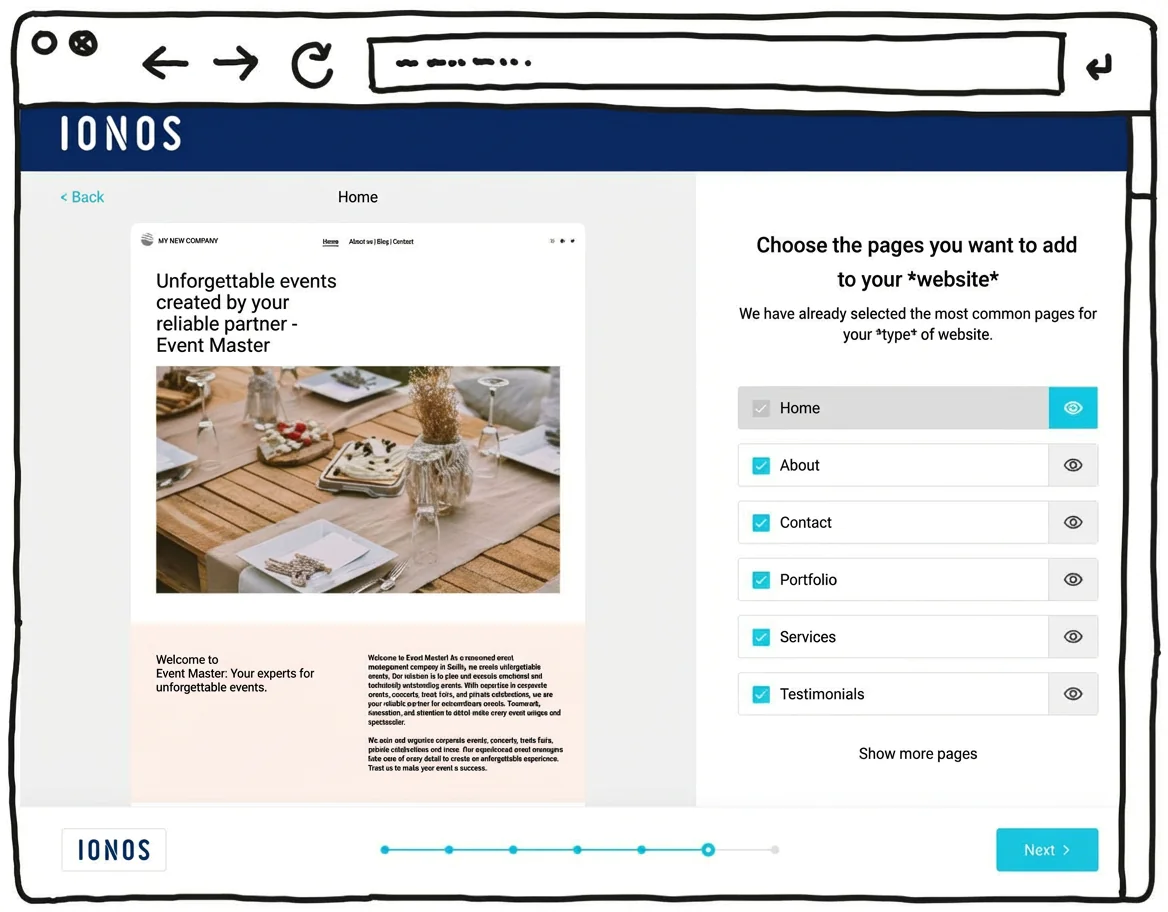
IONOS’s newer WordPress hosting aims to combine the simplicity of a website builder with the advantages of WordPress, the world’s most widely used website system. With its built-in AI setup, it can feel almost as easy as a website builder.
That can make it suitable for beginners who don’t have much experience building websites. The setup assistant guides you step by step through installing WordPress and suggests a practical selection of themes and plugins.
One key difference here is the built-in AI assistant, which can generate an initial WordPress website for you. It helps you take care of the most important settings quickly and find a suitable template. Automatic updates and daily backups can also provide extra peace of mind.
Another plus is customer support, available 24/7, including phone support rather than relying only on chat or email.
Pricing for IONOS WordPress hosting starts at around £1 per month for the first six months, then around £5 per month afterwards. A domain and an email mailbox are included in this price.
Pros of IONOS WordPress hosting
- WordPress installed securely in one click
- AI assistant for building your website
- A professional-looking design within minutes
- Designs well optimised for mobile phones
- All the benefits of WordPress as the world’s most widely used website CMS
- Flexible to extend with plugins
- Blogs or online shops possible
- Switching hosting provider later is possible
Cons of IONOS WordPress hosting
- Less design freedom than drag-and-drop website builders
- The wide range of features can still feel overwhelming for beginners, despite the guided setup
Pricing
- “Start” plan: from £3/month for the first 6 months, then £5/month
- “Grow” plan: from £1/month for the first 6 months, then £10/month
- All plans include your own domain and an email address
Here you can find our detailed IONOS WordPress hosting review.
IONOS MyWebsite (8.5 of 10): best value for money
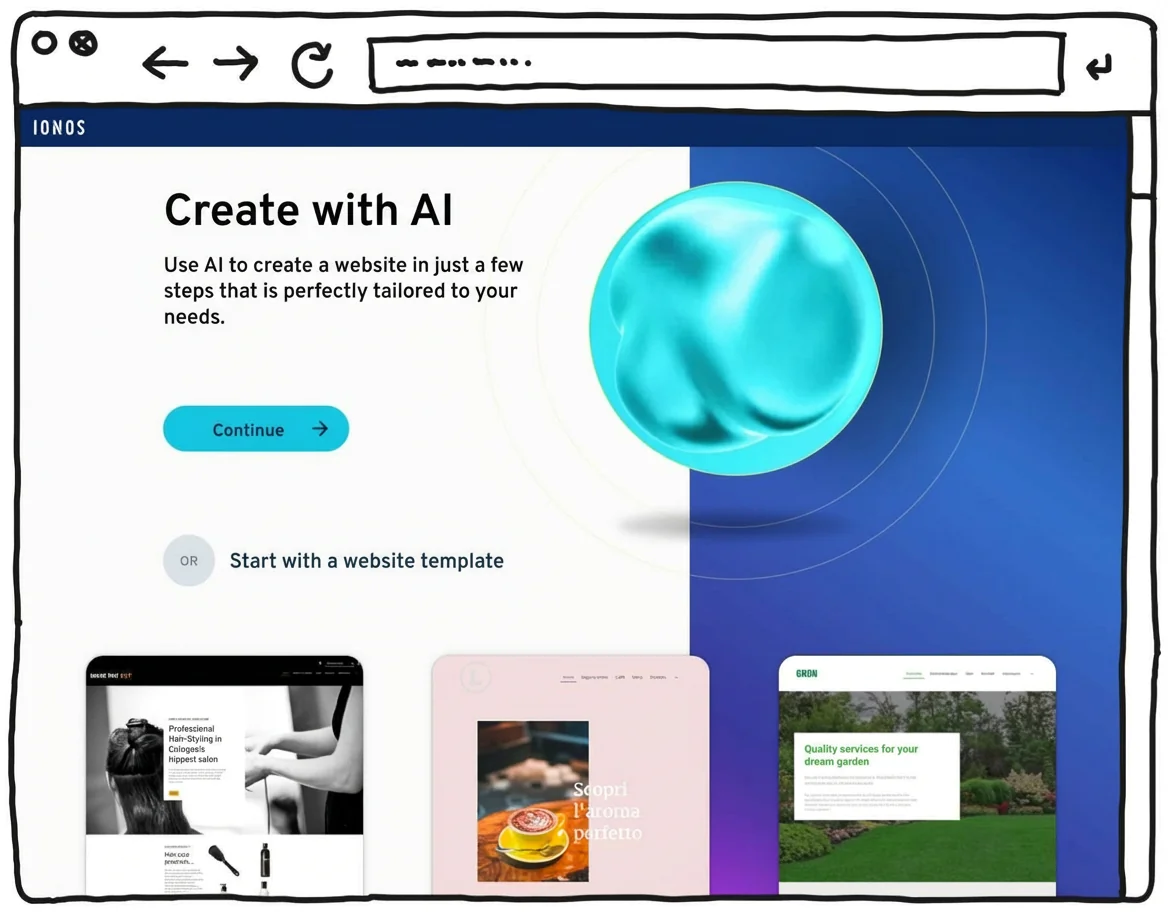
With IONOS “MyWebsite”, even beginners with no prior technical knowledge can easily create professional-looking websites in no time at all.
This is possible thanks to the clear operation and the support of convenient AI functionalities.
If you don’t want to use AI texts and images, you should prepare this content and have it ready when you create your website.
The comparatively low costs are a big plus point.
IONOS “MyWebsite” also impresses with its high level of data protection and German support. The only major drawback is that the “MyWebsite” system is not suitable for complex websites.
Best for:
- Individual entrepreneurs such as coaches or brokers
- Local companies such as craft businesses or medical practices
- Anyone who wants to create a simple website without any prior technical knowledge
What I liked most:
- Setting up and editing is easy and straightforward
- The AI assistant is a great help when creating the website and filling it with content (text and images)
- Legal certainty thanks to server location in Germany (keyword: GDPR)
- Tariffs are affordable
- Email address and domains are included in the tariff
What could be better:
- Designs/templates could have more creativity and quality
- For complex websites you should choose another provider
Find out more in my IONOS/1&1 website builder review and test report.
Start with IONOS MyWebsite
IONOS offers various website plans starting at just 1£/month for the first 6 months.
Webador (7.9 of 10): fast and affordable
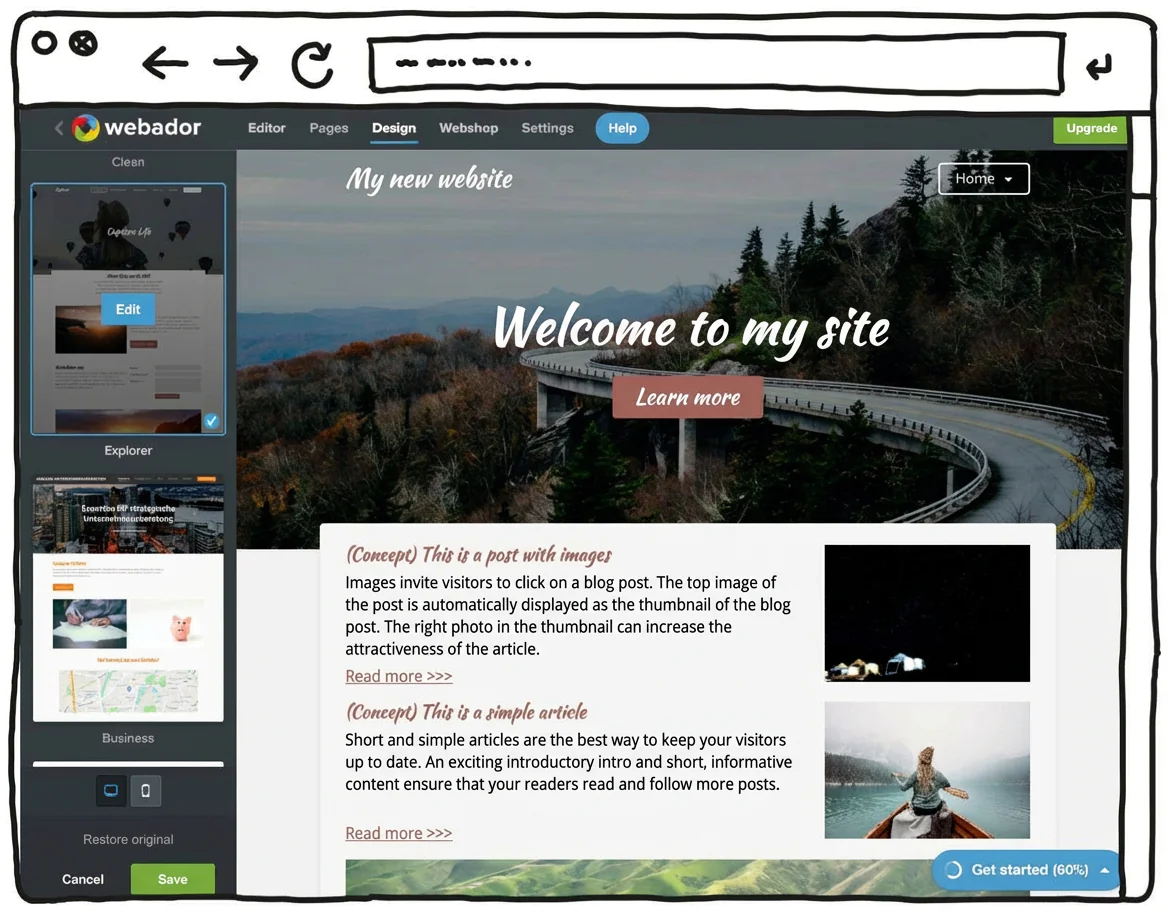
Webador is a particularly easy-to-use and low-cost website builder. It’s a fairly minimalist tool that focuses on the essentials. The upside is that, with this budget-friendly tool, you can save quite a bit compared to many other options. Webador also offers a permanently free “Free” plan.
On top of that, you can try the Pro version free for 6 months. You won’t find that kind of trial period with most other website builders.
This Dutch tool positions itself as a solution that helps beginners build a website.
As a result, the feature set is mainly limited to what you really need. In return, the editor is genuinely simple and intuitive to use.
Another plus: according to the company, Webador uses 100% sustainable energy for its servers. In theory, that means users can run their website in a climate-neutral way.
Also positive: as a Dutch tool, Webador hosts its servers in the EU. That can be reassuring for users in terms of legal framework and data protection standards.
With this minimalist builder, you can create simple websites and small online shops that don’t require major customisation or personalisation.
Webador’s free version — as with many competitors — is best seen as a way to test things out. You can use it to build a free website or even set up an online shop at no cost. However, you won’t get your own domain, and Webador will display an ad banner on your site.
Pricing:
- Webador Free: Permanently free, no custom domain, Webador banner displayed on the site
- Webador Lite: Includes a custom domain, 6-month free trial, then a low monthly fee
- Webador Pro: Includes a custom domain, email inbox and online shop, 6-month free trial, then a higher monthly fee
Try Webador free for 6 months
Test Webador’s website builder free for 6 months, or sign up for the permanently free Free plan.
Jimdo (7.3 of 10): particularly easy to get started
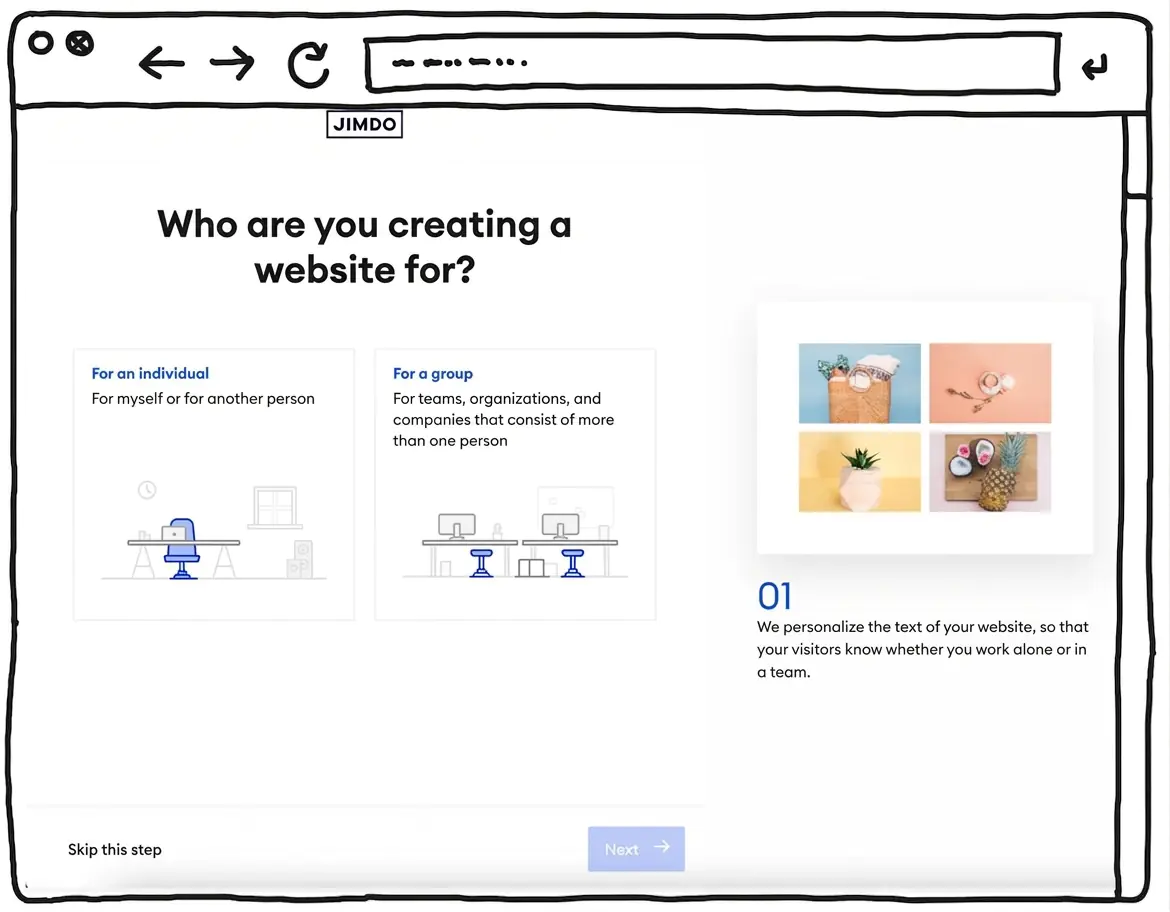
The website builder Jimdo, developed in Germany, is well suited to beginners who want to create an attractive website without any coding skills. It offers visually appealing, mobile-optimised designs and is largely intuitive to use. The builder guides you step by step through the setup process.
However, the simple handling and reduced feature set also have their limits. For more complex websites that require specific customisations and extensions — such as multilingual sites or dynamic features — Jimdo is not sufficient. If you have more advanced requirements but still value an easy setup, alternatives such as WordPress by IONOS or a professional shop system are worth considering.
One of Jimdo’s biggest strengths is its focus on legal compliance and data protection. The servers are located in Germany, which ensures high data protection standards. Jimdo also offers a dedicated plan that includes legal protection features, which is particularly relevant in the German context.
The relatively low prices also make Jimdo appealing for small projects or businesses with limited budgets.
Pros of Jimdo:
A major advantage of Jimdo is its ease of use. During my in-depth Jimdo test, I was able to create an attractive website quickly and without complications. It stood out that the platform requires no technical knowledge at all. Jimdo also provides templates that are easy to customise, making it straightforward to build a personalised website.
In addition, Jimdo offers integrated SEO tools and basic online shop features for small to medium-sized businesses. The free plan allows you to get started at no cost, while paid plans unlock extra features such as a custom domain and an ad-free site.
Cons of Jimdo:
One drawback of Jimdo is its limited flexibility compared to larger platforms such as WordPress or Squarespace. Customisation options are restricted, and more complex projects quickly run into functional limits. Some advanced features — including multilingual websites or more in-depth SEO options — are not available.
Pricing:
- Jimdo Free: Free of charge, no custom domain, with adverts.
- Jimdo Start: £8 per month, includes a custom domain and an email address.
- Jimdo Grow: £13 per month, with extended SEO tools and statistics.
- Jimdo Unlimited: £34 per month, all features, unlimited bandwidth.
If you’re interested in Jimdo, read my detailed Jimdo review as well.
Get started with Jimdo
You can try Jimdo for free with the “Free” plan.
A professional website with your own domain and no ads is available from £8 per month.
A website builder can be a great option if you want to create a website without having extensive technical skills.
Website builders have some things in common, but there are also major differences.
To compare them objectively, we use the same, very detailed checklist of criteria for every tool. That way, you get a solid comparison when it comes to building a website.
Unlike many other website builder comparisons, our ratings are not based on how much commission we receive from the tools. The tool we rate as the best website builder is the best — according to our transparent test results.
Jörn Brien
Our aim is to review website builder tools and their plans as objectively and carefully as possible.
To do this, we rate each website builder across several categories. We then weight these categories to calculate an overall score for each tool.
Evaluation criteria
| Rating criteria | Category winner | |
|---|---|---|
| Ease of use Weighting: 35% |
| IONOS WordPress Hosting |
| Templates / design Weighting: 15% |
| Squarespace |
| Features Weighting: 10% |
| IONOS WordPress Hosting |
| E-commerce Weighting: 5% |
| WIX.com |
| Support & reviews Weighting: 15% |
| IONOS MyWebsite |
| Costs & value for money Weighting: 20% |
| Webador |
Cost comparison:
Here you’ll find a complete overview of website costs and the key features of the website builders we tested. The top-rated tool is also one of the most affordable ones.
| WordPress by IONOS | IONOS MyWebsite | Jimdo | Webador | WIX | Squarespace | |
|---|---|---|---|---|---|---|
| Rating | 9.4 of 10 | 8.5 of 10 | 7.3 of 10 | 7.9 of 10 | 7 of 10 | 6.8 of 10 |
| Monthly base price | Plan “Start” — from about £4.50 per month | Plan “Starter” — from about £10 per month | Plan “Start” — from about £9 per month | Plan “Lite” — from about £4 per month | Plan “Start” — from about £12 per month | Plan “Personal” — from about £9 per month |
| Discount | £2.50 per month for 6 months | £5 per month for 6 months | No discount | Free for 6 months | No discount | No discount |
| Free trial | 30-day money-back guarantee | 30-day money-back guarantee | Free plan available indefinitely | Free plan available indefinitely | Free plan available indefinitely | 14-day free trial |
| Domain | ✅ Free for 1 year | ✅ Free for 1 year | ✅ Free for 1 year | ✅ Included | ✅ Free for 1 year | ✅ Free for 1 year |
| Email inbox | ✅ Included | ✅ Included | ✅ Included | ❌ Upgrade required | ❌ Via external provider | ❌ Via external provider |
| SSL | ✅ Included | ✅ Included | ✅ Included | ✅ Included | ✅ Included | ✅ Included |
| Storage | 25 GB | 10 GB | 5 GB | Unlimited | 2 GB | Unlimited |
| Subpages | ✅ Unlimited | max. 10 | max. 10 | ✅ Unlimited | ✅ Unlimited | ✅ Up to 1,000 |
| Online shop | Upgrade recommended (from about £18 per month) | Upgrade required (from about £20 per month) | Upgrade required (from about £16 per month) | Upgrade required (from about £7.50 per month) | Upgrade required (from about £24 per month) | Upgrade required (from about £16 per month) |
| Newsletter | ✅ Free extensions available | ❌ Via external tool | ❌ Via external tool | ❌ Via external tool | ✅ Included | Upgrade required (from about £15 per month) |
| Possible additional costs | External premium themes and plugins | Upgrades for extra features, external tools | Upgrades for extra features, external tools | Upgrades for extra features, external tools | Upgrades for extra features, external tools | Upgrades for extra features, external tools |
| Review | IONOS WordPress review | IONOS MyWebsite review | Jimdo review | Webador review | Wix review | Squarespace review |
Alongside our test winners, we also took a closer look at other well-known website builder tools. You’ll find all the builders we reviewed in the full overview here.
| Rank | Website builder | Rating | Short description | Costs | Tool link |
|---|---|---|---|---|---|
| 1 | WordPress by IONOS | 9.4 of 10 | Test winner | from £4 per month | Go to tool |
| 2 | IONOS My Website | 8.5 of 10 | Best value for money | from £10 per month | Go to tool |
| 3 | Webador | 7.9 of 10 | Fast and affordable | from £4 per month | Go to tool |
| 4 | Jimdo | 7.3 of 10 | Very easy to set up | from £9 per month | Go to tool |
| 5 | WIX.com | 7 of 10 | Very comprehensive builder | from £12 per month | Go to tool |
| 6 | Squarespace | 6.8 of 10 | Builder for design-focused users | from £9 per month | Go to tool |
| 7 | SITE123 | 6.6 of 10 | Ideal for simple websites | from £11 per month | Go to tool |
| 8 | Hostinger | 6.4 of 10 | Modern but simple builder | from £11 per month | Go to tool |
| 9 | Weebly | 6.2 of 10 | Free online shop option | from £8 per month | Go to tool |
| 10 | Godaddy | 6.2 of 10 | Only suitable for small projects | from £8 per month | Go to tool |
| 11 | Webflow | 6 of 10 | For advanced users | from £11 per month | Go to tool |
| 12 | Webnode | 5.6 of 10 | Simple and fast | from £11 per month | Go to tool |
| 13 | Umso | 5.2 of 10 | Simple but elegant | from £6 per month | Go to tool |
| 14 | Readymag | 5 of 10 | For experienced designers | from £11 per month | Go to tool |
| 15 | Strikingly | 4.6 of 10 | Simple and fast | from £7 per month | Go to tool |
Based on my experience, a website builder is ideal for straightforward web projects with clear requirements — especially small business websites such as restaurant websites, doctor or medical practice websites or tradespeople websites, as well as personal websites for coaches, artists, or designers
“Website builders are particularly suitable if you want to get online quickly and at a low cost.”
Jörn Brien
Because requirements can vary in detail, I also tested the website builders specifically for their suitability for different types of websites. This gives you a more precise comparison of tools and helps you choose the website builder that best fits your needs.
For more complex projects, however, I still prefer WordPress, as it offers greater flexibility and more options for extensions than website builders. Ultimately, the right choice depends on the scope of the project, your technical skills, and your individual requirements.
Click on the relevant link to see the full tool comparison and tips tailored to your industry:
| Industry | Special requirements | Recommended tool |
|---|---|---|
| Restaurant website |
| IONOS WordPress Hosting |
| Doctor / medical practice website |
| IONOS WordPress Hosting |
| Tradesperson website |
| IONOS WordPress Hosting |
| School website |
| IONOS WordPress Hosting |
| Portfolio website |
| Squarespace |
| Photographer website |
| Squarespace |
| Artist website |
| Squarespace |
| Association / club website |
| IONOS WordPress Hosting |
| Coaching website |
| IONOS WordPress Hosting |
| Estate agent website |
| IONOS WordPress Hosting |
| Holiday rental website |
| IONOS WordPress Hosting |
| Hotel website |
| IONOS WordPress Hosting |
| Personal website |
| IONOS WordPress Hosting |
| Hairdresser website |
| IONOS WordPress Hosting |
| Musician / band website |
| IONOS WordPress Hosting |
| Tax advisor website |
| IONOS WordPress Hosting |
| Wedding website |
| IONOS WordPress Hosting |
My conclusion
A website builder is ideal for straightforward web projects with clear requirements — or if you’re a beginner when it comes to creating websites.
The best website builders are:
- WordPress by IONOS (9.4 of 10)
- IONOS My Website (8.5 of 10)
- Webador (7.9 of 10)
- Jimdo (7.3 of 10)
- WIX (7 of 10)
- Squarespace (6.8 of 10)
- Site123 (6.6 of 10)
- Hostinger (6.4 of 10)
- Weebly (6.2 of 10)
- Godaddy (6.2 of 10)
- Webflow (6 of 10)
- Webnode (5.6 of 10)
- Umso (5.2 of 10)
- Readymag (5 of 10)
- Strikingly (4.6 of 10)
Pros of website builders:
- Easy setup: A website builder is ideal for beginners and people with limited technical skills. With good tools — especially the top website builders — the process is intuitive and requires no coding knowledge.
- Professional results: You don’t start from scratch, but use flexible, modern templates created by professional designers. However, quality can vary noticeably between tools — more on that in my website builder comparison.
- Saves time: Many tasks are simplified through setup assistants or integrated AI tools (for example, for text creation). Even with the best builders, though, you’ll still need to invest some time and care to achieve a strong result.
- Saves money: Because website builders allow non-experts to create professional-looking sites, you can potentially save thousands in design and development costs that would otherwise go to a web designer or agency.
- Secure: You don’t need to worry about maintenance, hosting, or security updates — so there’s less risk of your website being compromised.
Cons of website builders:
- Limited customisation: While builders make it easier to create a website, customisation options can be restricted. For more complex projects, this can become frustrating — especially if you only realise later that certain features are missing.
- Limited scalability: As your website grows or becomes more complex, you may hit the limits of a builder. For larger or more advanced projects — or for professional blogging — flexible solutions such as WordPress hosting are often better suited.
- Hidden costs: Some important features are only available as paid add-ons or upgrades. Because of the subscription model, costs can add up over time. You’ll find more details in the price comparison of website tools below.
Alternatives to website builders:
- WordPress: WordPress is a popular content management system (CMS) that offers far more freedom and customisation options. However, it requires significantly more technical know-how. I also recommend WordPress to anyone who wants to build a successful blog. By the way, our test winner “WordPress by IONOS” combines the flexibility of WordPress with the ease of a website builder.
- E-commerce platforms: If you want to create an online shop, specialised e-commerce systems such as Shopify or WooCommerce for WordPress may be a better choice. They offer advanced online selling features.
A website builder is an online tool that lets you create your own website relatively easily, without needing any special technical skills.
You can think of it like digital Lego. You choose from ready-made building blocks such as text, images, and layouts, and put them together using drag and drop.
The result is a tailored website — whether for a blog, a business, or a personal project. This allows you to build an online presence with relatively little effort and cost.
The best website builder is the one that fits you and your requirements best. For a simple website, a clear and straightforward website builder is often perfectly sufficient.
A website builder is ideal for people who are not tech experts but still want to create their own website. Whether you want to start a blog, run a business website, or simply share your interests online, a website builder offers an easy way to do so.
You can use ready-made designs and add content easily via drag and drop.
There are many different website builder tools. We compared a wide range of these builders and tested their respective strengths and weaknesses when it comes to creating websites.
The result: which website builder is best depends on the requirements you have for building your website.
We also created a ranking of the best website builders by industry.
A website builder is not the right choice for projects with very complex requirements. If you need a highly customised website with extensive functionality — such as an online shop with database integration or a large corporate website — a builder system is usually not the best option.
In such cases, working with a professional web developer is advisable. Larger companies with specific security or scalability needs should also consider more advanced solutions.
Website builders are best suited for anyone who wants to create a simple website with minimal effort and without extensive technical know-how.
Some website builders allow you to create websites in multiple languages. Wix, for example, offers tools to translate your website into many different languages.
By comparison, some tools — such as Jimdo and Squarespace — are more limited when it comes to multilingual features and are therefore not the first choice for international websites.
When choosing the best builder for creating your own website, comparing tools is essential. Most website builders focus heavily on ease of use and provide simple editors with intuitive drag-and-drop controls.
However, not all builders are equally suitable for beginners. Direct comparisons reveal sometimes significant differences in features, the quality and number of design templates, customer support, and of course pricing and plans.
For price-sensitive users, a cost comparison of website builders is therefore especially useful.
In our website builder comparison, we test the leading tools for creating websites and highlight the most important differences.
This includes the number, quality, and variety of templates and content blocks, available features such as blogs, e-commerce and marketing tools, support for search engine optimisation (SEO), customer support, pricing, and integrated hosting services.
When choosing the best website builder, we are not swayed by attractive conditions alone. We test website creation hands-on and put the tools through a rigorous comparison.
Our website builder tests are independent and based on transparent evaluation criteria.
The amount of storage you need depends on several factors: the size and number of images and videos, as well as the number of pages and their content. Most website builders offer enough storage for a simple to medium-sized website.
In my website builder comparison, I compare the storage allowances of different tools. This helps you choose a plan that is sufficiently generous for your project.
With most website builders, you can upgrade your storage later if needed — although this usually comes at an additional cost.
Comments and ratings
Was this article helpful?
Rate article
Share article