Create a free website: tool comparison (2026)

As seen in:



Top 3 tools for free websites
-
Visit site
Test score
9,1
2026
Outstanding
-
Visit site
Test score
8,5
2026
Excellent
-
Visit site
Test score
7,6
2026
Very good

This free website tools comparison 2026 covers:
Before you start creating your free website, it’s worth thinking about what type of site best fits you and your goals.
Depending on the type of website, different creation methods and tools may make the most sense for you:
| Free website | Free blog | Free online shop | |
|---|---|---|---|
| Description | Here you can present yourself or your business online. | Here you regularly share new content about topics you care about. | Here you sell your products online. |
| Suitable tool | Website builder or WordPress | Website builder or WordPress | Shop system or tools for a free online shop |
| Best free tool | Webador | Jimdo | Webador |
| Free option available? | ✅ Yes — “Free” plan | ✅ Yes — permanent free plan | ✅ Yes — “Free” plan |
| Limitations | ❌ No custom domain ❌ Tool branding | ❌ No custom domain ❌ Tool branding | ❌ E-commerce and marketing features are limited |
| Best professional option | WordPress | WordPress | WooCommerce |
As you can see, different types of websites can be created using free tools and services. But does that always make sense
“Creating a free website is generally not a problem — and it sounds great at first, especially if your budget is tight. But like most things in life, there are pros and cons.”
Joern Brien
So let’s take a closer look at the advantages and disadvantages of free websites.
Pros of a free website
- No costs: The biggest advantage? It’s free. Ideal if you want to start small and don’t want to invest any money upfront.
- Easy to use: Most free website builders such as Wix, Weebly or Jimdo are very user-friendly. You don’t need any coding skills to create a good-looking site.
- Quickly online: You can build and publish your website within minutes. Perfect for spontaneous projects or short-term events.
- First steps on the web: A free website is a good way to gain initial experience and see how people respond to your content.
Cons of a free website
- Annoying ads: Many tools finance themselves through advertising that appears on your website. This can look unprofessional and may put visitors off.
- Subdomains instead of a custom domain: Instead of your own domain like mysite.co.uk, you’ll usually get a subdomain such as mysite.wixsite.com. This doesn’t look very professional and can weaken your branding.
- Limited features: Free plans often come with restricted functionality. If you want an online shop or advanced design options, you usually have to pay extra.
- Limited storage and bandwidth: Storage space and bandwidth are often capped. If your site grows or attracts more visitors, this can become an issue.
- Weaker support: If something goes wrong, you’re often on your own or have to rely on community forums. Paying users usually get better support.
- Lower trust: A custom domain tends to look more trustworthy. Visitors may perceive a free website as less credible.
This is what free subdomains look like with different website builders:
- Webador: yoursite.webador.co.uk
- Jimdo: yoursite.jimdosite.com
- SITE123: 612e49a7ab75f.site123.me
- Wix: yourname.wixsite.com/yourname
As you can see, you can publish your free website under a publicly accessible web address — but the downside is that these free addresses don’t look particularly appealing. If you want a clean address like www.yourname.co.uk, you’ll usually need to switch to a paid plan sooner or later.
In my view, a free website is mainly useful for thoroughly testing a tool or if you have little to no budget. For professional websites, however, a paid plan is usually worth it. You get more features and avoid the hassle of ads and subdomains. In the end, it all comes down to what you need and where you want to go.
Want to start with a completely free website despite these drawbacks?
Here’s how you can do it at no cost at all.
-
1 Budget-friendly test winner

Test score
9,1
2026
Outstanding
Pros and Cons
- WordPress made easy
- AI assistant for website creation
- Professional design in minutes
- Optimised for mobile devices
- Flexible extensions through plugins
- Switching providers later is possible
- Less design flexibility than drag-and-drop builders
- The extensive feature set can be overwhelming for beginners
Visit sitePricing
- IONOS WordPress
- Includes AI website creation
- Includes domain and email addresses
- From £1 / month
- 30-day money-back guarantee
-
2 Best free plan

Test score
8,5
2026
Excellent
Pros and Cons
- Very simple and beginner-friendly creation
- Designs optimised for mobile devices
- Free support
- Attractive Pro tariffs
- Selection of design templates is limited
- Functionality not as extensive in comparison (no app store)
Visit sitePricing
- Webador Free
- Permanently free of charge
- No own domain
- Webador banner on the page
- Webador Pro
- Incl. domain and email inbox
- Incl. online shop
- from £8.50 / month
- Test 3 months free of charge
-
3 Best German provider

Test score
7,6
2026
Very good
Pros and Cons
- Website wizard that gets your page up and running in just a few minutes
- Attractive & mobile-optimised designs
- Functions rather limited to basics
- Few possibilities for extension
Visit sitePricing
- JIMDO Free
- Permanently free of charge
- Jimdo branding
- No own domain
- JIMDO Premium
- Advertising free
- With your own domain
- from 9,00£ / month
-
4 Test permanently for free

Test score
7,2
2026
Very good
Pros and Cons
-
Particularly easy and fast setup
-
Very user-friendly editor
-
Built-in AI assistant for content creation
-
Mobile-optimised designs
-
Expandable with online shop and blog features
-
Affordable pricing plans
-
Limited selection of design templates
-
Features not as comprehensive in comparison (no app store)
Visit sitePricing
- SITE123 “Free”
- Permanently free
- No custom domain
- Advertising banner displayed on the site
- SITE123 “Advanced”
- Includes domain and email
- Includes newsletter sending
- From £5 per month
- Discount: Save 50% now!
- Limited-time offer: upgrade within 72 hours and save 50%
-
-
5 Most flexible solution

Test score
7
2026
Very good
Pros and Cons
- Website builder with the greatest design freedom
- 800+ high-quality designs, 300+ app extensions
- AI assistant for website and content
- Several image databases integrated
- Range of functions can be overwhelming at first
- Email addresses only via Google Workspace (costs extra)
Visit sitePricing
- WIX Free
- Permanently free of charge
- Wix.com branding
- No own domain
- WIX Premium
- Advertising free
- With your own domain
- from £7.50 / month
- Test 14 days free of charge
-
6 Free online shop

Test score
6,5
2026
Good
Pros and Cons
-
Free, fully featured online shop
-
Easy drag-and-drop editor
-
Mobile app for building and managing on the go
-
Expandable thanks to the app centre
-
Limited selection of design templates
-
Support and documentation available only in English
Visit sitePricing
- Weebly Free
- Permanently free
- Maximum of 5 products
- No custom domain
- Weebly Professional
- Ad-free
- With your own domain
- From £14.00 per month
-
All free website tools
Alongside our top performers, we also took a close look at many other well-known free website tools. Here you’ll find a complete overview of all the free tools and builders we tested:
| Rank | Tool | Rating | Short description | Free long term? | Tool link |
|---|---|---|---|---|---|
| 1 | WordPress by IONOS | 9.1 of 10 | Test winner | Free WordPress CMS, hosting from around £1 per month | Visit tool |
| 2 | Webador | 8.5 of 10 | Best free plan | ✅ Yes | Visit tool |
| 3 | Jimdo | 7.6 of 10 | Best local provider | ✅ Yes | Visit tool |
| 4 | SITE 123 | 7.2 of 10 | Simple and affordable | ✅ Yes | Visit tool |
| 5 | WIX.com | 7 of 10 | Very feature-rich builder | ✅ Yes | Visit tool |
| 6 | Weebly | 6.5 of 10 | Free online shop option | ✅ Yes | Visit tool |
| 7 | WordPress.com | 6.4 of 10 | Create a free blog | ✅ Yes | Visit tool |
| 8 | Webflow | 6.4 of 10 | For advanced users | ✅ Yes | Visit tool |
| 9 | IONOS MyWebsite | 5.8 of 10 | Website creation with AI | Free trial available | Visit tool |
| 10 | Squarespace | 5.4 of 10 | For design-focused users | 14-day free trial | Visit tool |
| 11 | Strikingly | 4.6 of 10 | Simple and fast | ✅ Yes | Visit tool |
| 12 | Homepage-Baukasten.de | 4 of 10 | Very basic website builder | ✅ Yes | Visit tool |
Many free website tools are similar in core features, but there are also clear differences that matter when choosing the right one.
To make your decision easier, we test and review all tools using a consistent set of criteria. This gives you a clear comparison when you want to create a free website — whether for a hobby project, a blog, or a small business.
Our ratings are not influenced by commission payments from the tools. They are based solely on transparent test results. The tool awarded as the best free website builder stands out for its quality, ease of use, and range of features.
We place a strong emphasis on objectivity and careful evaluation to help you choose the right free website tool with confidence.
Each builder is assessed across several categories. The results are weighted to produce a fair overall score, making it easier for you to find the tool that best matches your needs.
Evaluation criteria
| Evaluation criteria | Category winner | |
|---|---|---|
| Ease of use (weighting: 15%) |
| SITE 123 |
| Templates & design (weighting: 10%) |
| IONOS WordPress Hosting |
| Features & functionality (weighting: 15%) |
| IONOS WordPress Hosting |
| E-commerce (weighting: 5%) |
| Webador |
| Support & reviews (weighting: 5%) |
| IONOS WordPress Hosting |
| Costs & value for money (weighting: 50%) |
| SITE 123 |
WordPress by IONOS: free WordPress that feels like a website builder
WordPress is the world’s most widely used content management system (CMS) and powers millions of websites. It is fully open source and continuously improved by a large, active community. This makes the platform extremely flexible and easy to extend.
WordPress itself is completely free to use. Many high-quality design templates (themes) and functional add-ons (plugins) are also available at no cost. Another important advantage is flexibility: you are not tied to a single provider. If needed, you can move your website to a different host at any time. For this reason, a WordPress-based solution comes out on top in my comparison of tools to create a free website.
The only limitation: to use WordPress, you need a web server where it can be installed. This involves a small monthly hosting fee. However, costs remain reasonable — basic hosting typically starts at around £1 per month, and even managed WordPress hosting is often available for under £5 per month.
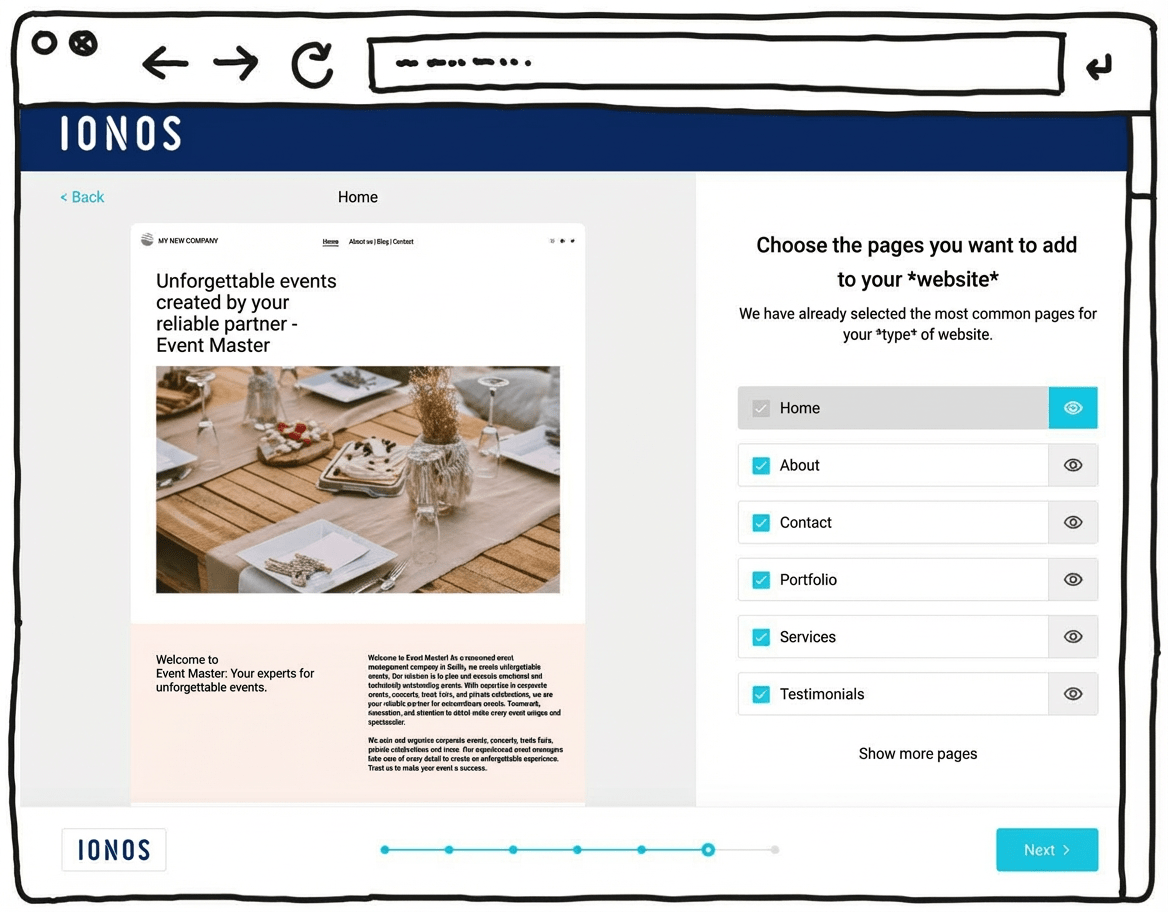
IONOS’s newer WordPress hosting aims to combine the simplicity of a website builder with the advantages of WordPress, the world’s most widely used website system. With its built-in AI setup, it can feel almost as easy as a website builder.
That can make it suitable for beginners who don’t have much experience building websites. The setup assistant guides you step by step through installing WordPress and suggests a practical selection of themes and plugins.
One key difference here is the built-in AI assistant, which can generate an initial WordPress website for you. It helps you take care of the most important settings quickly and find a suitable template. Automatic updates and daily backups can also provide extra peace of mind.
Another plus is customer support, available 24/7, including phone support rather than relying only on chat or email.
Pricing for IONOS WordPress hosting starts at around £1 per month for the first six months, then around £5 per month afterwards. A domain and an email mailbox are included in this price.
Pros of IONOS WordPress hosting
- WordPress installed securely in one click
- AI assistant for building your website
- A professional-looking design within minutes
- Designs well optimised for mobile phones
- All the benefits of WordPress as the world’s most widely used website CMS
- Flexible to extend with plugins
- Blogs or online shops possible
- Switching hosting provider later is possible
Cons of IONOS WordPress hosting
- Less design freedom than drag-and-drop website builders
- The wide range of features can still feel overwhelming for beginners, despite the guided setup
Pricing
- “Start” plan: from £3/month for the first 6 months, then £5/month
- “Grow” plan: from £1/month for the first 6 months, then £10/month
- All plans include your own domain and an email address
Here you can find our detailed IONOS WordPress hosting review.
Webador: best free website builder plan
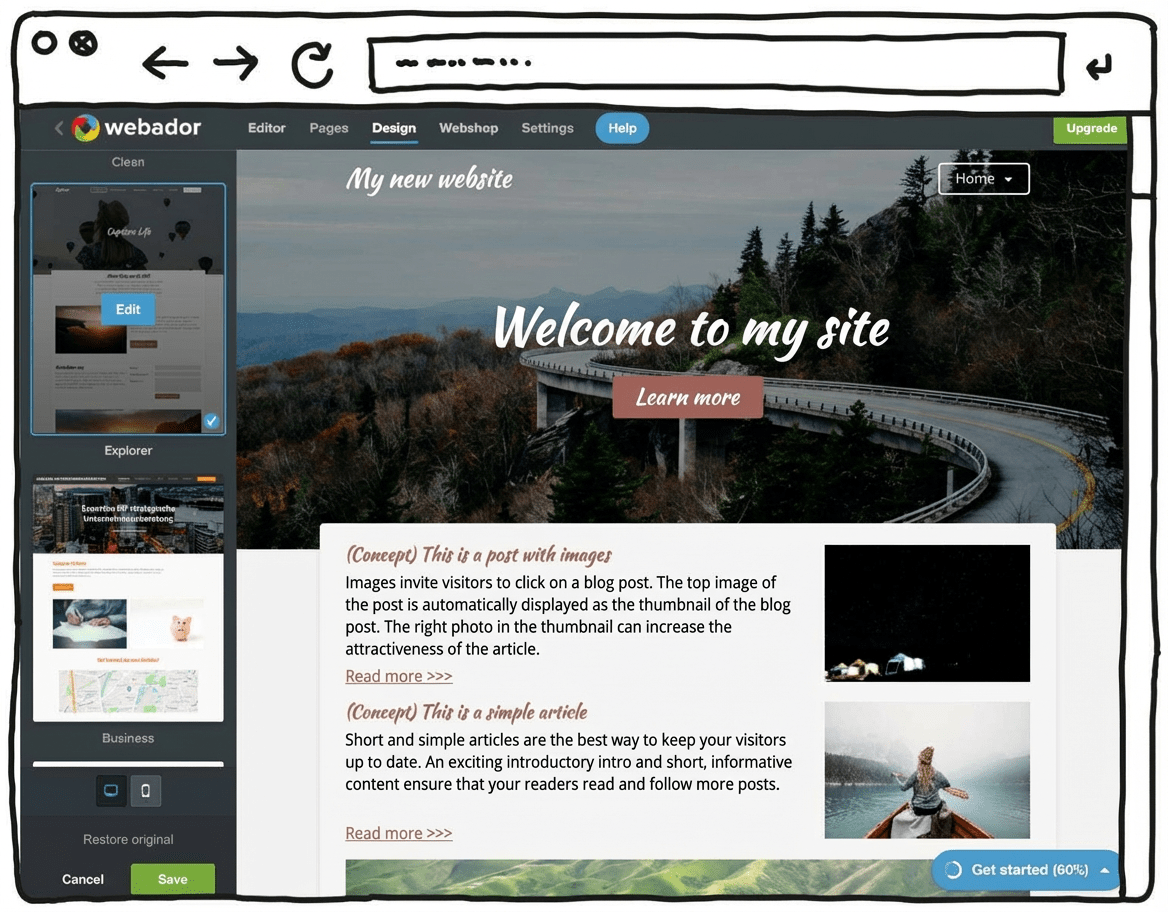
Webador is a particularly easy-to-use and low-cost website builder. It’s a fairly minimalist tool that focuses on the essentials. The upside is that, with this budget-friendly tool, you can save quite a bit compared to many other options. Webador also offers a permanently free “Free” plan.
On top of that, you can try the Pro version free for 6 months. You won’t find that kind of trial period with most other website builders.
This Dutch tool positions itself as a solution that helps beginners build a website.
As a result, the feature set is mainly limited to what you really need. In return, the editor is genuinely simple and intuitive to use.
Another plus: according to the company, Webador uses 100% sustainable energy for its servers. In theory, that means users can run their website in a climate-neutral way.
Also positive: as a Dutch tool, Webador hosts its servers in the EU. That can be reassuring for users in terms of legal framework and data protection standards.
With this minimalist builder, you can create simple websites and small online shops that don’t require major customisation or personalisation.
Webador’s free version — as with many competitors — is best seen as a way to test things out. You can use it to build a free website or even set up an online shop at no cost. However, you won’t get your own domain, and Webador will display an ad banner on your site.
Pricing:
- Webador Free: Permanently free, no custom domain, Webador banner displayed on the site
- Webador Lite: Includes a custom domain, 6-month free trial, then a low monthly fee
- Webador Pro: Includes a custom domain, email inbox and online shop, 6-month free trial, then a higher monthly fee
Try Webador free for 6 months
Test Webador’s website builder free for 6 months, or sign up for the permanently free Free plan.
Jimdo: best German option with a free plan
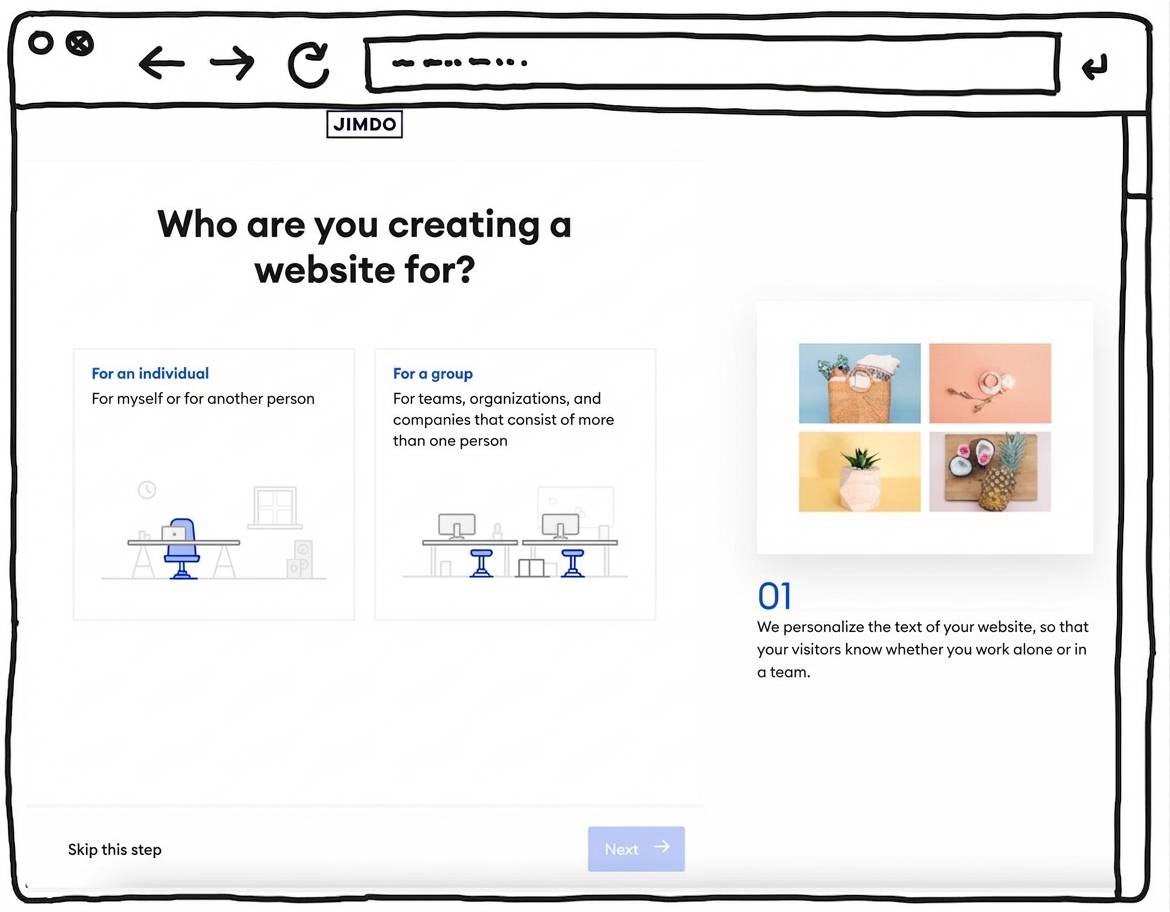
The website builder Jimdo, developed in Germany, is well suited to beginners who want to create an attractive website without any coding skills. It offers visually appealing, mobile-optimised designs and is largely intuitive to use. The builder guides you step by step through the setup process.
However, the simple handling and reduced feature set also have their limits. For more complex websites that require specific customisations and extensions — such as multilingual sites or dynamic features — Jimdo is not sufficient. If you have more advanced requirements but still value an easy setup, alternatives such as WordPress by IONOS or a professional shop system are worth considering.
One of Jimdo’s biggest strengths is its focus on legal compliance and data protection. The servers are located in Germany, which ensures high data protection standards. Jimdo also offers a dedicated plan that includes legal protection features, which is particularly relevant in the German context.
The relatively low prices also make Jimdo appealing for small projects or businesses with limited budgets.
Pros of Jimdo:
A major advantage of Jimdo is its ease of use. During my in-depth Jimdo test, I was able to create an attractive website quickly and without complications. It stood out that the platform requires no technical knowledge at all. Jimdo also provides templates that are easy to customise, making it straightforward to build a personalised website.
In addition, Jimdo offers integrated SEO tools and basic online shop features for small to medium-sized businesses. The free plan allows you to get started at no cost, while paid plans unlock extra features such as a custom domain and an ad-free site.
Cons of Jimdo:
One drawback of Jimdo is its limited flexibility compared to larger platforms such as WordPress or Squarespace. Customisation options are restricted, and more complex projects quickly run into functional limits. Some advanced features — including multilingual websites or more in-depth SEO options — are not available.
Pricing:
- Jimdo Free: Free of charge, no custom domain, with adverts.
- Jimdo Start: £8 per month, includes a custom domain and an email address.
- Jimdo Grow: £13 per month, with extended SEO tools and statistics.
- Jimdo Unlimited: £34 per month, all features, unlimited bandwidth.
If you’re interested in Jimdo, read my detailed Jimdo review as well.
Get started with Jimdo
You can try Jimdo for free with the “Free” plan.
A professional website with your own domain and no ads is available from £8 per month.
SITE123: simple free website builder you can grow with
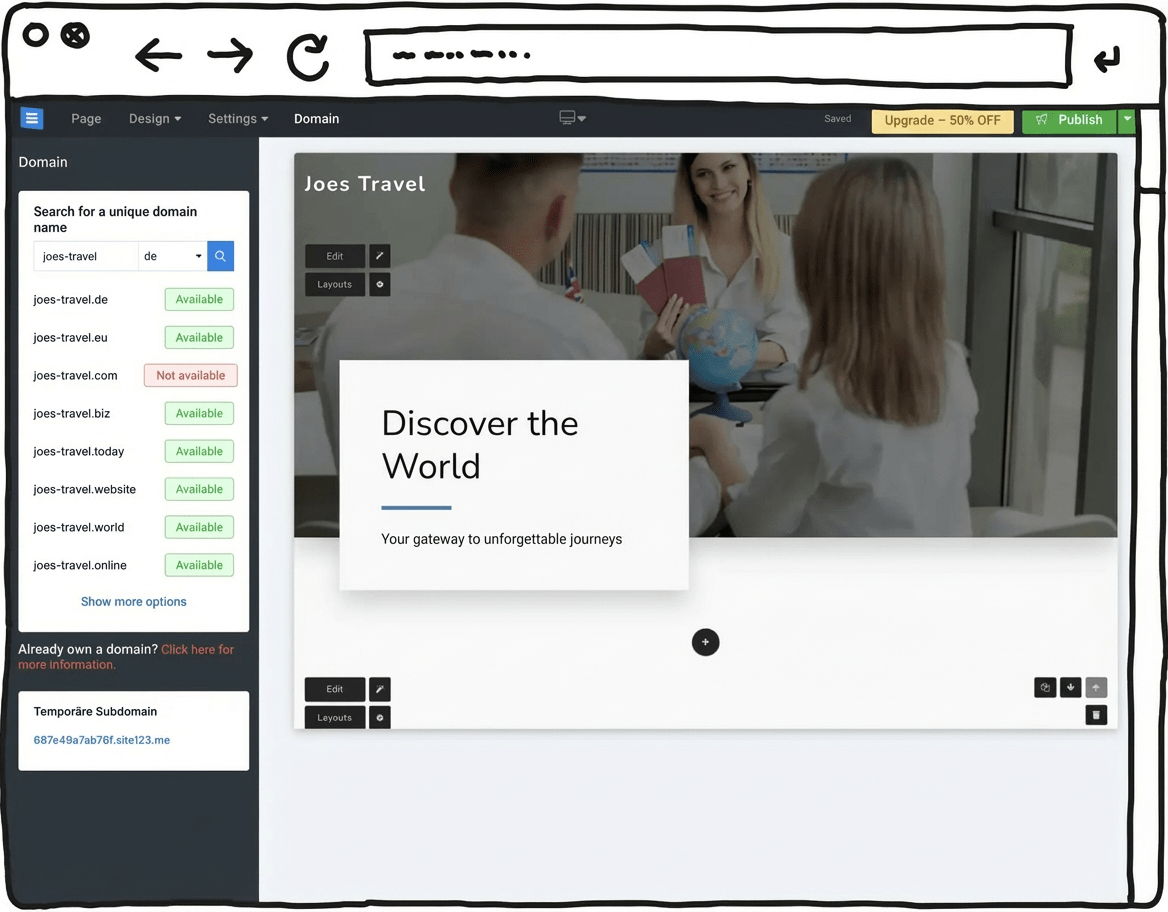
If you want to create a free website within minutes and without any prior knowledge, SITE123 is one of the strongest options available. This website builder stands out for its very fast setup, intuitive interface, and a permanent free plan that lets you get started straight away.
Signing up takes only a few seconds, after which you can choose from a range of professional design templates. Everything is structured so that you can find your way around immediately, even without technical experience. Texts, images, and page content can be edited with just a few clicks.
Despite its simplicity, SITE123 remains flexible. With minimal effort, you can add features such as a blog or a small online shop — making it a practical choice for freelancers, creatives, and small businesses that want their website to grow over time.
The free plan from SITE123 is well suited for testing things out. You get a free website with a subdomain, SSL encryption, and access to the most important basic features.
However, ads are displayed on the site, and using your own custom domain is only possible on paid plans.
Pricing:
- Free: Permanently free, includes a SITE123 subdomain and advertising banner
- Basic: Custom domain, more storage and bandwidth, from around £4 per month
- Advanced / Professional: Includes online shop features, email inbox, and additional tools, from around £11 per month
A website of your own — for free? With website builders, this is generally possible. However, free plans usually come with certain limitations. In most cases, your site will run on a less appealing subdomain provided by the tool, and the provider’s branding will be visible. Storage space and bandwidth are often limited as well, which can restrict the growth of your website over time.
Because of these limitations, free websites are mainly suitable for simple projects such as a personal site, a blog, or for testing purposes. If you’re aiming for long-term growth or a more professional presence, free plans tend to fall short — they’re also not ideal from an SEO perspective.
The good news is that upgrading to a paid plan later on is usually straightforward. This gives you more flexibility, additional storage, and your own custom domain. You can start at no cost and switch to a better plan whenever your needs grow.
With the globally popular WordPress system, you avoid many of these restrictions from the start. WordPress itself is open source and free to use, and it offers an open, highly flexible platform that can be expanded at any time. The only ongoing cost is a small monthly fee for web hosting.
How much will my website really cost?
You can certainly start by trying to create a free website, but in the long run, free plans often come with limitations that can hold you back. To help you estimate a realistic budget for building and running a website, we’ve created an interactive calculator that lets you work out your expected website costs.
Best free website tools:
| Rank | Tool | Free available? |
|---|---|---|
| 1 | WordPress | WordPress itself is free to use; web hosting starts at around £1 per month. |
| 2 | Webador | ✅ Yes — “Free” plan available, but includes ads and a provider subdomain. |
| 3 | Jimdo | ✅ Yes — “Play” plan available, but includes ads and a provider subdomain. |
| 4 | SITE123 | ✅ Yes — “Free” plan available, but includes ads and a provider subdomain. |
| 5 | WIX | ✅ Yes — permanent free plan, but includes ads and a provider subdomain. Subdomain |
| 6 | Weebly | ✅ Yes — “Free” plan available, but includes ads and a provider subdomain. |
Yes, Webador lets you create a free website. It offers a Free plan that remains free indefinitely. With this plan, you can publish a website using a subdomain such as “yoursite.webador.co.uk”. It includes all the basic features needed to design and publish your site, including a user-friendly editor and a selection of design templates.
Key features of the free Webador plan include:
Free hosting: No additional hosting fees, as hosting is included in the free plan.
Unlimited storage and traffic: There are no fixed limits on how much content you can upload or how many visitors your site can receive.
Professional design templates: Access to more than 50 responsive templates created by professional designers, which you can customise to suit your needs.
Advertising: One downside of the free plan is that Webador displays ads on your website.
Yes. With Wix’s free plan, you can build and publish a website at no cost, including a provider subdomain. Hosting is included. However, a custom domain isn’t available on the free plan, and Wix branding is displayed on your site. Many users choose the free option mainly for testing or small personal projects.
Comments and ratings
Was this article helpful?
Rate article
Share article