WordPress hosting comparison 2026

As seen in:



Top 3 test winners for WordPress hosting:
-
Visit site
Test score
9.4
2026
Outstanding
-
Visit site
Test score
8,8
2026
Excellent
-
Visit site
Test score
7,9
2026
Very good
You want to build a WordPress website or a blog and need the right WordPress hosting for it?
I’ve tested a wide range of WordPress hosting tools in depth and collected my experiences. In this article, I compare leading tools to help you make a decision.
Whether you care most about speed, an easy-to-use dashboard, reliable support, or strong value for money — you’ll find suitable options here.
I’ll show you which WordPress web hosts have proven themselves in real-world use and what to look out for when choosing.
Let’s find the perfect web host for your WordPress project together!

This WordPress hosting comparison 2026 covers:
- Top picks: the best WordPress hosting providers overall
- Top picks in detail: what sets the top tools apart in detail
- Rating criteria: what makes good WordPress hosting
- Costs: how much do WordPress web hosts cost
- Full list: other WordPress hosting providers we tested
- Conclusion & alternatives: our recommendation and possible alternatives
Here you’ll find an overview of all WordPress web hosts I tested. Afterwards, I describe the best WordPress hosting tools in more detail.
-
1 Winner 2026

Test score
9.4
2026
Outstanding
Pros and Cons
- WordPress securely installed with 1 click
- Control over functions and data
- Huge range of extensions and designs
- Automatic updates and backups
- Using WordPress is more complicated than a website builder
Visit sitePricing
- IONOS WordPress
- Fast server hardware
- Incl. domain & email addresses
- From £1 / month
- 30 days money back
-
2 Fast premium hosting

Test score
8,8
2026
Excellent
Pros and Cons
-
Powerful servers
-
Very fast loading times
-
Free automatic updates and backups
-
Includes staging environment, CDN and more
-
Automated setup and migration
-
24/7 expert support
-
More expensive than the test winner in comparison
-
No built-in AI setup
Visit sitePricing
- Siteground “StartUp”
- Includes domain and email inbox
- Up to approx. 10,000 visitors per month
- 30-day money-back guarantee
- From £2.99 / month for the first year, then £15.99 / month
-
-
3 Best value for money

Test score
7,9
2026
Very good
Pros and Cons
-
Unlimited bandwidth
-
Includes AI WordPress builder
-
Free pre-built templates
-
WordPress-optimised server environment
-
LiteSpeed web server and the LSCWP Cache plugin
-
Free CDN from the “Business” plan
-
Free automated website migration
-
More expensive than the test winner in comparison
-
Automatic backups available only on a weekly basis
Visit sitePricing
- Tarif “Premium”
- For approx. 25,000 visitors per month
- Includes domain and email inbox
- From £2.79 per month for the first two years
- 30-day money-back guarantee
-
-
4 Hosting with page builder

Test score
7
2026
Very good
Pros and Cons
-
All-in-one solution for WordPress
-
Includes Elementor page builder
-
Includes Elementor AI tools
-
Access to over 100 professional themes
-
Managed WordPress with staging environment, backups and updates
-
Free migration of existing WordPress websites
-
Relatively expensive in comparison
-
Mainly worthwhile if you specifically want to use the Elementor page builder
Visit sitePricing
- Plan “Host Cloud”
- Includes domain and email inbox
- Pro version of the Elementor builder
- Free website migration
- From £14.99 per month
-
IONOS WordPress (9.4 of 10): best overall WordPress hosting
The WordPress hosting plan from IONOS that I tested as part of this comparison is especially suitable for beginners who have little experience building websites. The setup wizard guides you step by step through the WordPress installation and offers a practical pre-selection of themes and plugins.
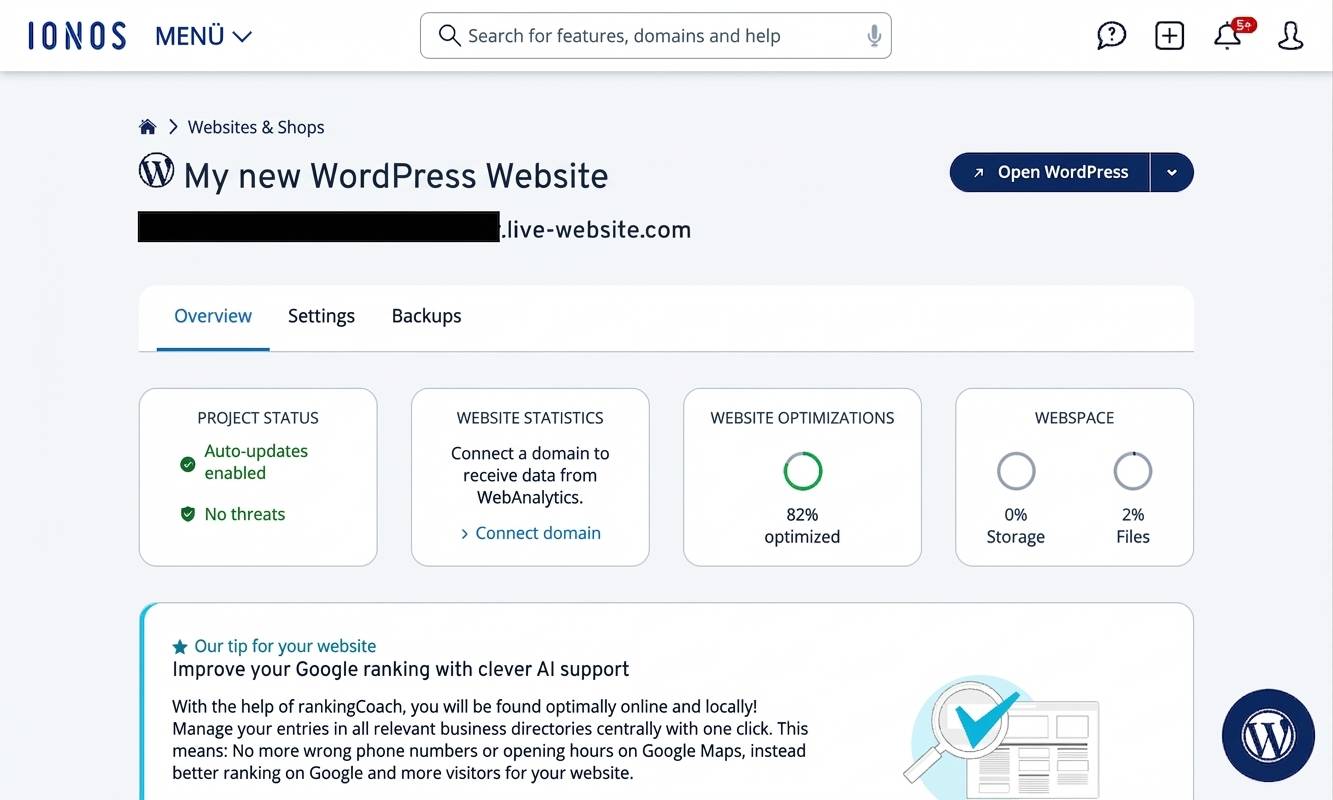
What ultimately secured the test win — and is genuinely unusual in this form — is that IONOS WordPress hosting includes a well-built AI assistant that can create your WordPress website for you using artificial intelligence. This makes WordPress, a popular and flexible system, much easier to handle for beginners and turns it into a genuine alternative to traditional website builders.
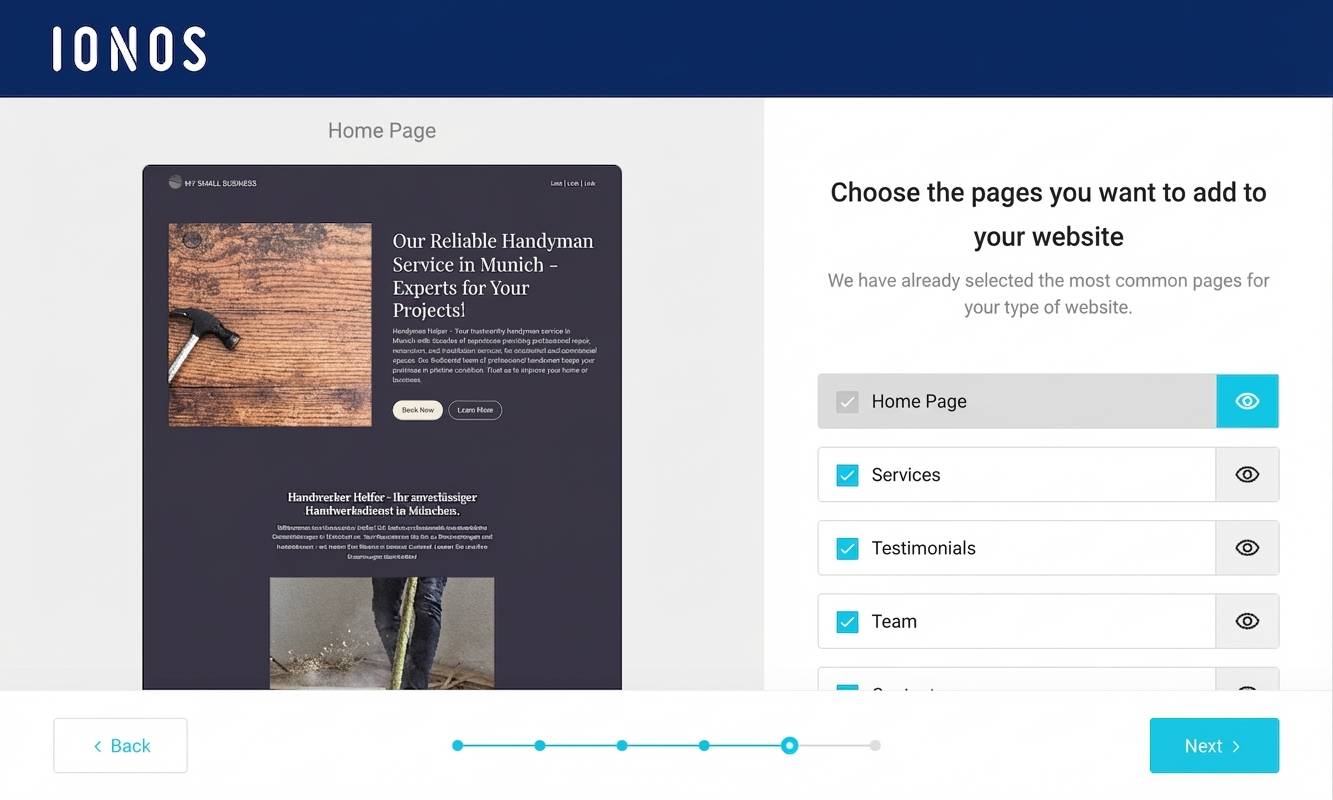
The rest of the setup also ran smoothly for me: the assistant helped me quickly apply the most important settings and find a suitable template for my site. Automatic updates and daily backups also reduced the ongoing maintenance effort.
Another plus is the capable customer support, available 24/7. Whenever I had questions, I got quick and helpful answers. A small downside is the limited flexibility compared to fully self-managed hosting, though that’s unlikely to matter much for most beginners.
IONOS WordPress hosting starts at around £0.87 per month for the first 6 months and then costs around £4.33 per month, which I find very affordable — especially as the price includes a domain and an email inbox.
For larger, more demanding websites, IONOS may not be the best fit: configuration options are more limited, and some advanced features such as a CDN or developer tools (which pricier pro hosts may offer) are partly missing.
Overall, I’m very happy with IONOS‘s managed WordPress hosting and would recommend it especially to beginners who want a simple, reliable solution.
Pros of IONOS WordPress hosting
- Easy WordPress setup and low-maintenance management
- AI assistant for automatic WordPress website creation
- Fast servers with SSD storage and caching
- 99.98% uptime
- Automatic backups and updates
- DDoS and malware protection
- Strong value for money
Cons of IONOS WordPress hosting
- No migration service for existing websites
- No built-in CDN (content delivery network)
Pricing
- “Start” plan from around £2.60/month for the first 6 months, then around £4.33/month
- “Grow” plan from around £0.87/month for the first 6 months, then around £8.66/month
- All plans include your own domain and email address
Here’s our in-depth IONOS WordPress hosting review.
SiteGround WordPress Hosting (8.8 of 10): high-performance with premium features
SiteGround has established itself as one of the leading tools for WordPress hosting and still offers strong value for money despite being positioned in the premium range. That’s why it takes second place in our WordPress hosting comparison. With solid performance, a wide feature set, and a user-friendly interface, SiteGround is suitable for both beginners and professional users.
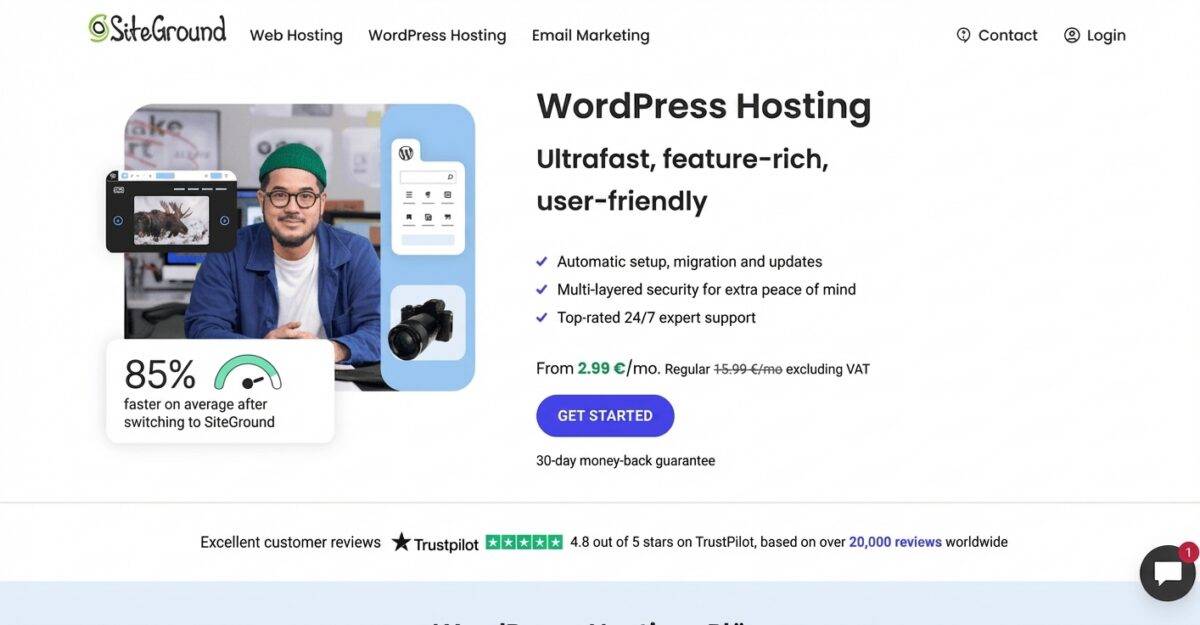
Pros of SiteGround WordPress:
- Excellent performance: SiteGround delivers fast loading times and strong reliability. Its servers run on the Google Cloud Platform, which helps provide stable, speedy performance.
- First-class customer support: SiteGround’s 24/7 support is known for quick response times and knowledgeable help.
- User-friendly interface: SiteGround’s control panel is designed to be intuitive, making day-to-day site management easier.
- Free migration service: Existing websites can be moved to SiteGround quickly and professionally.
- Suitable for eCommerce: The WooCommerce shop extension can be enabled easily and at no extra cost.
- Comprehensive security features: With daily backups, free SSL certificates, and DDoS protection, SiteGround offers a strong security setup.
- Global data centres: With server locations worldwide — including in Germany — SiteGround can deliver good performance for visitors around the globe while supporting compliance with European data protection standards.
Cons of SiteGround WordPress:
- Higher renewal prices: Introductory prices are attractive, but costs typically increase significantly when you renew (often after 12 months).
- Limited storage: Plans come with capped storage, which can be restrictive for very large projects.
Pricing:
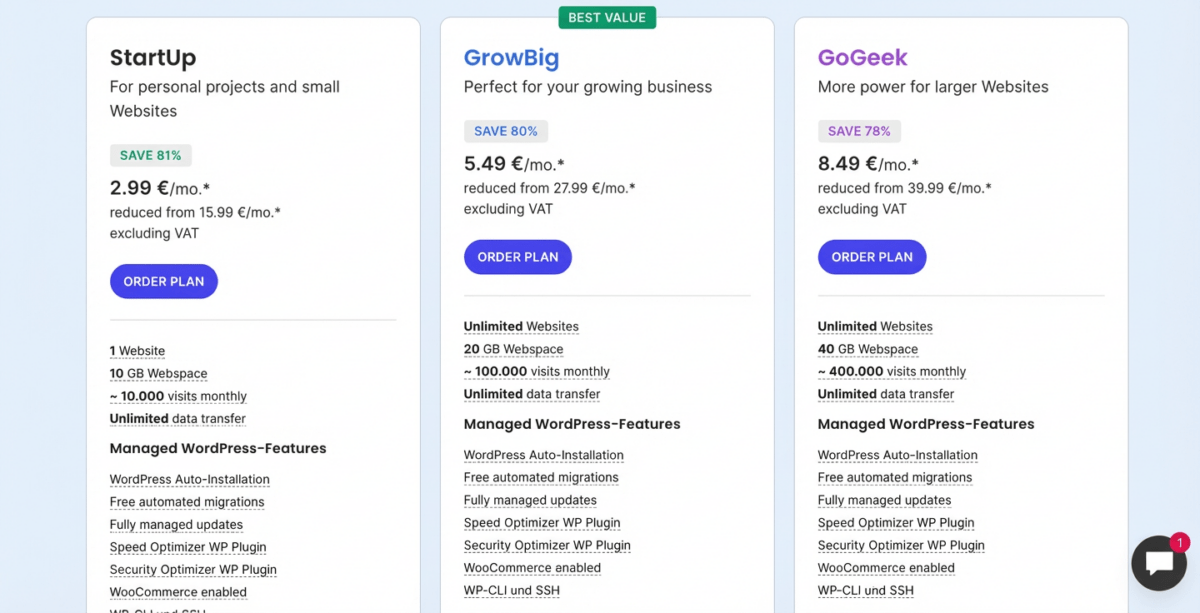
- StartUp Plan: around £2.55/month for the first 12 months, then around £13.65/month
- GrowBig Plan: around £4.65/month for the first 12 months, then around £23.80/month
- GoGeek Plan: around £7.20/month for the first 12 months, then around £34.00/month
“WordPress hosting”, also known as “managed WordPress hosting”, usually refers to a web hosting package that’s specifically optimised for WordPress.
The exact services included — and even what “managed WordPress hosting” means — can vary from provider to provider. What most have in common is that WordPress comes pre-installed and pre-configured. This setup typically includes caching, automatic backups, and security and performance settings. Support is often more specialised too, with a stronger focus on WordPress expertise than you’d get from standard hosting.
But do these tools actually deliver on what they promise in their marketing? I signed up for packages from the most important tools and took a close look behind the scenes. My takeaway: there are real strengths, but also clear drawbacks. If you want to know which option I consider the best WordPress hosting overall, you’ll find it here.
Managed WordPress convenience features
Managed WordPress hosting often means you get convenience features that make setting up and managing a WordPress site much easier, depending on the tool:
- WordPress comes pre-installed and already configured correctly for you
- Automatic backups help reduce the risk of data loss
- Automatic updates for WordPress core and plugins keep your site up to date
- Security features such as SSL, automatic malware scans and protection against DDoS attacks are included
Technical features that matter
Many WordPress web hosts also promote the fact that their server environment is specifically tuned for WordPress, so your site runs faster and more reliably:
- Optimised server: use of SSD storage plus generous CPU and RAM resources
- Caching: built-in caching or a CDN solution for faster page delivery
- Server location: a UK/EU-based location, or a global choice of data centres
Other factors to consider
Beyond that, the best WordPress hosting services should also perform well in these areas:
- Good value for money: are the plans competitive, and are things like a domain and email inbox included?
- Fast support: is there a helpful point of contact available when problems come up?
- Wide feature set: are features like a staging environment, multisite, SSH access and other developer tools available?
- Uptime guarantee: is it guaranteed that the site is reachable at least 99.9% of the time?
Who can skip WordPress-specific hosting?
- If you’re technically confident, you can also install and optimise WordPress on a standard web host — which can be cheaper.
- If you’re a complete beginner, a website builder may be a better fit. You can put together your site via drag-and-drop in the browser. Hosting is already included with these builders, so you don’t need to book it separately.
“From my own experience with many WordPress projects, I can say that properly optimised WordPress hosting offers major advantages. For example, at WebsiteWissen.com we measured a clear improvement in loading times after switching to a specialised WordPress host.”
Johannes Schwaderer
Evaluation criteria
The different WordPress web hosts have some things in common, but there are also clear differences.
To make them objectively comparable, we use a consistent, detailed set of criteria for every tool. This gives you a clear comparison when it comes to hosting your WordPress website.
Unlike many other comparisons, our ratings are not based on the commissions we receive from providers. The hosting services we name as the best web host is genuinely the best — based on our transparent test results.
Our aim is to assess hosting providers and their plans as objectively and thoroughly as possible.
For each web host, we assign ratings across several categories. We then weight these to calculate an overall result for each provider.
| Evaluation Criteria | Category Winner | |
|---|---|---|
| Ease of use (weighting: 20%) |
| IONOS WP-Hosting |
| Features (weighting: 20%) |
| Siteground WP-Hosting |
| Fast loading times (weighting: 20%) |
| IONOS WP-Hosting |
| Security (weighting: 10%) |
| IONOS WP-Hosting |
| Support & reviews (weighting: 10%) |
| |
| Costs & value for money (weighting: 20%) |
| IONOS WP-Hosting |
WordPress hosting cost comparison
Here, I’ve put together the prices and the most important features of the WordPress hosting tools we tested:
| IONOS WordPress | Siteground WordPress | Hostinger WordPress | Elementor WP Hosting | WP Engine | |
|---|---|---|---|---|---|
| Monthly base price | “Start” from approx. £4.30/month | “StartUp” from approx. £13.75/month | “Premium” from approx. £11.15/month | “Lite” from approx. £10.30/month | “Essential” from approx. £16.35/month |
| Discount price | ✅ approx. £2.60 for the first 6 months | ✅ approx. £2.60 for the first 12 months | ✅ approx. £1.70 for the first 48 months | ✅ approx. £2.60 for the first 12 months | ✅ free for 4 months |
| Storage | 25 GB SSD | 10 GB | 100 GB | 5 GB | 10 GB |
| Traffic / month | ✅ unlimited | ✅ unlimited | approx. 25,000 visitors | approx. 10,000 visitors | approx. 25,000 visitors / 75 GB traffic |
| Domain | ✅ included for 1 year | ✅ included for 1 year | ✅ included for 1 year | ✅ included for 1 year | ❌ not included |
| Email inboxes | ✅ 1 inbox included | ✅ unlimited | ✅ up to 100 inboxes | ✅ free, expandable via “Zoho” | ❌ not included |
| Automatic WordPress updates | ✅ included | ✅ included | ✅ included | ✅ included | ✅ included |
| Backups | ✅ daily, automatic | ✅ daily, automatic | ✅ weekly, automatic | ✅ daily, automatic | ✅ automatic & on demand |
| Malware scans | ✅ included | ✅ included | ✅ included | ✅ included | ✅ included |
| Caching | free via plugin | ✅ included | ✅ included | ✅ included | ✅ included |
| Online shop (WooCommerce hosting) | upgrade recommended (from approx. £17.20/month) | included | included | upgrade recommended (from approx. £15.50/month) | upgrade recommended (from approx. £19.80/month) |
Alongside our test winners, we also took a close look at other well-known and lesser-known WordPress hosting tools. You’ll find a full overview of all the WordPress hosts we reviewed here:
| Rank | Tool | Overall score | Short description | Server location | Link |
|---|---|---|---|---|---|
| 1 | IONOS WordPress-Hosting | 9.4 of 10 | WordPress hosting test winner | Germany | Go to website |
| 2 | Siteground WordPress | 8.8 of 10 | Wide range of features | Worldwide | Go to website |
| 3 | Hostinger WordPress | 7.9 of 10 | Best value for money | Europe (Lithuania, France, UK) | Go to website |
| 4 | Elementor WP Hosting | 7 of 10 | WordPress hosting with Elementor Pro website builder | Worldwide | Go to website |
| 5 | WP Engine | 6.6 of 10 | Fast managed WordPress hosting for advanced users | Worldwide | Go to website |
| 6 | world4you | 6 of 10 | WordPress hosting from Austria | Austria | Go to website |
| 7 | WP Space | 6 of 10 | Managed WordPress for advanced users | Germany | Go to website |
| 8 | Raidboxes | 5.6 of 10 | Managed WordPress for advanced users | Germany | Go to website |
Alongside WordPress hosting, there are several alternatives that can work well for both beginners and more experienced users.
Website builders such as IONOS are ideal for beginners because they offer intuitive drag-and-drop editors with hosting included.
If you’re mainly looking for the cheapest possible WordPress hosting, standard shared hosting can be a budget-friendly option where multiple websites share one server. You get fewer convenience features and usually have to install and maintain your WordPress site yourself — but you can save on monthly fees.
If your main goal is running an online shop, you could also consider a dedicated eCommerce platform such as Shopify, or take a look at specialised WooCommerce hosting.
Dedicated server hosting is another option if you need particularly powerful infrastructure for a larger website or an online shop. In that case, you get your own server resources and don’t have to share the hardware with other websites.
| Goal | Alternative |
|---|---|
| Run WordPress websites in a convenient, secure and fast way | (Managed) WordPress Hosting |
| Keep WordPress costs as low as possible | Shared Webhosting |
| Create a simple website yourself without technical knowledge | Website Builder |
| Create an online shop | eCommerce platform or WooCommerce hosting |
| Host larger portals, blogs or shops | Dedicated Server |
My conclusion
Managed WordPress hosting is the best option if you want to run WordPress in a convenient, secure and fast way — without having to spend much time thinking about installation, maintenance and security.
The best WordPress web hosts are:
- IONOS WordPress-Hosting (9.4 of 10)
- Siteground WordPress (8.8 of 10)
- Hostinger WordPress (7.9 of 10)
- Elementor WP Hosting (7 of 10)
- WP Engine (6.6 of 10)
- world4you (6 of 10)
- WP Space (6 of 10)
- Raidboxes (5.6 of 10)
WordPress hosting refers to web hosting packages that are specifically optimised for the needs of WordPress websites, aiming to provide better performance, security and ease of use.
Managed WordPress hosting is a hosting service where the tool takes care of managing and maintaining your WordPress website, including updates, backups and security measures, so you have less to worry about.
Look at performance, reliability and support. Check for optimised servers, a strong uptime guarantee and 24/7 customer support. Compare pricing and extra features such as SSL certificates and automatic backups.
WordPress hosting works by optimising server resources and settings so WordPress websites run more efficiently. It often includes WordPress pre-installed, automatic updates and dedicated security measures.
WordPress hosting is tuned specifically for WordPress websites and typically includes WordPress pre-installed, automatic updates and WordPress-specific security features. Regular web hosting is more general and can support different CMSs and applications.
In my comparison of the best WordPress hosting tools, IONOS and SiteGround came out on top because they offer WordPress-optimised servers, strong support and extra features such as automatic backups and SSL certificates. With the test winner IONOS, you can even have your WordPress website created automatically with the help of AI.
Comments and ratings
Was this article helpful?
Rate article
Share article